---
title: "Amazon Review Metadata: Extraction Guide"
description: "How to extract timestamps, verified purchase, ratings, helpful votes and images from Amazon reviews and export clean CSV or JSON files with a Chrome extension."
canonical: https://www.redditcommentscraper.com/article/amazon-review-metadata-extraction-guide
---
# Amazon Review Metadata: Extraction Guide
Published 2026-03-07. https://www.redditcommentscraper.com/article/amazon-review-metadata-extraction-guide
[Amazon](https://www.amazon.com/) reviews hold more than just opinions - they include metadata like timestamps, verified purchase status, helpful votes, and more. These details can provide insights into customer behavior, product trends, and [competitor performance](https://www.redditcommentscraper.com/article-amazon-review-analyzer.html). **Manually extracting this data takes time**, but tools like [Comment Exporter](https://redditcommentscraper.com/) simplify the process, allowing you to export reviews into structured formats like CSV or JSON in seconds.
### Key Points:
- **Why Metadata Matters**: Verified purchase badges ensure reliable feedback, timestamps track changes over time, and helpful votes highlight influential reviews.
- **Automation Saves Time**: Manual extraction takes 20–30 minutes per product, while Comment Exporter completes it in under a minute.
- **How It Works**: Install the Chrome extension, open an Amazon product page, and export data fields like star ratings, review dates, and helpful votes.
- **Output Options**: Choose between CSV (for spreadsheets) or JSON (for coding workflows). You can also [analyze reviews with ChatGPT](https://www.redditcommentscraper.com/article-analyze-reviews-with-chatgpt.html) to quickly summarize these datasets.
With a **5.0 rating** on the [Chrome Web Store](https://chromewebstore.google.com/) and support for over 20 Amazon domains, Comment Exporter is a fast, browser-based solution for transforming unstructured reviews into actionable data.
## Scrape [AMAZON](https://www.amazon.com/) REVIEWS Like a PRO in 2025!
If you need a step-by-step walkthrough on the different methods available, check out our guide on [how to download Amazon reviews](https://www.redditcommentscraper.com/article-how-to-download-amazon-reviews.html) for your analysis.
###### sbb-itb-eded204
## Why Extract Amazon Review Metadata
Amazon review metadata transforms scattered customer feedback into structured, actionable insights. By analyzing this data, you can measure sentiment on a large scale - tracking complaints like "damaged packaging" against praises such as "easy setup." This structured approach makes it easier to conduct sentiment analysis and refine operational strategies.
Certain metadata fields, like the Verified Purchase status, help filter out unreliable reviews, ensuring you focus on genuine customer experiences. Timestamps, on the other hand, let you see if changes to your product or packaging have resolved earlier complaints. Helpful vote counts identify the reviews that carry the most weight with potential buyers. Shane Barker, Founder of [TraceFuse.ai](https://tracefuse.ai/about-us/), highlights the value of this data:
> "Your reviews are a treasure trove of insights into your customers' minds. With the right Amazon reviews exporter, you can convert reviews into data-driven insights".
Another benefit? Competitive intelligence. By extracting competitor metadata, you can spot recurring issues - like problems with durability, sizing, or shipping - and use that knowledge to refine your product positioning. You can also mine customer language from reviews to improve SEO and PPC campaigns.
Armed with insights from both competitors and your own customers, product teams can focus on innovation backed by data. For example, tracking patterns over time with normalized date formats (MM/DD/YYYY in the U.S.) helps you see if your updates are making a difference. This data-driven approach ensures feature prioritization aligns with customer needs.
Given the sheer scale of Amazon - over 4,000 items sold every minute - automated tools like Comment Exporter are essential. These tools handle massive amounts of data while preserving critical details like review images, variant information (e.g., color, size), and reply threads. Without automation, manually copying and pasting reviews often leads to losing these valuable details.
## Prerequisites for Metadata Extraction
Extracting review data from Amazon is straightforward and requires only a few basic tools. With these simple steps, you can quickly start using Comment Exporter to analyze review insights. You can even [analyze Amazon reviews with AI](https://www.redditcommentscraper.com/article-how-to-analyze-amazon-reviews-with-ai.html) to uncover deeper sentiment patterns. There's no need for coding skills, API keys, or complicated software setups - everything runs directly in your browser, keeping your data private.
You'll need the **[Google Chrome](https://www.google.com/chrome/) browser**, as Comment Exporter is specifically designed for it, and access to the Amazon product page you want to analyze. The extension supports over 20 Amazon country domains, including Amazon.com, Amazon.co.uk, and Amazon.de. Here's how to get started with installing Comment Exporter and preparing your product page for data extraction.
### Installing [Comment Exporter](https://redditcommentscraper.com/) Extension
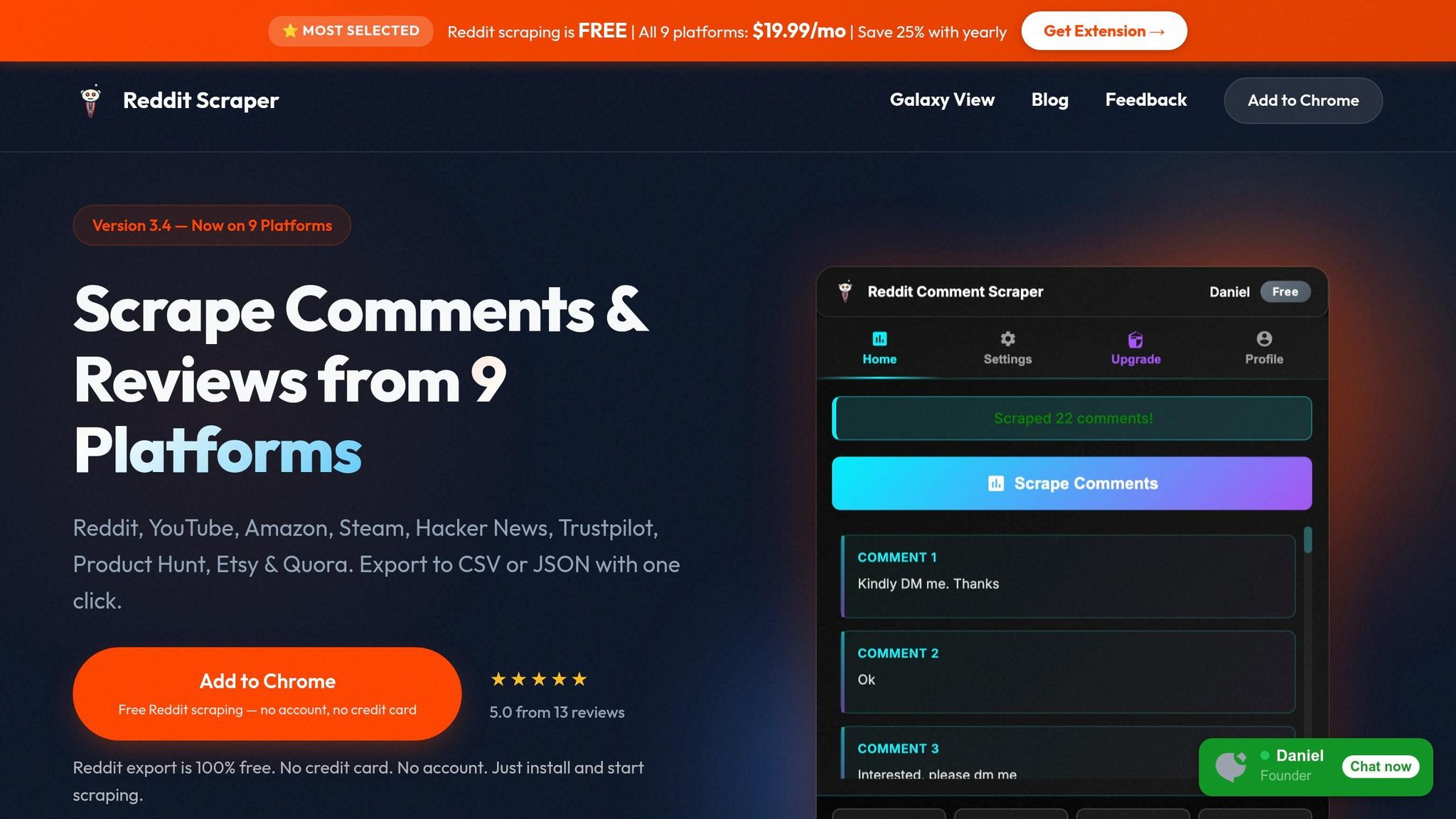
First, go to the Chrome Web Store and search for "Comment Exporter." Click **"Add to Chrome"** to install it - no account signup is needed. Once installed, pin the extension to your browser toolbar for easy access.
Users appreciate the extension's clean CSV outputs and its ability to handle large datasets efficiently. For instance, Mitran Marian shared this feedback:
> "Compared to other tools, the price is incredibly low for the quality it delivers. I can now export reviews from Amazon and Trustpilot in seconds".
After installation, the extension will request permission to access Amazon domain data. This step is essential for extracting review information. Comment Exporter also supports platforms like YouTube, [Reddit](https://www.reddit.com/), and Trustpilot, with over 2,500 weekly users. Once installed, you're ready to prepare your Amazon product page for a seamless extraction process.
### Preparing the Amazon Product Page
Go to the Amazon product page you want to analyze and click **"See all reviews"** to access the complete reviews section. This ensures the extension can capture all relevant data, including metadata like verified purchase status, helpful votes, and review dates.
For the most accurate extraction of helpfulness scores, dates, and locations, set the Amazon site language to **English**. Keep in mind that Amazon shows a maximum of 100 reviews per page. If you're working with a product that has thousands of reviews, you can use Amazon's built-in filters - like star ratings or most recent reviews - to focus on specific segments.
Once your page is ready, ensure that all scripts are fully loaded before running the export. Wait a few seconds after the page finishes loading to make sure the extension's content scripts are properly injected. If you don't need to filter reviews by star ratings or keywords, clear any active filters to extract the full dataset.
## How to Extract Amazon Review Metadata
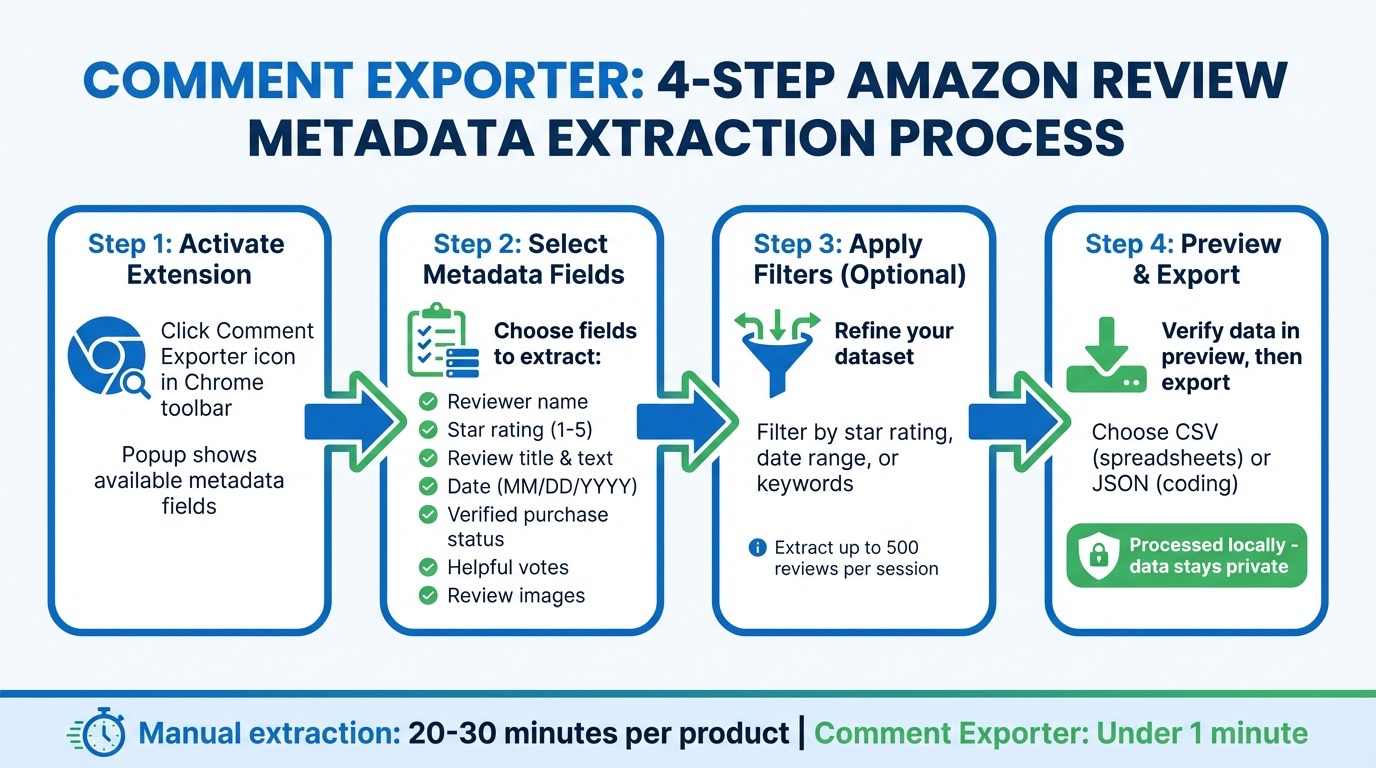
How to Extract Amazon Review Metadata in 4 Steps
Once you've set everything up, extracting data with Comment Exporter transforms raw Amazon reviews into structured, ready-to-analyze information. For more platform-specific tips, check out our [guides and tool comparisons](https://www.redditcommentscraper.com/blog.html). With the Amazon reviews page open, the process is straightforward: click the extension icon, apply filters if needed, and preview the data before exporting it. Comment Exporter uses specialized parsers to extract this data directly in your browser, eliminating the need for API keys or coding. Plus, because everything is processed locally, your data stays private. The tool also handles pagination and dynamic content loading seamlessly, enabling you to gather thousands of reviews in just seconds.
### Activating Comment Exporter on Amazon Reviews
To get started, click the **Comment Exporter icon** in your Chrome toolbar while on the Amazon reviews page. A popup will appear, showing the metadata fields you can capture, such as:
- **Reviewer name**
- **Star rating** (1–5)
- **Review title**
- **Full review text**
- **Date** (exported in MM/DD/YYYY format)
- **Verified purchase status**
- **Helpful votes**
- **Review images**
The extension automatically detects your Amazon domain. You can choose only the fields relevant to your analysis. Once you've selected your fields, refine your extraction further by using Amazon's built-in filters.
### Using Filters for Targeted Data Extraction
To narrow down your dataset, take advantage of Amazon's native filters at the top of the reviews page. You can sort reviews by "Most recent" or "Top reviews" and filter by specific star ratings to focus on positive or negative feedback. If Amazon's default limit of 100 reviews per filter feels restrictive, you can apply keyword filters directly within the extension. This refreshes the results and lets you capture up to 500 reviews in one session. You can also set date ranges or use multiple keywords to target reviews mentioning specific aspects like "battery life" or "customer service".
### Previewing and Verifying Metadata
Before exporting, use the preview function to ensure your data is structured correctly. The preview feature separates metadata fields into distinct columns, making it easy to inspect and organize. You can search through reviews, sort by specific criteria, and toggle column visibility to check details like timestamps or star ratings. Verify that all key elements, such as review dates, expanded texts, helpful votes, and verified purchase badges, are captured accurately. As Alfon Labadan remarked:
> "The files it spits out are perfectly formatted, no messy cleanup needed".
After confirming that everything looks right, you can export your structured dataset. This ensures that the selected metadata is ready for your analysis.
## Exporting and Structuring Metadata Outputs
Once you've verified your data in the preview, the next step is exporting it in a format that fits your workflow. With Comment Exporter, you can choose between **CSV** and **JSON** formats, both processed locally to prioritize privacy. A single click is all it takes to export your data - no extra authentication or external data transfers required. This makes it incredibly efficient to use an [Amazon review scraper](https://www.redditcommentscraper.com/amazon-review-scraper.html) to extract thousands of reviews in seconds, ready to be loaded into spreadsheets or analysis tools. The process is straightforward, letting you focus on selecting the format that best suits your analysis.
### Export Formats: CSV and JSON
After previewing your data, you'll need to pick a format. **CSV** works perfectly for tools like [Excel](https://www.microsoft.com/en-us/microsoft-365/excel), [Google Sheets](https://workspace.google.com/products/sheets/), or [Airtable](https://www.airtable.com/). In this format, each review is presented as a separate row, with metadata fields organized into columns such as Reviewer Name, Star Rating, Date (MM/DD/YYYY), Verified Purchase status, and Review Text. The layout is clean and ready for immediate use. As Pendo Kessam shared:
> "I exported 2,000 Reddit comments and loaded them straight into my research pipeline."
For more technical workflows, **JSON** is the go-to choice. It structures data as an array of objects, making it ideal for Python scripts, Node.js applications, or AI-driven sentiment analysis. Developers often prefer JSON because it supports nested data structures and integrates seamlessly with automated pipelines. Both formats include the same metadata fields, but the organization varies to suit different use cases.
### Sample Output Structure
The exported file organizes metadata into clearly labeled fields, ensuring that each piece of information is easy to analyze. Here's a typical example of how the structure looks:
| Field Name | Description | Example Data |
| --- | --- | --- |
| **Reviewer Name** | Display name of the person who posted the review | Jane Doe |
| **Date** | Review publication date | 03/07/2026 |
| **Rating** | Star score (1–5) | 5 |
| **Verified** | Indicates if purchase was confirmed | Verified Purchase |
| **Review Title** | Short headline of the review | Highly recommended! |
| **Review Text** | Full body content of the review | This product works exactly as described... |
| **Helpful Votes** | Number of users who found it helpful | 24 |
| **Review Image** | Links to images uploaded by the reviewer | https://m.media-amazon.com/images/I/... |
This structure breaks down key fields like star ratings, verified purchase status, and helpful votes into separate columns, making it easy to filter, sort, and analyze data for sentiment insights. Whether you're working with spreadsheets or automated tools, this structured output is designed to streamline your workflow from extraction to analysis.
## Key Metadata Fields and Analysis Tips
Once you've extracted metadata, the next step is to analyze it for insights that can guide customer-focused decisions. Each field plays a unique role, from monitoring product quality trends to pinpointing customer opinions that carry the most weight. These fields, pulled using Comment Exporter, form the backbone of any targeted analysis.
### Overview of Metadata Fields
Here’s a breakdown of key metadata fields, their purpose, and how they can be used for analysis:
| Metadata Field | Description | Analysis Use Case | Example Output |
| --- | --- | --- | --- |
| **Review ID** | Unique Amazon identifier | Helps with deduplication and tracking changes | B07XJ8CGRX |
| **Rating** | 1–5 star score | Measures customer satisfaction and star distribution | 5 |
| **Verified Purchase** | Purchase confirmation badge | Filters for authentic buyer feedback | True / Verified |
| **Helpful Votes** | Count of "Helpful" clicks | Highlights reviews that resonate with shoppers | 42 |
| **Review Date** | Date the review was posted | Tracks trends and identifies quality regressions | 2025-08-15 |
| **Review Content** | Full review text | Useful for sentiment analysis and feature requests | "The battery lasts 12 hours..." |
| **Review Title** | Headline of the review | Provides quick sentiment snapshots | "Best purchase this year!" |
| **Review Images** | URLs to reviewer photos | Offers visual evidence of defects or usage | https://m.media-amazon... |
The **Review ID** is critical for keeping your data clean and organized, especially when consolidating multiple exports or tracking updates over time. **Verified Purchase** ensures that the feedback comes from actual buyers, making it more trustworthy. Reviews with high **Helpful Votes** often contain insights that influence other shoppers' decisions - these are the reviews to prioritize for deeper analysis. The **Review Date** field helps identify patterns over time, such as seasonal shifts in sentiment or changes in product quality. To streamline analysis, convert localized date formats (like "May 3, 2025") into ISO format (YYYY-MM-DD). For products with multiple options, **Product Variant** data can uncover whether negative feedback is tied to a specific color, size, or feature.
### Best Practices for Metadata Analysis
To make the most of your metadata, follow these tips designed to enhance your analysis and uncover actionable insights.
- Use **Verified Purchase** to ensure you're analyzing genuine feedback from real buyers.
- Focus on reviews with high **Helpful Votes**, as these often highlight the most impactful customer opinions.
- Group reviews by time periods, such as months or quarters, to identify how product updates or external factors affect customer satisfaction.
- Add a "Variant" column for listings with multiple options (e.g., sizes or colors) to isolate issues or praise tied to specific SKUs.
- Deduplicate your data using the **Review ID** to avoid skewed results, especially when working with multiple exports.
[Competitor research is another area where metadata analysis shines](https://www.redditcommentscraper.com/article-competitor-analysis-using-reviews.html). By exporting data from competing ASINs, you can benchmark average ratings, spot feature gaps, and even study how competitors handle customer complaints. As Shane Barker, Founder of TraceFuse.ai, puts it:
> "Reviews are your customers' unfiltered opinions. Exporting them lets you quantify sentiment: how many are positive, how many mention shipping issues, or which features get the most praise."
## Conclusion
Extracting Amazon review metadata is surprisingly straightforward - no coding, no API subscriptions, and no tedious copy-pasting. With **Comment Exporter**, the process is as easy as 1-2-3: install the Chrome extension, head to an Amazon product page, and hit export. The tool gathers everything from star ratings and verified purchase badges to helpful votes and review dates, all while keeping your data private by processing it directly in your browser.
This simplicity delivers powerful results. The exported data, available in **CSV** for spreadsheets or **JSON** for more advanced workflows, turns scattered reviews into organized, actionable insights. Whether it's spotting recurring product complaints, tracking market trends, or conducting [ecommerce review analysis](https://www.redditcommentscraper.com/article-ecommerce-review-analysis.html) to track customer sentiment, you can achieve it all without technical know-how. As one user, Mitran Marian, shared:
> "I can now export reviews from Amazon and Trustpilot in seconds. Highly recommend for anyone who needs structured data fast."
With a growing base of over 2,500 weekly users and a perfect 5.0/5 rating on the Chrome Web Store, **Comment Exporter** has become a go-to tool for researchers, marketers, and product teams seeking clean, structured review data. For $49 per month, the Starter plan unlocks data extraction across all 9 supported platforms, including Amazon's 20+ country domains.
## FAQs
### Is exporting Amazon reviews with Comment Exporter legal?
Exporting Amazon reviews using Comment Exporter is typically allowed since it gathers data that’s already publicly available and doesn’t require login credentials. However, Amazon’s terms of service strictly forbid automated scraping without prior authorization, which could apply to third-party tools like this. It’s crucial for users to carefully follow relevant laws and platform rules, using the tool responsibly to steer clear of any potential breaches.
### Why are Verified Purchase and Helpful Votes important?
When shopping online, **Verified Purchase** badges and **Helpful Votes** can make a big difference in trusting reviews. A **Verified Purchase** badge shows that the reviewer actually bought the product, adding an extra layer of authenticity to their feedback. Meanwhile, **Helpful Votes** highlight reviews that other shoppers found useful, helping you quickly spot the most relevant and insightful opinions. These features work together to make it easier to assess which reviews are credible and prioritize the information that matters most when making a decision.
### How do I export more than 100 Amazon reviews?
To pull more than 100 Amazon reviews, you'll need a Chrome extension specifically designed for scraping reviews. Many of these tools let you export up to 500 reviews in a single session. If you need even more, try breaking the process into smaller chunks - use different filters or date ranges to export reviews in batches, then merge the data afterward. Some extensions also include features like pagination or batch processing, which can make collecting larger datasets easier. Just be sure to follow the tool’s guidelines to ensure smooth operation.
{"@context":"https://schema.org","@type":"FAQPage","mainEntity":[{"@type":"Question","name":"Is exporting Amazon reviews with Comment Exporter legal?","acceptedAnswer":{"@type":"Answer","text":"Exporting Amazon reviews using Comment Exporter is typically allowed since it gathers data that’s already publicly available and doesn’t require login credentials. However, Amazon’s terms of service strictly forbid automated scraping without prior authorization, which could apply to third-party tools like this. It’s crucial for users to carefully follow relevant laws and platform rules, using the tool responsibly to steer clear of any potential breaches.
"}},{"@type":"Question","name":"Why are Verified Purchase and Helpful Votes important?","acceptedAnswer":{"@type":"Answer","text":"When shopping online, Verified Purchase badges and Helpful Votes can make a big difference in trusting reviews. A Verified Purchase badge shows that the reviewer actually bought the product, adding an extra layer of authenticity to their feedback. Meanwhile, Helpful Votes highlight reviews that other shoppers found useful, helping you quickly spot the most relevant and insightful opinions. These features work together to make it easier to assess which reviews are credible and prioritize the information that matters most when making a decision.
"}},{"@type":"Question","name":"How do I export more than 100 Amazon reviews?","acceptedAnswer":{"@type":"Answer","text":"To pull more than 100 Amazon reviews, you'll need a Chrome extension specifically designed for scraping reviews. Many of these tools let you export up to 500 reviews in a single session. If you need even more, try breaking the process into smaller chunks - use different filters or date ranges to export reviews in batches, then merge the data afterward. Some extensions also include features like pagination or batch processing, which can make collecting larger datasets easier. Just be sure to follow the tool’s guidelines to ensure smooth operation.
"}}]}
To go from reviews to findings, see the [Amazon reviews MCP](https://tryadlicio.com/mcp/amazon-reviews) and [the best Amazon review analysis tools](https://tryadlicio.com/blog/best-amazon-review-analysis-tools).