Best Comment Exporters in 2026 (Free and Paid, Compared)
Why You Need a Comment Exporter in 2026
Customer feedback is scattered across dozens of platforms. Reddit threads, YouTube comment sections, Amazon product reviews, Steam user feedback -- the list keeps growing. And in 2026, with AI-powered sentiment analysis and market research tools becoming mainstream, the ability to collect and structure this feedback is more valuable than ever. If you want the data in a spreadsheet, the free scrapers for 14 platforms exports it to CSV.
Whether you are a product manager tracking feature requests, a researcher building datasets, or a marketer mining competitive intelligence, exporting comments is the critical first step. Raw platform data needs to become structured CSVs and JSONs before any meaningful analysis can happen.
The problem is that no single tool covers every platform, and the pricing models vary wildly. Some charge per export, others offer flat subscriptions, and a few have free tiers. This guide compares the three main comment exporter tools available today so you can pick the right one without wasting money or time.
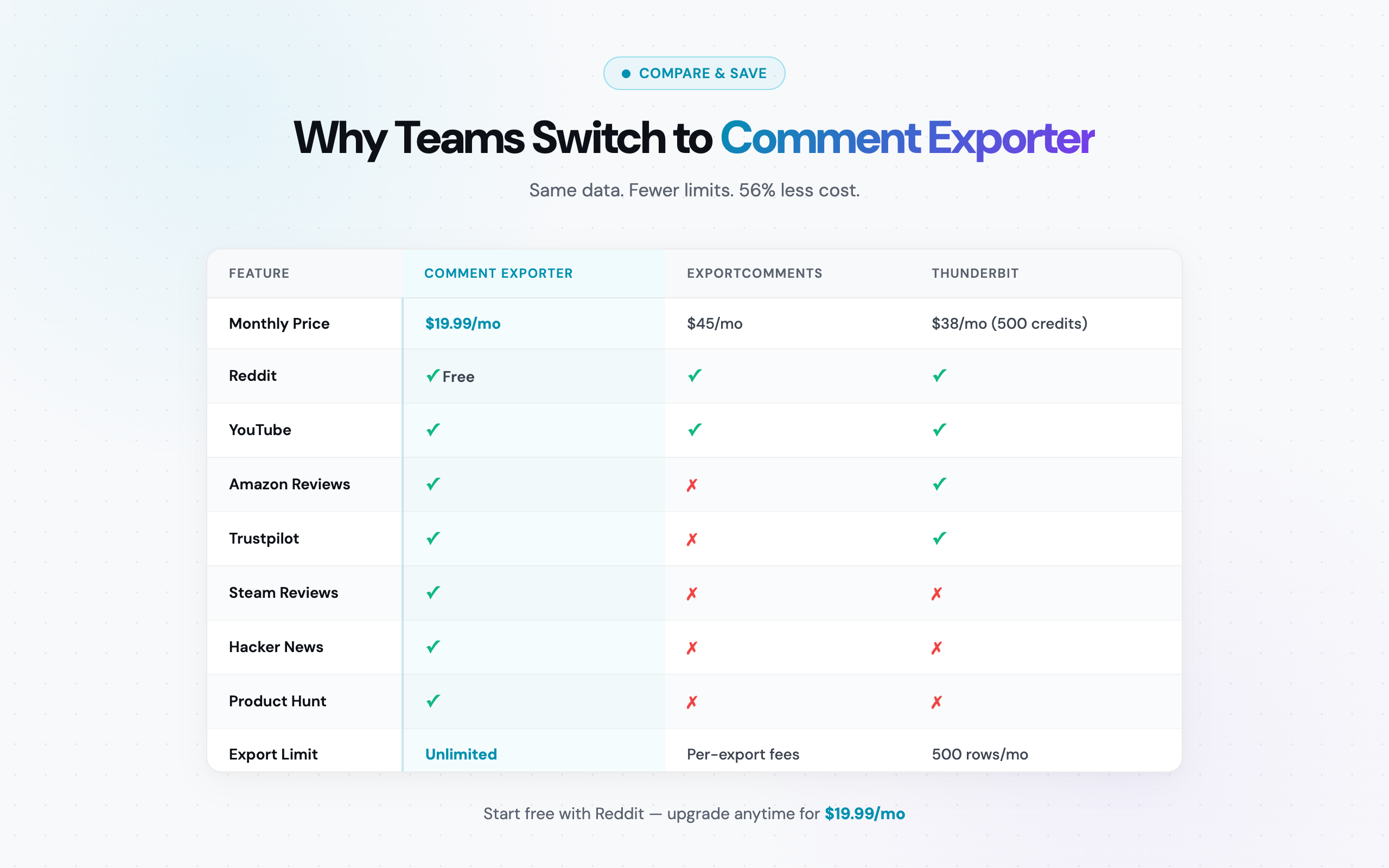
Quick Comparison Table
Here is a side-by-side breakdown of the three tools across the features that matter most:
| Feature | Comment Exporter (Our Tool) | ExportComments.com | Thunderbit |
|---|---|---|---|
| Platforms | 8 (Reddit, YouTube, Amazon, Steam, HN, PH, Etsy, Quora) | 7 (YouTube, Instagram, Facebook, Twitter/X, TikTok, Vimeo, Amazon) | 50+ (broad web scraper) |
| Type | Chrome extension | Web app | Chrome extension |
| Export formats | CSV, JSON | CSV, Excel, JSON | CSV, Excel |
| Reddit support | ✅ (free tier) | ❌ | ✅ |
| YouTube support | ✅ | ✅ | ✅ |
| Amazon reviews | ✅ | ✅ | ✅ |
| Steam reviews | ✅ | ❌ | ❌ |
| Hacker News | ✅ | ❌ | ❌ |
| Product Hunt | ✅ | ❌ | ❌ |
| Etsy | ✅ | ❌ | ✅ |
| Quora | ✅ | ❌ | ✅ |
| Pricing | Free (Reddit) / $49/mo | Per-export (~$3-10/export) | Free trial / $15-38/mo |
| No-code | ✅ | ✅ | ✅ |
| API needed | ❌ | ❌ | ❌ |
Comment Exporter (Reddit Comment Scraper)
What it is: A Chrome extension originally built for Reddit comment scraping that has expanded to cover 12 platforms total. It is the only tool in this comparison that supports Steam reviews, Hacker News threads, and Product Hunt discussions natively.
Strengths:
- Widest review platform coverage: 12 platforms including niche but important sites like Steam, Hacker News, Product Hunt, and Etsy that other tools ignore
- Free Reddit tier: Export Reddit comments at no cost, which is especially useful for researchers and anyone doing market validation
- One-click export: Navigate to a page, click the extension, and download your CSV or JSON. No accounts to create, no URLs to paste into a web app
- Privacy-first: All data processing happens locally in your browser. Nothing gets sent to external servers
- Flat pricing: $49/month or $399/year for Starter across all 12 platforms. No per-export fees, no surprise charges
Limitations:
- No Instagram, Facebook, or TikTok support
- Chrome only (no Firefox or Safari)
- No scheduled or automated exports
Pricing:
- Free: Reddit comment export to start, no card
- Pro ($9.99/mo or $79.99/yr): No cap on Reddit scrapes in the Chrome extension
- Starter ($49/mo or $399/yr): 250 credits a month across 30 sources
Best for:
Researchers, product managers, and marketers who need to pull comments and reviews from multiple discussion and review platforms -- especially Reddit, Amazon, YouTube, and Steam. If your workflow involves analyzing what real users say about products and services across different sites, this is the most efficient option.
ExportComments.com
What it is: A web-based comment export tool focused primarily on social media platforms. You paste a URL into their website and download the comments as a file. No extension or software to install.
Strengths:
- Social media focus: Supports Instagram, Facebook, TikTok, and Vimeo, which the other tools in this comparison do not cover
- No installation required: Works entirely in the browser as a web app. Paste a link, get your export
- Twitter/X support: One of the few tools that can still reliably export replies from X posts
Limitations:
- No Reddit support at all
- No Steam, Hacker News, or Product Hunt support
- Per-export pricing model (roughly $3-10 per export depending on comment volume) can become expensive if you need to export frequently
- No bulk export capabilities -- each URL must be processed individually
Pricing:
- Pay-per-export: ~$3-10 per export depending on the number of comments
Best for:
Social media managers and community managers who primarily work with Instagram, Facebook, and TikTok comments. If your analysis is centered on social media engagement rather than product reviews or forum discussions, ExportComments fills that niche. However, the per-export pricing can add up quickly for heavy users -- exporting 10 posts per week at $5 each is $200/month.
Thunderbit
What it is: An AI-powered web scraping Chrome extension designed for general-purpose data extraction. It can scrape structured data from 50+ website types, not just comments. Think of it as a Swiss army knife rather than a specialized tool.
Strengths:
- Broad coverage: Can extract data from virtually any website, not limited to predefined platforms
- AI-powered extraction: Uses AI to identify and structure data fields, which can handle unusual page layouts
- Versatile: Goes beyond comments -- can scrape product listings, contact pages, directories, and more
Limitations:
- Jack-of-all-trades approach means it is not optimized specifically for comment and review export
- No Steam or Hacker News or Product Hunt support
- More complex to use than a one-click comment exporter -- requires configuring extraction fields
- Higher pricing tiers ($15-38/month) for the amount of comment-specific functionality you get
Pricing:
- Free trial: Limited pages
- Paid plans: $15-38/month depending on volume
Best for:
Users who need general web scraping capabilities that extend beyond just comments and reviews. If you are scraping product catalogs, lead lists, or job postings in addition to comments, Thunderbit makes sense as a single tool. But if your primary need is exporting comments and reviews, it is more complex and more expensive than a purpose-built comment exporter.
Which Should You Pick?
Here is a straightforward decision framework based on what you actually need:
- If you need Reddit + YouTube + Amazon + review platforms (Steam, Etsy): Use Comment Exporter. It covers the widest range of review and discussion platforms in a single extension, and the free Reddit tier means you can start without paying anything.
- If you primarily need Instagram, Facebook, or TikTok comments: Use ExportComments.com. It is the only tool here with native social media platform support. Just watch out for per-export costs if you plan to use it frequently.
- If you need general web scraping beyond just comments: Use Thunderbit. Its AI-powered extraction handles a wider variety of page types, but it is overkill if all you need is a comment export button.
- If budget is your primary concern: Use Comment Exporter's free tier for Reddit. For multi-platform work, compare the $49/month flat Starter fee with ExportComments' per-export charges and Thunderbit's $15-38/month credit limits based on your expected volume.
For most users doing product research, competitive analysis, or academic work, the combination of Reddit, YouTube, and Amazon coverage in a single tool makes Comment Exporter the most practical choice. The platforms it covers are where the majority of genuine product feedback lives.
Conclusion
There is no single tool that covers every platform perfectly. ExportComments owns the social media space. Thunderbit offers flexibility for general scraping. But for the broadest coverage of review and discussion platforms -- the places where customers and users share honest, detailed opinions -- Comment Exporter fills the widest gap with the least friction.
12 platforms from one Chrome extension, with a free tier that lets you start immediately. If you spend any amount of time analyzing what people say online about products, services, or ideas, it is worth trying.
Install Comment Exporter from the Chrome Web Store and see for yourself.
See also on Adlicio: Adlicio's comment and review scrapers for 12 platforms.