ExportComments Alternative: 11 Platforms with Flat Pricing
Why People Search for an ExportComments Alternative
ExportComments.com has been in the comment export space for years. It works, it has a large user base, and it handles social media platforms that most tools ignore. So why are people looking for an alternative?
Three reasons come up consistently:
- Pricing: ExportComments' Premium plan starts at $45/month. The Business tier runs $199/month. For teams or solo researchers who export comments frequently, these costs compound fast -- especially when the free tier limits you to a single export per day.
- Platform gaps: ExportComments focuses heavily on social media. If your work centers on Reddit threads, Steam feedback, Hacker News discussions, or Etsy product reviews, ExportComments either does not support the platform or handles it poorly.
- Workflow friction: ExportComments is a web app. You copy a URL, paste it into their site, configure the export, and download. For users who want to scrape comments directly from the page they are already viewing, the back-and-forth adds up over dozens of exports per week.
None of these are deal-breakers on their own. But combined, they push a specific type of user -- the researcher, product manager, or marketer focused on review and discussion platforms -- to look for something better suited to their workflow.
ExportComments.com: An Honest Overview
Before comparing, it is worth acknowledging what ExportComments does well. This is not a tool that became popular by accident.
What ExportComments Gets Right
- Social media platform coverage: ExportComments supports 20+ platforms, with particularly strong support for Instagram, TikTok, Facebook, and Twitter/X. These are platforms where most comment export tools -- including ours -- do not operate.
- Established track record: The service claims 100,000+ users and over 1 billion comments exported. That is a significant base, and it speaks to reliability.
- No installation required: As a web app, ExportComments works on any browser, any operating system. Paste a URL, configure your export, download the file. No extensions to install, no permissions to grant.
- Multiple export formats: Supports CSV, Excel (.xlsx), and JSON output -- covering the most common data formats for analysis workflows.
Where ExportComments Falls Short
- Pricing tiers are steep: The free tier gives you 1 export per day. Premium is $45/month. Business is $199/month. If you need more than a handful of exports per week, you are paying at least $540/year.
- Weak on Reddit: Despite listing Reddit as a supported platform, ExportComments' Reddit support is limited compared to dedicated tools. Thread depth, comment metadata, and nested reply structures are not handled as thoroughly.
- Missing review platforms: No native support for Steam, Hacker News, Product Hunt, Etsy, or Quora. If your research involves customer reviews on e-commerce or discussion platforms, ExportComments has significant blind spots.
- Web app workflow: Every export requires navigating to exportcomments.com, pasting a URL, waiting for processing, and downloading. There is no way to export directly from the page you are viewing.
- Cloud processing: All data goes through ExportComments' servers. For users handling sensitive competitive intelligence or working under strict data policies, this can be a concern.
Comment Exporter: What We Built and Why
Comment Exporter started as a Reddit comment scraper -- a Chrome extension built to solve one problem well. Over the past year, it has expanded to cover 12 platforms, all accessible from the same extension with a consistent one-click export workflow.
Core Strengths
- 30 customer sources: Reddit, YouTube, Amazon, Steam, Hacker News, Product Hunt, Etsy, Quora, Facebook, Google Maps, Shopify and more. These are the platforms where customers, developers, gamers, and professionals leave detailed, honest feedback.
- Chrome extension -- one click on the page: Navigate to a supported page, click the extension icon, and export. No URL copying, no web app tab-switching, no waiting for server-side processing.
- Starter at $49/month: 250 credits a month across 30 sources.
- Free Reddit tier: Reddit comment export is free to start -- no credit card. Pro ($9.99/month) has no cap on Reddit scrapes in the Chrome extension. Install the extension and start exporting.
- Local data processing: All scraping and data structuring happens in your browser. Comment data never touches an external server. Your exports stay on your machine.
- Structured metadata: Every export includes author names, timestamps, scores/upvotes, reply depth, and platform-specific fields (star ratings for Amazon reviews, hours-played for Steam, etc.).
- Chrome Web Store rated 4.6/5: 40 reviews and 16,000+ users.
Honest Limitations
- Limited social media coverage: Facebook is supported, but Instagram, TikTok, and Twitter/X are not. If you need those platforms, Comment Exporter is not the right tool.
- Chrome only: No Firefox, no Safari, no standalone app. You need Chrome (or a Chromium-based browser like Edge or Brave).
- No scheduled exports: Every export is manual. There is no way to set up recurring or automated scrapes.
- No API: There is no programmatic access. If you need to integrate comment export into an automated pipeline, you will need a different solution.
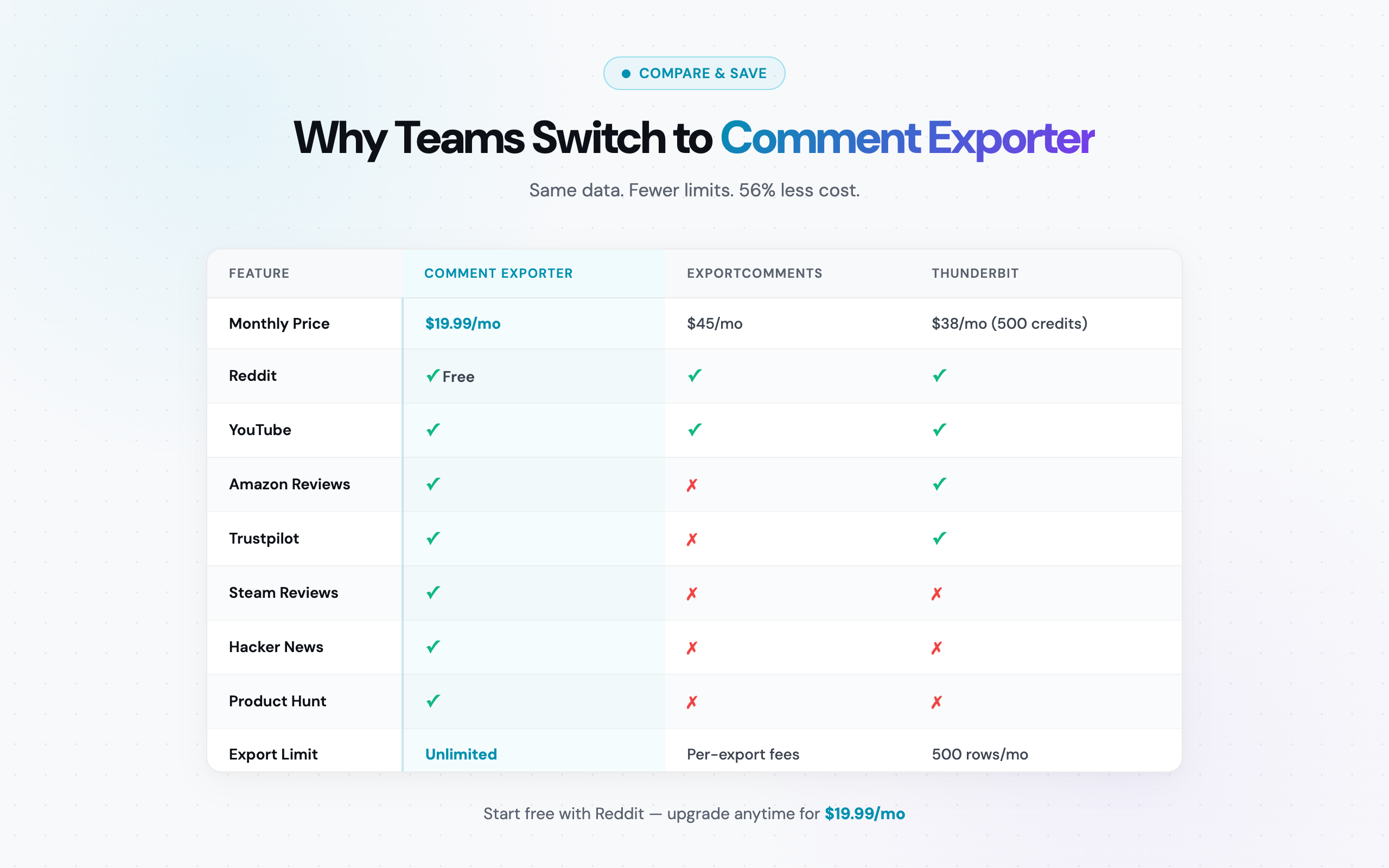
Head-to-Head Comparison Table
Here is a detailed breakdown across every dimension that matters when choosing between these two tools:
| Feature | Comment Exporter | ExportComments.com |
|---|---|---|
| Total platforms | 9 | 20+ |
| ✅ (free tier) | ✅ (limited) | |
| YouTube | ✅ | ✅ |
| Amazon reviews | ✅ | ✅ |
| Steam reviews | ✅ | ❌ |
| Hacker News | ✅ | ❌ |
| Product Hunt | ✅ | ❌ |
| Etsy reviews | ✅ | ❌ |
| Quora | ✅ | ❌ |
| ❌ | ✅ | |
| TikTok | ❌ | ✅ |
| ❌ | ✅ | |
| Twitter/X | ❌ | ✅ |
| Vimeo | ❌ | ✅ |
| Free tier | Reddit, free to start | 1 export/day |
| Paid plan (monthly) | $49/mo | $45/mo (Premium) |
| Paid plan (annual) | $399/yr (~$33.25/mo) | Not publicly listed |
| Enterprise/Business tier | N/A | $199/mo |
| Per-export limits | Credits (250/mo on Starter) | Varies by tier |
| Export formats | CSV, JSON | CSV, Excel, JSON |
| Interface type | Chrome extension | Web app |
| Data processing | Local (in-browser) | Cloud (server-side) |
| Setup required | Install Chrome extension | None (web app) |
| Account required | No (free tier) | Yes |
| Scheduled/automated exports | ❌ | ❌ |
| API access | ❌ | ❌ |
| User base | 16,000+ users | 100,000+ total users |
| Rating | 4.6/5 (Chrome Web Store, 40 reviews) | 4.9/5 |
Pricing Deep Dive: Monthly and Annual Costs
Comment Exporter costs slightly more on monthly billing and less on annual billing. Here is the full breakdown.
ExportComments Pricing
- Free: 1 export per day. Functional for light, occasional use.
- Premium ($45/month): The primary paid tier. Unlocks higher export limits and priority processing.
- Business ($199/month): Designed for teams and agencies. Includes higher rate limits and additional features.
Comment Exporter Pricing
- Free: Reddit comment export to start, no card.
- Pro ($9.99/month): No cap on Reddit scrapes in the Chrome extension.
- Starter ($49/month): 250 credits a month across 30 sources.
- Starter ($399/year): Same features, billed annually. Works out to ~$33.25/month.
Cost Comparison Over Time
| Time Period | Comment Exporter | ExportComments Premium | You Save |
|---|---|---|---|
| 1 month | $49.00 | $45.00 | Comment Exporter costs $4 more |
| 6 months | $294.00 | $270.00 | Comment Exporter costs $24 more |
| 12 months (monthly billing) | $588.00 | $540.00 | Comment Exporter costs $48 more |
| 12 months (annual billing) | $399 | $540.00 | Lower annual cost |
Comment Exporter's annual plan costs less than 12 months of ExportComments Premium billed monthly.
And the gap widens further when you factor in what each dollar buys. ExportComments charges per-export on the free tier and imposes limits on paid tiers. Comment Exporter's $49/month Starter plan gives you 250 credits a month across 30 sources, and Pro ($9.99/month) has no cap on Reddit scrapes in the Chrome extension.
The Hidden Cost of Per-Export Pricing
ExportComments' free tier caps you at 1 export per day. If you are doing competitive research across 5 products on Amazon, pulling YouTube comments from 3 competitor channels, and monitoring Reddit discussions on 2 subreddits -- that is 10 exports just for one research cycle. On ExportComments' free tier, that takes 10 business days. On their Premium plan, it works but at $45/month.
With Comment Exporter, that entire research cycle takes 30 minutes and costs $49/month regardless of volume.
When to Use ExportComments
We are not going to pretend Comment Exporter is the right tool for every use case. ExportComments is the better choice in specific scenarios:
- You need Instagram comment exports. Comment Exporter does not support Instagram. ExportComments does. If Instagram is a primary data source, there is no alternative here.
- You need TikTok comment exports. Same story. TikTok comments are increasingly important for brand monitoring and trend analysis, and ExportComments handles them.
- You need Facebook post comments. Facebook's ecosystem is largely closed to third-party extensions. ExportComments' web app approach navigates this better than a Chrome extension can.
- You need Twitter/X reply exports. With X's API changes making direct scraping more difficult, ExportComments remains one of the few tools with reliable X comment export.
- You do not want to install anything. If your IT policy restricts Chrome extension installs or you work across multiple browsers, ExportComments' web app model requires no installation.
- You only need occasional exports. If you export comments once or twice a week at most, ExportComments' free tier (1 export/day) may be sufficient -- and costs nothing.
If your workflow centers on social media comment analysis -- tracking engagement on brand posts, monitoring influencer campaigns, analyzing viral content replies -- ExportComments is purpose-built for that. It handles social platforms we do not, and it does so reliably.
When to Use Comment Exporter
Comment Exporter is the better fit when your work involves review platforms, discussion forums, or high-volume export needs:
- You export Reddit comments regularly. Comment Exporter Pro has no cap on Reddit scrapes in the Chrome extension for $9.99/month. ExportComments' Reddit support is limited. If Reddit is part of your research stack, this alone justifies the switch.
- You analyze YouTube comments alongside other platforms. Both tools support YouTube, but Comment Exporter bundles it with 29 other sources for $49/month instead of $45/month.
- You scrape Amazon product reviews. Comment Exporter exports Amazon reviews with star ratings, verified purchase flags, and full review text. One click on the product page.
- You monitor Steam game reviews. Steam review data -- hours played, recommendation status, review text -- is available through Comment Exporter and not through ExportComments.
- You track Hacker News, Product Hunt, or Quora discussions. These niche but high-value discussion platforms are covered by Comment Exporter and ignored by ExportComments.
- You need Etsy review data. For e-commerce research and competitor analysis on Etsy, Comment Exporter is one of the few tools with native support.
- You want to keep exports local. Comment Exporter processes everything in your browser. No data hits external servers. If your work involves proprietary research or sensitive competitive intelligence, this matters.
- You want a predictable bill. $49/month for 250 credits a month. No surprise invoices.
Platform Coverage: A Closer Look
The headline source counts are misleading without context. The type of platform matters as much as the count.
ExportComments' platform list is heavily weighted toward social media -- Instagram, TikTok, Facebook, Twitter/X, Vimeo, and YouTube make up the core. These are engagement-oriented platforms where comments tend to be short, conversational, and tied to specific posts.
Comment Exporter's core sources are weighted toward reviews and discussions -- Reddit threads with hundreds of nested replies, Amazon reviews with star ratings and purchase verification, Steam reviews with playtime data. These are platforms where comments tend to be longer, more substantive, and more structured.
Neither approach is better in absolute terms. But if your analysis depends on review depth, product feedback, or community discussion data, Comment Exporter's sources cover more relevant ground than ExportComments' 20+ social media-focused platforms.
Workflow Comparison: Web App vs. Chrome Extension
This is an underrated difference that affects daily productivity more than most people expect.
ExportComments Workflow
- Find the page with comments you want to export
- Copy the URL
- Open a new tab and navigate to exportcomments.com
- Paste the URL
- Configure export settings
- Wait for server-side processing
- Download the file
Comment Exporter Workflow
- Navigate to the page with comments you want to export
- Click the extension icon
- Download the file
Three steps vs. seven. For a single export, the time difference is small -- maybe 30 seconds. But multiply that by 20 exports in a research session and the web app workflow adds 10+ minutes of friction. Over weeks and months of regular use, the Chrome extension model is meaningfully faster.
Data Privacy: Local vs. Cloud Processing
Comment Exporter runs entirely in your browser. When you click "export," the extension reads the page content, structures the data, and generates your CSV or JSON file locally. The comment data never leaves your machine.
ExportComments operates as a web app with server-side processing. When you paste a URL, their servers fetch the page, extract the comments, and return the structured file to you. Your export request -- and the resulting data -- passes through their infrastructure.
For most users, this distinction does not matter. But for researchers working with proprietary datasets, consultants handling client-sensitive competitive analysis, or organizations with strict data governance policies, the local processing model provides an additional layer of control.
Frequently Asked Questions
How does Comment Exporter pricing compare with ExportComments?
Comment Exporter's Starter plan is $49/month for exports across 12 platforms, while ExportComments' Premium plan is $45/month. Comment Exporter's annual plan costs $399/year, or about $33.25/month, and costs less than 12 months of ExportComments billed monthly.
Does Comment Exporter support Instagram, TikTok, or Facebook?
Comment Exporter supports Facebook, but not Instagram or TikTok. It also covers Reddit, YouTube, Amazon, Steam, Hacker News, Product Hunt, Etsy, Quora, Google Maps, and Shopify. If you need Instagram or TikTok comment exports, ExportComments is the better choice for those specific platforms.
Can I use Comment Exporter for free?
Yes. Reddit comment export is free to start, and Pro ($9.99/month) has no cap on Reddit scrapes in the Chrome extension. Install the Chrome extension and start exporting immediately -- no account or credit card required. The paid Starter plan ($49/month) unlocks 30 customer sources with 250 credits a month.
What export formats does Comment Exporter support?
CSV and JSON. Both formats include full metadata -- author names, timestamps, upvotes/scores, and reply threading where available. ExportComments also supports Excel (.xlsx) in addition to CSV and JSON.
Is my data safe with Comment Exporter?
All data processing happens locally in your browser. No comment data is sent to external servers. ExportComments processes data on their servers. If data privacy is a concern for your workflow, Comment Exporter's local processing model keeps your exports entirely on your machine.
The Bottom Line
There is no single tool that covers every comment export scenario perfectly. ExportComments has broader social media coverage across Instagram, TikTok, Facebook, and Twitter/X. It has a massive user base, a strong reputation, and it handles platforms that Comment Exporter does not support, including Instagram, TikTok, and Twitter/X.
But for broad coverage of review and discussion platforms -- the places where customers, developers, gamers, and professionals leave substantive, detailed feedback -- Comment Exporter fills the widest gap with flat monthly pricing and a lower annual cost.
12 platforms. One Chrome extension. $49/month flat. No per-export fees. No surprises.
If your workflow involves Reddit, YouTube, Amazon, Steam, or any of the other supported platforms, Comment Exporter delivers broader review and discussion coverage. Monthly billing costs $4 more than ExportComments Premium, while annual billing costs less.
For the full picture on how Comment Exporter stacks up against other tools beyond ExportComments, see our full roundup of comment exporters in 2026.
Install Comment Exporter from the Chrome Web Store -- Reddit exports are free, no account required.
See also on Adlicio: how Adlicio compares with other scrapers.