How to Scrape Amazon Reviews: 3 Methods, From Copy-Paste to a Free Chrome Extension
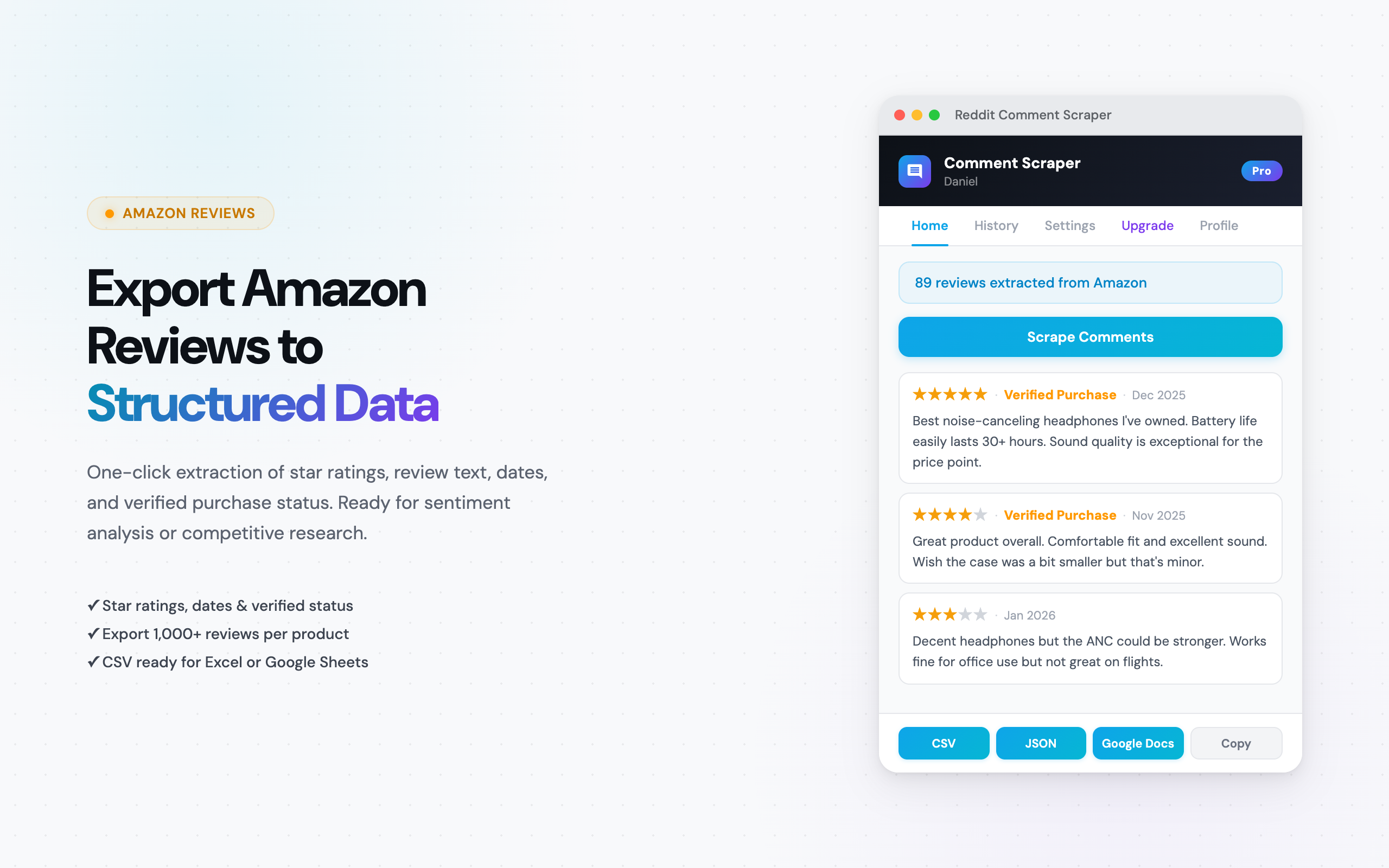
Amazon product reviews contain some of the most detailed consumer feedback available anywhere online. Star ratings, verified purchase flags, specific complaints, feature comparisons — it is all there, spread across thousands of product pages.
The problem: Amazon does not offer a "Download Reviews" button. There is no official export feature and no public API for review data. So if you want that data in a spreadsheet, you need a workaround.
This guide covers three methods for downloading Amazon reviews — ranked from fastest to most technical. Whether you are an Amazon seller analyzing competitor products, a researcher building a dataset, or a product manager tracking customer sentiment, one of these methods will fit your workflow.
Why Download Amazon Reviews?
Before jumping into the how, here is why people download Amazon reviews in the first place. These are the five most common use cases we see from Comment Exporter users.
- Competitor analysis: Export reviews from competing products to find out what customers love and hate. Look for patterns in 1-star and 5-star reviews — that is where the strongest opinions live. If 30% of a competitor's negative reviews mention "battery life," you have a product positioning opportunity.
- Product research & development: Mining reviews before building or sourcing a product saves months of guesswork. Customers describe exactly what they want — and exactly what is missing — in their own words. That data is more honest than any focus group.
- Sentiment analysis: Download hundreds or thousands of reviews into a CSV, then run sentiment analysis to quantify how customers feel. Track whether sentiment trends up or down over time — especially after product updates, price changes, or new competitor launches.
- Identifying product gaps: Read through exported reviews sorted by "helpful votes" to find the most impactful feedback. Common complaints that surface across multiple competing products signal a gap in the market — something nobody has solved yet.
- Supplier evaluation: If you are sourcing products from manufacturers, downloading reviews for their existing Amazon listings tells you whether their quality holds up at scale. Verified purchase reviews with detailed complaints are more useful than any product spec sheet.
In all of these cases, the workflow is the same: get the reviews out of Amazon and into a spreadsheet or analysis tool where you can sort, filter, and search.
Method 1: Chrome Extension (No Code)
A Chrome extension is the fastest path from an Amazon product page to a structured spreadsheet. The Comment Exporter extension works directly inside your browser as an Amazon review exporter — no Python, no terminal, no API registration.
This is the no-code alternative to APIs. You get the same data fields a developer would extract with a custom scraper, but the entire process takes about 2 minutes instead of 2 hours.
Step-by-Step Walkthrough
- Install the extension: Go to the Comment Exporter page on the Chrome Web Store and click "Add to Chrome." Installation takes about 10 seconds.
- Navigate to any Amazon product page: Open the product whose reviews you want to download. This works on Amazon.com, Amazon.co.uk, Amazon.de, Amazon.co.jp, and 20+ other Amazon country domains.
- Click the extension icon, then "Scrape Reviews": The extension automatically paginates through all review pages for the product. It loads each page, extracts every review, and moves to the next — no manual scrolling required.
- Choose CSV or JSON and download: Once scraping finishes, pick your export format. CSV opens directly in Excel and Google Sheets. JSON is ready for Python, Node.js, or data pipeline tools.
What Data Fields Are Exported?
Every review export includes the following structured data — not just the review text:
- Star rating: The 1-5 star rating for each review, ready for filtering and pivot tables.
- Review text: The full review body, including the review title/headline.
- Verified purchase status: Whether the reviewer is a confirmed buyer — critical for filtering out fake or incentivized reviews.
- Helpful votes: How many people found the review helpful. High helpful-vote reviews are the ones that shape purchasing decisions.
- Reviewer name: The display name of the person who wrote the review.
- Date: When the review was posted, so you can track sentiment over time.
- Product variant: Which color, size, or configuration the reviewer purchased — if the product has multiple options.
Supported Amazon Domains
The extension works on 20+ Amazon country domains, including:
- Amazon.com (United States)
- Amazon.co.uk (United Kingdom)
- Amazon.de (Germany)
- Amazon.fr (France)
- Amazon.it (Italy)
- Amazon.es (Spain)
- Amazon.co.jp (Japan)
- Amazon.ca (Canada)
- Amazon.com.au (Australia)
- Amazon.in (India)
- Amazon.nl, Amazon.sg, Amazon.sa, Amazon.ae, Amazon.com.br, and more
This matters if you sell internationally or are doing market research across regions. You can export reviews from Amazon Germany and Amazon Japan in the same session — same tool, same CSV format.
Pros
- No coding, no API keys, no setup
- Automatic pagination through all review pages
- Structured data with all metadata fields included
- Works on 20+ Amazon country domains
- One-click export to CSV or JSON
- Takes 2-5 minutes for most products
Cons
- Requires the Chrome browser (not available on Firefox or Safari)
- Amazon review scraping requires the Starter plan ($49/mo or $399/year)
- Not suitable for fully automated, scheduled scraping (that requires a script)
Best for: Amazon sellers, product managers, market researchers, and anyone who wants structured review data in a spreadsheet without writing code.
Method 2: Python Script (BeautifulSoup / Scrapy)
If you need to scrape Amazon reviews on a schedule — say, pulling new reviews daily for 50 products — a Python script gives you that level of automation. But it comes with significant setup overhead and ongoing maintenance.
What You Need
- Python 3.8+ installed on your machine
- Libraries:
requests,beautifulsoup4, orscrapy - Understanding of HTML parsing and CSS selectors
- A proxy service (Amazon blocks repeated requests from the same IP)
Basic Code Example
Here is a simplified version of what an Amazon review scraper looks like in Python:
import requests
from bs4 import BeautifulSoup
import csv
import time
import random

headers = {
    "User-Agent": "Mozilla/5.0 (Windows NT 10.0; Win64; x64) "
                  "AppleWebKit/537.36 (KHTML, like Gecko) "
                  "Chrome/120.0.0.0 Safari/537.36"
}

def scrape_reviews(asin, pages=10):
    reviews = []
    for page in range(1, pages + 1):
        url = f"https://www.amazon.com/product-reviews/{asin}"
        params = {"pageNumber": page, "sortBy": "recent"}

        response = requests.get(url, headers=headers, params=params)
        soup = BeautifulSoup(response.text, "html.parser")

        for review in soup.select("[data-hook='review']"):
            star = review.select_one("[data-hook='review-star-rating']")
            body = review.select_one("[data-hook='review-body']")
            title = review.select_one("[data-hook='review-title']")
            date = review.select_one("[data-hook='review-date']")

            reviews.append({
                "rating": star.text.strip() if star else "",
                "title": title.text.strip() if title else "",
                "body": body.text.strip() if body else "",
                "date": date.text.strip() if date else "",
            })

        # Respect rate limits
        time.sleep(random.uniform(2, 5))

    return reviews

# Write to CSV
data = scrape_reviews("B0EXAMPLE01")
with open("reviews.csv", "w", newline="", encoding="utf-8") as f:
    writer = csv.DictWriter(f, fieldnames=data[0].keys())
    writer.writeheader()
    writer.writerows(data)
That is roughly 40 lines of code for a basic scraper — and it does not handle proxies, CAPTCHAs, blocked requests, or changing page layouts. A production-ready version is typically 200-400 lines.
The Challenges
- Anti-bot detection: Amazon actively blocks scraping. You will encounter CAPTCHAs, IP bans, and request throttling. Rotating proxies are essentially required.
- No official API: Unlike YouTube or Reddit, Amazon does not offer a public API for review data. The Product Advertising API (PA-API) provides product metadata but not individual review text.
- Layout changes: Amazon updates its HTML structure periodically. When they change a CSS class name or restructure the review section, your scraper breaks. You will need to update selectors regularly.
- Rate limiting: Even with proxies, scraping too aggressively gets your IP pool flagged. Most developers add 2-5 second delays between requests, which means scraping 1,000 reviews takes 30+ minutes.
- Proxy costs: Residential proxy services — the kind you need to avoid Amazon's blocks — typically cost $5-15/GB of data transferred. That adds up if you are scraping across many products.
Pros
- Fully automated — schedule scraping jobs with cron or task schedulers
- Customizable data extraction (pull exactly the fields you need)
- Scalable to thousands of products if you invest in proxy infrastructure
Cons
- Requires Python knowledge and HTML parsing experience
- Setup time: 2-4 hours for a working scraper, longer for production-ready code
- Ongoing maintenance as Amazon changes their HTML structure
- Proxy costs add up ($5-15/GB for residential proxies)
- Risk of IP bans if not handled carefully
Best for: Developers and data engineers who need automated, scheduled scraping across many products and are comfortable maintaining a scraping pipeline.
Method 3: Manual Copy-Paste
This is exactly what it sounds like. Open the product page on Amazon, scroll through the reviews, highlight the text, and paste it into a spreadsheet.
How It Works
- Open the Amazon product page and navigate to the reviews section.
- Select the review text with your mouse.
- Copy (Ctrl+C / Cmd+C) and paste into Excel, Google Sheets, or a text file.
- Repeat for each review. Amazon shows 10 reviews per page, so you need to click "Next page" and repeat.
Why It Does Not Scale
A product with 500 reviews means 50 pages of manual copying. At 2 minutes per page, that is nearly 2 hours of tedious work — and you still lose all the metadata.
- No structured star ratings in your spreadsheet (just pasted text)
- No verified purchase flags
- No helpful vote counts
- No product variant information
- Formatting breaks when pasting into a spreadsheet, requiring manual cleanup
Best for: Grabbing 5-10 specific reviews for a quick reference. Not a viable approach for any kind of analysis or research project.
What Data Can You Export?
Here is a comparison of the data fields available with each method:
| Data Field | Chrome Extension | Python Script | Manual Copy-Paste |
|---|---|---|---|
| Star rating (1-5) | Yes | Yes (with parsing) | No |
| Review title | Yes | Yes (with parsing) | Partial |
| Review body text | Yes | Yes | Yes |
| Verified purchase | Yes | Yes (with parsing) | No |
| Helpful votes | Yes | Yes (with parsing) | No |
| Reviewer name | Yes | Yes (with parsing) | Partial |
| Review date | Yes | Yes (with parsing) | No |
| Product variant | Yes | Custom code needed | No |
| Export format | CSV, JSON | Custom (CSV, JSON, DB) | Plain text |
| Setup time | 1 minute | 2-4 hours | None |
The Chrome extension captures every data field automatically and formats it into clean columns. With Python, you get the same data — but you have to write and maintain the parsing code yourself. Manual copy-paste loses most metadata entirely.
Tips for Analyzing Exported Reviews
Once you have your Amazon reviews in a CSV file, here is how to put that data to work.
Excel and Google Sheets
- Pivot tables by star rating: Create a pivot table grouping reviews by their star rating. This gives you an instant breakdown — how many 1-star vs. 5-star reviews, and what percentage each represents.
- Filter by verified purchase: Remove unverified reviews to focus on confirmed buyer feedback. This is especially important for competitive analysis — verified reviews are more trustworthy.
- Sort by helpful votes: The reviews with the most helpful votes are the ones that influence buying decisions the most. Start your analysis there.
- Search for keywords: Use Ctrl+F or the SEARCH function to find reviews mentioning specific features, competitor names, or common complaints.
ChatGPT and AI Analysis
- Paste reviews into ChatGPT: Copy 50-100 reviews and ask ChatGPT to summarize the top 5 complaints, the top 5 praised features, and any recurring themes. This turns hours of manual reading into a 30-second analysis.
- Upload the CSV to ChatGPT Plus: If you have ChatGPT Plus with Code Interpreter, upload the entire CSV file and ask for a sentiment breakdown, keyword frequency analysis, or competitive comparison.
- Use the JSON export for programmatic analysis: Feed the JSON file directly into a Python script with pandas, or into an AI analysis pipeline for large-scale processing.
Dedicated Sentiment Analysis Tools
- MonkeyLearn: Upload your CSV and run pre-built sentiment analysis models. Categorizes each review as positive, negative, or neutral with a confidence score.
- Google Sheets + GPT add-ons: Several Google Sheets add-ons let you run GPT prompts directly on each row. Analyze 500 reviews without leaving your spreadsheet.
The key insight: the value of downloading Amazon reviews is not in the download itself — it is in what you do with the data afterward. An Amazon review exporter gives you the raw data; the tools above turn that data into an Amazon review analyzer workflow. A structured CSV is the starting point for competitor intelligence, product decisions, and market research.
Frequently Asked Questions
Is Comment Exporter free for Amazon reviews?
Reddit scraping is free. Amazon review scraping is included in the Starter plan at $49/mo or $399/year. The plan also covers YouTube, Steam, Hacker News, Product Hunt, Etsy, Quora, Facebook, Google Maps, and Shopify, 12 platforms total with one subscription.
How many reviews can I export from a single product?
The extension automatically paginates through all review pages for a product. It handles products with hundreds or thousands of reviews. Amazon shows 10 reviews per page, and the extension loads each page sequentially until every review is captured.
Does it work on all Amazon domains?
Yes. The extension supports 20+ Amazon country domains — including Amazon.com, .co.uk, .de, .fr, .it, .es, .co.jp, .ca, .com.au, .in, .nl, .sg, .sa, .ae, .com.br, and more. The export format is the same regardless of which domain you scrape from.
What format is the export?
You can export as CSV or JSON. CSV files open directly in Excel, Google Sheets, and Airtable with all data fields as separate columns. JSON is structured for developers, data pipelines, and AI analysis tools.
Can I filter reviews by star rating before exporting?
Yes. Use Amazon's built-in star rating filter on the reviews page before you start scraping. The extension captures whichever reviews are displayed on the page — so if you filter to 1-star reviews only, that is what gets exported. This is useful for focused analysis of negative feedback.
See also on Adlicio: Adlicio's Amazon review scraper for ad research.