How to Export Etsy Reviews: A Seller's Guide to Feedback Analysis
Etsy sellers sit on a goldmine of customer feedback, but the platform gives you no way to export it. There is no "Download Reviews" button. No built-in CSV export. No analytics dashboard that lets you sort, filter, or search your review data.
That is a problem if you have 200+ reviews and want to find patterns. This guide covers three methods for getting your Etsy reviews into a spreadsheet — ranked from fastest to most technical.
Why Export Etsy Reviews?
Etsy review data is useful well beyond your shop dashboard. Here are 5 concrete use cases:
- Improve your own products: Export your shop reviews and sort by star rating. One-star and two-star reviews reveal specific complaints — sizing issues, shipping damage, color mismatches — that you can fix in your next production run.
- Research competitors: Export reviews from rival Etsy listings. Find out what customers love about their products and what they complain about. Use those gaps to differentiate your own listings.
- Spot trending categories: Pull reviews across multiple product listings in a category. Sentiment shifts — an increase in complaints about material quality, for example — signal opportunities to offer a better alternative.
- Source product ideas: Customer reviews are full of "I wish this also had..." and "Would be great if..." statements. Export them, search for those phrases, and you have a list of product ideas backed by real demand.
- Build social proof: Collect your best 4- and 5-star reviews into a spreadsheet. Use them in your marketing — product photography overlays, social media posts, email campaigns, or your own website.
What Data Can You Export from Etsy Reviews?
Here is a breakdown of the data fields available when you export Etsy reviews:
| Data Field | Description | Available? |
|---|---|---|
| Review text | The full written review from the buyer | Yes |
| Star rating | 1 to 5 star rating given by the buyer | Yes |
| Buyer name | The display name of the reviewer | Yes |
| Review date | When the review was posted | Yes |
| Product variant | The specific item option purchased (size, color, etc.) | Yes |
| Seller response | The shop owner's reply to the review, if any | Yes |
The Chrome extension captures all of these fields automatically. The API method requires you to map each field manually. Manual copy-pasting loses most metadata — you get the review text and star count, but product variants and seller responses are difficult to capture cleanly.
Method 1: Chrome Extension (Comment Exporter)
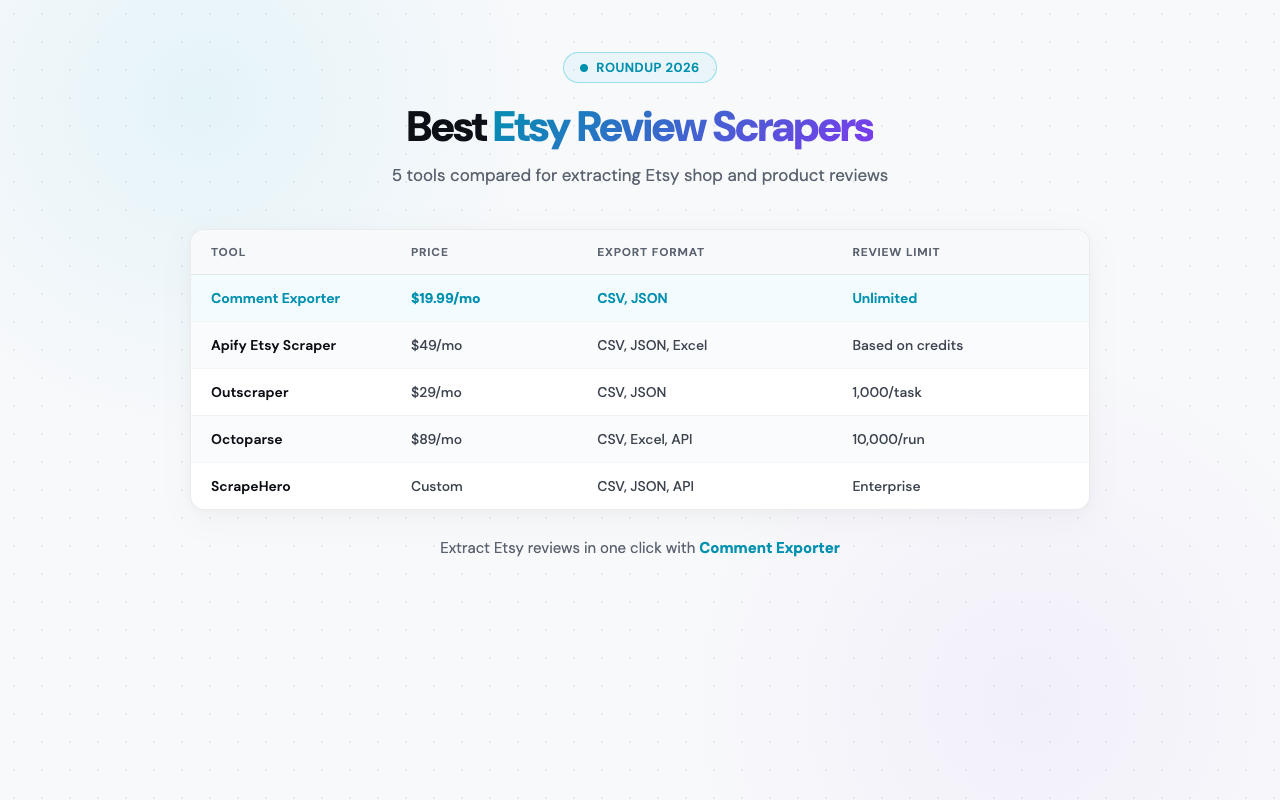
A browser extension is the fastest path from an Etsy product page to a spreadsheet file. Comment Exporter supports Etsy natively — one of the few tools that does. Most review scrapers focus on Amazon or Google and ignore Etsy entirely.
Step-by-Step Walkthrough
- Install the extension: Visit the Comment Exporter page on the Chrome Web Store and click "Add to Chrome." Installation takes about 10 seconds.
- Navigate to an Etsy product page: Open the listing whose reviews you want to export. Scroll down to confirm reviews are visible on the page.
- Click the extension icon: The extension detects Etsy automatically. Click "Scrape" and it will scroll through the review section, loading and capturing every review — including star ratings, buyer names, dates, and product variants.
- Choose CSV or JSON and download: Once scraping is complete, pick your format and save the file. Open the CSV directly in Excel or Google Sheets. Every review gets its own row with all metadata in separate columns.
Pros
- No coding or technical setup required
- No API key needed
- Works in under 2 minutes for most product pages
- Captures star ratings, buyer names, dates, product variants, and seller responses automatically
- One-click export to CSV or JSON
- Supports Etsy natively — most tools do not
Cons
- Requires the Chrome browser (not available on Firefox or Safari)
- Etsy scraping requires the Starter plan ($49/mo or $399/year)
Best for: Etsy sellers, ecommerce researchers, and marketers who want structured review data without writing code or dealing with API authentication.
Method 2: Etsy Open API
Etsy provides an Open API v3 with endpoints for retrieving reviews programmatically. This is the official developer route — and it is significantly more involved than the extension method.
Step-by-Step Walkthrough
- Register as an Etsy developer: Go to etsy.com/developers and create a developer account. You will need to describe your application and agree to Etsy's API terms of use.
- Create an app and get API keys: Register a new application in the developer dashboard. Etsy will issue you a keystring (API key). For endpoints that access private data, you also need to implement OAuth 2.0 authentication — which requires a callback URL and token exchange flow.
- Call the reviews endpoint: Use the following endpoint to fetch reviews for a specific listing:
ReplaceGET https://openapi.etsy.com/v3/application/listings/{listing_id}/reviews?limit=100{listing_id}with the numeric listing ID from the Etsy product URL. Thelimitparameter caps at 100 per request. For listings with more than 100 reviews, paginate using theoffsetparameter. - Parse the JSON response and convert to CSV: The API returns JSON. You will need to extract each field — review text, rating, buyer name, created date — and write them into CSV rows. In Python, the
csvandrequestslibraries handle this in about 40 lines of code.
Pros
- Free within rate limits
- Fully programmable — automate with cron jobs or integrate into data pipelines
- Access to shop-level and listing-level review data
Cons
- Requires coding knowledge (Python, JavaScript, or another language)
- Developer account registration and API key setup takes 30-60 minutes
- OAuth 2.0 authentication is required for many endpoints — adds significant complexity
- Rate limits: 10 requests per second with daily quotas that vary by endpoint
- Etsy's API documentation is sparse in places — expect to troubleshoot
- API access can be revoked if Etsy changes its terms or deprecates endpoints
Best for: Developers building automated data collection systems or integrating Etsy review data into existing analytics platforms.
Method 3: Manual Collection
The manual approach works exactly how it sounds. Open an Etsy product page, scroll to the reviews section, and start copying.
How It Works
- Open the Etsy product listing and scroll down to the reviews section.
- Select the review text, star count, and buyer name with your mouse.
- Copy (Ctrl+C / Cmd+C) and paste into Excel, Google Sheets, or a text file.
- Repeat for each review. Click "Load more" to reveal additional reviews as needed.
Pros
- Completely free
- No tools, extensions, or accounts required
Cons
- Extremely tedious — Etsy loads reviews in batches, so you must keep clicking "Load more" to reveal them
- No structured metadata — star ratings, product variants, and dates require manual entry into separate columns
- Does not scale — practical only for 20-30 reviews at most
- Formatting breaks when pasting into a spreadsheet, requiring manual cleanup
- Seller responses are often collapsed and require extra clicks to copy
Best for: One-off situations where you need fewer than 20 reviews and do not want to install or configure anything.
Comparison Table
| Feature | Chrome Extension | Etsy API | Manual |
|---|---|---|---|
| Setup time | 1 minute | 30-60 minutes | None |
| Coding required | No | Yes | No |
| Reviews captured | All on page | All (with pagination) | Limited by patience |
| Metadata included | Yes (ratings, dates, variants) | Yes | Partial |
| Export format | CSV, JSON | JSON (needs conversion) | Plain text |
| Cost | $49/mo | Free (rate limits) | Free |
| Best for | Most sellers | Developers | Quick one-offs |
5 Ways to Use Exported Etsy Reviews
Having a CSV file of reviews is the starting point. Here is how to turn that data into actionable insights:
1. Find Common Complaints to Improve Your Product
Filter your exported reviews to 1-star, 2-star, and 3-star ratings. Look for repeating phrases. If 12 out of 40 negative reviews mention "smaller than expected," that is a listing description problem — not a product defect.
2. Analyze Competitor Weaknesses
Export reviews from 3-5 competing listings. Sort by lowest rating. You are looking for patterns — complaints that appear across multiple competitors. If every similar product gets complaints about fragile packaging, ship yours better and say so in your listing.
3. Identify Keywords Customers Actually Use
Customers describe products in their own words. If they say "boho wedding gift" but your listing says "rustic home decor," you are missing search traffic. Pull buyer language directly into your Etsy titles, tags, and descriptions.
4. Track Satisfaction Trends Over Time
Sort exported reviews by date. Plot the average star rating per month. A downward trend after a supplier change tells you something went wrong. An upward trend after packaging updates confirms the investment paid off.
5. Feed to ChatGPT for Bulk Sentiment Analysis
Export 100-500 reviews to CSV. Paste the review text column into ChatGPT with a prompt like: "Categorize these reviews into themes (quality, shipping, sizing, value) and summarize the top 3 positive and negative patterns." You get structured analysis in 30 seconds. See our full guide: How to Analyze Reviews with ChatGPT.
Frequently Asked Questions
Can I export Etsy reviews without coding?
Yes. The Comment Exporter Chrome extension handles Etsy review export with no coding, no API keys, and no setup beyond installing the extension. Navigate to the product page, click the extension, download your CSV.
Does Etsy allow you to export your own reviews?
No. Etsy does not provide a native review export feature. The seller dashboard shows your reviews, but there is no download button and no CSV export. You need a third-party tool or the API.
Is it legal to scrape Etsy reviews?
Etsy reviews are publicly visible on product pages. Scraping publicly available data for personal research is generally considered acceptable. Review Etsy's Terms of Service for your specific use case — especially if you plan to republish data commercially.
How many reviews can I export at once?
With the Chrome extension, you can export all reviews visible on a product page — typically hundreds per listing. The Etsy API returns up to 100 per request but supports pagination. Manual copy-pasting becomes impractical past 20-30 reviews.
What format should I export Etsy reviews in — CSV or JSON?
CSV for most people — it opens directly in Excel and Google Sheets. JSON if you are feeding data into a script or database. The extension supports both.
Conclusion
For most Etsy sellers and researchers, the Chrome extension method is the clear winner. It takes about a minute to set up, requires no coding, and gives you a clean CSV with all metadata in separate columns.
If you are a developer building an automated pipeline, the Etsy Open API is worth the setup effort. And if you only need a handful of reviews once, manual copy-paste works in a pinch.
Etsy is a platform most scraping tools ignore entirely. Comment Exporter supports it natively — alongside 6 other platforms including Amazon, Reddit, and YouTube.
See also on Adlicio: Adlicio's Etsy review scraper.