
Social media comments are a goldmine for understanding user sentiment, identifying trends, and gathering feedback. But collecting and analyzing comments comes with challenges like platform restrictions, legal compliance, and technical hurdles. This guide explains how to extract comments ethically and efficiently, covering tools, methods, and analysis strategies.
Key Takeaways:
- Why Comments Matter: Comments provide deeper insights than likes or shares, revealing user opinions, complaints, and requests.
- Challenges: API rate limits, anti-bot measures, dynamic content loading, and legal regulations like GDPR/CCPA.
- Tools: Use browser extensions like Comment Exporter for simplicity or Python libraries (e.g., Beautiful Soup, Scrapy) for custom solutions.
- Analysis: Sentiment analysis tools like VADER can measure positivity or negativity, while keyword tracking helps identify recurring themes.
Quick Overview of Platforms:
- Facebook/Instagram: Handle nested comments via Meta’s Graph API but watch for rate limits and hidden comments.
- Twitter/X: Use
conversation_idto group threads, but manage strict API rate limits and pagination. - YouTube: Navigate dynamic loading with continuation tokens and internal APIs for structured data.
Ethical data extraction ensures compliance with privacy laws while leveraging the right tools and techniques for actionable insights.
Legal and Technical Requirements
Data Privacy and Legal Compliance
When it comes to data scraping, sticking to publicly accessible data is key. The 2022 Ninth Circuit ruling in hiQ Labs v. LinkedIn clarified that scraping public information - like comments visible without logging in - doesn't violate the Computer Fraud and Abuse Act (CFAA). However, the line gets crossed if you bypass login walls or use fake accounts to access private content. For example, the 2020 Meta Platforms v. BrandTotal case confirmed that getting around security measures breaches the CFAA.
Laws like GDPR and CCPA add more layers of responsibility. To comply, you need a legal basis for processing data and must respect users' rights, like data deletion and transparency. One way to simplify compliance is by anonymizing your data - removing usernames, profile links, or any personally identifiable information. GDPR doesn’t classify anonymized data as personal data, making this a practical workaround.
"The CFAA's prohibition on accessing a computer 'without authorization' is violated when a person circumvents a computer's generally applicable rules regarding access permissions, such as username and password requirements, not when a person accesses a computer in violation of a contract or agreement." - 9th Circuit Court of Appeals
While breaking a platform’s Terms of Service is usually a civil issue rather than a criminal one, it still has consequences. You could face account bans, IP blocks, or cease-and-desist letters. To avoid trouble, respect robots.txt files and use rate limiting to mimic normal user behavior. Keep in mind, non-compliance with GDPR could lead to penalties as high as €20 million or 4% of your global annual revenue.
Once the legal aspects are addressed, the next step is equipping yourself with the right technical skills and tools to extract data effectively and ethically.
Required Technical Skills and Tools
The technical skills you need depend on your approach, but there are options for everyone - from beginners to advanced users.
- No-code tools: These are perfect for newcomers, offering simple, point-and-click interfaces to extract data without any programming. Browser extensions can also handle small, one-off tasks.
- Python basics: For custom solutions, even basic Python knowledge can go a long way. Libraries like BeautifulSoup and Scrapy are great for parsing HTML, while Selenium or Playwright handle websites with heavy JavaScript.
- Scraping APIs: If you want to avoid the complexities of DIY scraping, APIs can take care of tricky tasks like managing proxies, solving CAPTCHAs, and implementing rate limits.
For the most stable and reliable access, official platform APIs are the gold standard. However, they often come with steep restrictions and costs. Some platforms charge up to $5,000 per month for high-volume, production-level access.
"The real cost isn't just infrastructure - it's opportunity cost. Every hour spent maintaining a fragile scraper is an hour not spent building features." - Marta Krysan, Data365.co
sbb-itb-eded204
How To Scrape Facebook Comments In Posts In 8 Minutes (Seriously)
Platform-Specific Extraction Methods
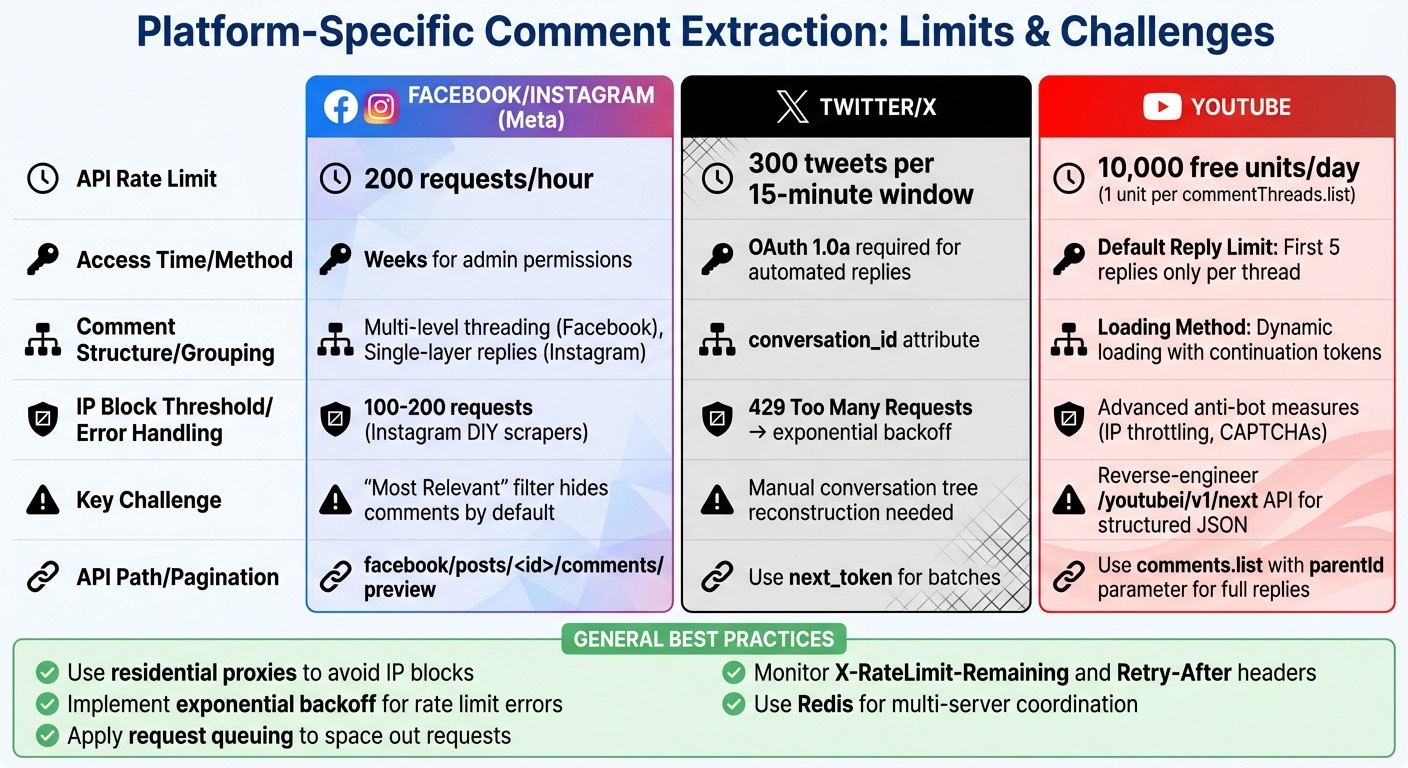
Social Media Platform API Rate Limits and Comment Extraction Comparison 2025
Each social media platform has its own set of challenges when it comes to extracting comments. Understanding these nuances can make the process much smoother.
Facebook and Instagram: Handling Nested Comments
Facebook and Instagram bring some unique hurdles. For starters, Meta's Graph API limits requests to just 200 per hour as of 2025, and gaining admin access or user permissions can take weeks.
Meta provides a Content Library API with paths like facebook/posts/<id>/comments/preview or instagram/posts/<id>/comments/preview. The tricky part? Managing nested comments. Facebook supports multi-level threading, while Instagram keeps replies in a single layer. To address this, you can either "flatten" the data to retrieve all comment levels at once or query specific comment IDs to get sub-replies. When using Meta's research APIs, setting the FETCH_ALL parameter to True ensures you get both nested and unnested comments in a flattened format, but it disables chronological sorting.
Another challenge is Facebook's "Most Relevant" filter, which hides many comments by default. To capture everything, adjust your scraper to use the "ALL" setting. On Instagram, DIY scrapers often hit IP blocks after 100–200 requests, so for larger-scale projects in 2026, residential proxies are essential to avoid disruptions.
Once you've tackled nested comments here, it's time to look at how to extract threaded replies on Twitter/X.
Twitter/X: Collecting Threaded Replies
On Twitter (now X), the conversation_id attribute in API v2 makes it easier to group entire threads. Every tweet in a conversation shares the same ID. While this simplifies capturing discussions, you'll likely need to manually reconstruct the conversation tree since the API responses don't always return tweets in order.
API v2 permits 300 tweets per 15-minute window. If you hit a 429 Too Many Requests error, apply exponential backoff to manage rate limits. For automated reply extraction, OAuth 1.0a is necessary, as OAuth 2.0 bearer tokens are often limited to read-only access. To track real-time engagement, webhooks are far more efficient than constant polling.
To extract replies, start by getting the root tweet's tweet_id, then retrieve its conversation_id. Use the search endpoint with this ID as a filter. Pagination tokens (next_token) help you fetch additional batches, but remember to deduplicate by tweet_id and set limits - like a maximum of 1,000 tweets or a 15-minute timeout - to avoid infinite loops.
Now, let’s dive into overcoming the hurdles of dynamic loading when dealing with YouTube comments.
YouTube: Navigating Dynamic Comment Loading
YouTube's comment system is built around dynamic loading, using continuation tokens as users scroll. This means you can't extract all comments in a single request. The YouTube Data API v3 offers 10,000 free units per day, with each commentThreads.list request costing just 1 unit. However, standard API calls only fetch the first five replies for any comment thread.
To gather all comments, loop through pagination using the nextPageToken from each API response. If a comment's totalReplyCount exceeds five, use the comments.list endpoint with the parentId parameter to pull all replies. Keep in mind that page tokens are temporary and may expire if you don't complete the pagination in one session.
"Modern web scraping is less about parsing messy HTML and more about becoming a digital detective. The most valuable data... is loaded dynamically via internal APIs." - Live Proxies Editorial Team
YouTube employs advanced anti-bot measures like IP throttling and CAPTCHAs. To avoid detection, apply exponential backoff for server errors and use high-quality residential proxies to rotate IPs and mimic real user behavior. Rather than parsing HTML, reverse-engineer YouTube's internal API (e.g., /youtubei/v1/next) to extract clean, structured JSON data.
These techniques tie into a broader strategy for efficiently extracting and analyzing social media comments across platforms.
Tools for Comment Extraction
Once you’ve nailed down your extraction methods, the next step is picking the right tool to retrieve your data. You generally have two main options: no-code browser extensions for quick and easy extraction or Python libraries for those who prefer custom automation.
Comment Exporter: Features and Pricing
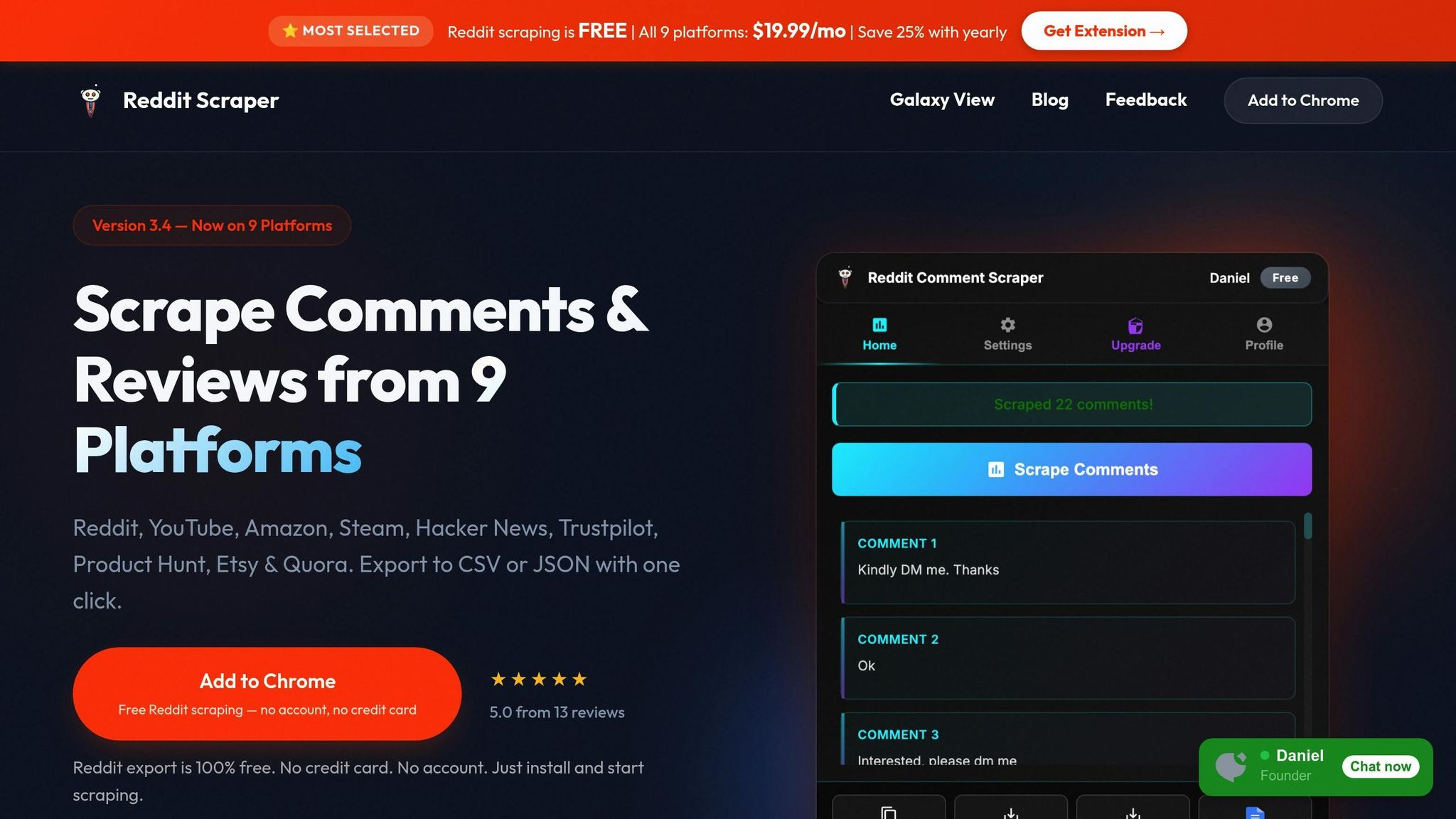
Comment Exporter is a Chrome extension designed for users who want to skip coding, API key headaches, or paying per-row fees. It supports nine major platforms, including Reddit, YouTube, Amazon, Trustpilot, Steam, Product Hunt, Quora, Etsy, and Hacker News. Setup is lightning-fast - just a 10-second installation - and it already serves over 2,500 weekly users.
This tool operates entirely within your browser, meaning your data stays private. It’s designed to handle everything automatically: scrolling through threads, expanding nested replies, and capturing even the deepest conversation chains. When it comes to exporting, you can choose between CSV or JSON formats, complete with metadata like comment text, username, upvotes, timestamps, flair, awards, comment depth, and permalinks.
As for pricing, there are two plans:
- Free Reddit Plan: Reddit thread scraping at no cost.
- Starter Plan: $49 per month (or save 32% with yearly billing), unlocking all nine platforms.
Here’s a quick breakdown:
| Feature | Free Reddit Plan | Starter Plan |
|---|---|---|
| Monthly Cost | $0 | $49 |
| Supported Platforms | Reddit only | 9 platforms (e.g., YouTube, Amazon) |
| Export Formats | CSV, JSON | CSV, JSON |
| Export Limits | Unlimited Reddit threads | Unlimited across all platforms |
| Data Privacy | Local (browser-based) | Local (browser-based) |
| Technical Setup | None | None |
After exporting, you can sort your data by columns like "Score" in a spreadsheet to quickly pinpoint the most influential comments. The timestamp metadata is particularly handy for tracking how audience sentiment evolves over time - perfect for monitoring responses to product launches or major brand events.
Python Libraries for Custom Solutions
If you’re comfortable with coding and need more control or large-scale automation, Python libraries can be a game-changer.
- Beautiful Soup: A lightweight library for parsing HTML and XML documents. It’s great for extracting data from unstructured pages.
- Scrapy: A more advanced framework tailored for large-scale crawling and data extraction. If you’re planning to scrape hundreds of threads on a regular basis, Scrapy provides the tools to build fully automated pipelines.
These libraries are ideal for users who want to go beyond the simplicity of browser extensions and create custom solutions for their data needs. Together, they complement tools like Comment Exporter, giving you flexibility depending on your goals and technical expertise.
How to Use Comment Exporter
Installing and Configuring Comment Exporter
Getting started with Comment Exporter is quick and straightforward - it takes just 10 seconds to install. Head over to the Chrome Web Store, search for "Comment Exporter", and click "Add to Chrome". Once installed, the extension icon will show up in your toolbar, ready to use on supported platforms.
Before diving in, make sure the platform you're working on is set to English. This step is crucial for platforms like Facebook and Instagram, as it ensures the scraper works smoothly and captures all comment data without missing anything. If you're planning to pull a large amount of data from Instagram, it’s a good idea to use a secondary or "burner" account to protect your main profile from potential restrictions or rate limits. Once everything is set up, you’re ready to start exporting comments along with their metadata.
Exporting Comments with Metadata
With the setup complete, navigate to the post you want to scrape. Look for a download icon near the comment count on the page. Clicking this icon - or accessing the extension from your browser toolbar and selecting "Scrape Comments" or "Fetch" - will kick off the extraction process.
The tool takes care of everything automatically. It scrolls through the entire comment thread, expands collapsed replies, and captures nested comment chains without you needing to lift a finger. For posts with over 1,000 comments, the process might take anywhere from 30 to 90 seconds to ensure all data is captured.
Once the extraction is done, you can choose to export the data in formats like CSV, Excel, or JSON. These files include detailed metadata such as the comment text, username, user ID, timestamp, reaction counts, comment depth, and permalinks. The comment depth field is especially helpful for distinguishing between main comments and replies.
When opening your CSV file, make sure to use UTF-8 encoding. This step preserves emojis and special characters, which is critical for accurate sentiment analysis.
Handling Large Datasets
After exporting, managing large datasets requires a bit of planning. Comment Exporter processes data locally, ensuring privacy while handling thousands of comments. However, if you're dealing with massive datasets, you’ll need to be strategic to avoid running into software limitations.
For threads with tens of thousands of comments, avoid opening the raw file directly in Excel. Standard spreadsheet software can’t handle more than 1,048,576 rows and may crash or lag when working with large files. Instead, use a specialized text editor designed for handling multi-gigabyte files.
If your export is particularly large, consider splitting the data into smaller files. This makes it easier and faster to import into analysis tools. Always keep an untouched copy of your raw dataset before cleaning or standardizing it. This way, you can recover from any errors without needing to redo the entire scraping process. For flat, tabular data, CSV is ideal, while JSON works better for hierarchical comment structures where parent–child relationships are important.
Common Challenges and Solutions
Working Around API Restrictions and Rate Limits
Navigating API restrictions is a key part of ensuring smooth data extraction. Most platforms impose limits on the number of requests you can make within a specific timeframe. For instance, Instagram allows around 50 requests per hour for public access and up to 200 per hour for authenticated users. TikTok provides roughly 100 requests per hour without an API key, increasing to 300–500 with API key access. Twitter's free tier is especially limited, offering only 1,500 reads per month, while paid plans like the "Pro" tier grant access to up to 1,000,000 reads.
Platforms often monitor various factors to detect scraping activity, such as request patterns, session behavior, IP reputation, and browser fingerprints. For Instagram, failing to implement anti-scraping measures can result in IP blocks after about 100–200 requests. To avoid this, using residential proxies can help simulate real user behavior and reduce the risk of being flagged.
When dealing with rate limits, strategies like exponential backoff are invaluable. For example, if you encounter an HTTP 429 error, start with a 1-second delay and double it with each retry. Pay attention to response headers like X-RateLimit-Remaining and Retry-After to adjust your request pace before hitting a block. Another useful technique is request queuing, which spaces out requests to ensure they stay within platform limits. If you're running multiple servers, tools like Redis can help coordinate request limits across all of them for better management.
Once you've successfully managed these restrictions, the focus shifts to preparing your data for analysis.
Cleaning and Formatting Extracted Data
After handling rate limits, the next step is to ensure your extracted data is clean and usable. Start by removing duplicates, filtering out spam, and addressing formatting issues. For instance, you can identify and exclude bot-generated comments by looking for generic phrases or emoji-only responses. To improve text analysis, eliminate common stop words such as "the", "is", or "at", which can clutter word clouds and analytics.
When exporting data to CSV, ensure text fields with quotes are properly escaped to prevent formatting errors. Check that essential fields like usernames, text, and timestamps are present, and convert numeric strings into integers where applicable. If you're working with nested JSON data - common with platforms like YouTube - you'll need to flatten the structure to make it easier to analyze. Adding metadata, such as precise timestamps or platform-specific tags, can also provide valuable context for identifying trends over time. Always make sure to back up your raw data before starting the cleaning process.
Analyzing Extracted Comments
Once your extracted data is cleaned and formatted, the next step is to dive into the comments to gauge public sentiment, pinpoint recurring themes, and identify trends. This kind of analysis can provide actionable insights for your business or research.
Running Sentiment Analysis
Sentiment analysis helps determine whether comments lean positive, negative, or neutral. A widely used tool for this is VADER (Valence Aware Dictionary and Sentiment Reasoner). It’s especially effective because it understands intensifiers like "very", negations like "not", and even emoticons. VADER assigns a compound score ranging from -1 (most negative) to +1 (most positive). Scores above 0.05 are considered positive, while scores below -0.05 are negative.
"The compound score is computed by summing the valence scores of each word in the lexicon, adjusted according to the rules, and then normalized to be between -1 (most extreme negative) and +1 (most extreme positive)." - VADER Documentation
For more nuanced analysis, such as detecting sarcasm or subtle context, advanced transformer models like BERT or roBERTa are better suited. These models, though, demand greater computational resources. If your goal is to categorize feedback into specific areas like Product Quality, Shipping, or Customer Service, language models like GPT-4-mini can handle the sorting and scoring automatically. To stay proactive, consider setting up real-time alerts - for instance, flagging when negative feedback exceeds 20% of your total comment volume.
Once sentiment scores are established, the next step is to explore the underlying topics that matter most to your audience.
Finding Trends and Patterns
Sentiment analysis is just the beginning. To gain deeper insights, analyze the content of comments to identify recurring topics and emerging trends. Start by tracking the frequency of specific keywords, hashtags, or phrases over time. This can help you spot new trends early. For instance, using pandas, you can organize and filter comments by factors like date, author, or engagement metrics to uncover patterns.
WordClouds are a great way to visualize frequently mentioned terms in positive versus negative comments. For example, if the term "shipping" consistently appears in negative feedback, it could highlight a recurring issue. Platforms like Reddit offer rich data, and tools such as PRAW with the replace_more(limit=None) method allow you to capture the full scope of threaded conversations. Combining metadata like timestamps and engagement data can help pinpoint when a trend gains traction and its overall importance.
For a more automated approach, tools can score user issues on a scale from 0 to 100, helping you prioritize which problems need immediate attention. Whether you’re using Python scripts or no-code platforms, it’s essential to go beyond basic metrics. Focus on uncovering the specific themes and patterns that drive user sentiment, so you can address the issues that matter most.
Conclusion
Extracting social media comments offers a powerful way to gain deeper insights into your audience, competitors, and market trends. This guide has walked through the key steps: staying legally compliant, choosing the right tools, and transforming raw comment data into actionable insights through analysis.
First and foremost, legal compliance is critical. Stick to scraping publicly available data, avoid bypassing authentication measures, and adhere to data protection laws like GDPR and CCPA when dealing with personal information. As Apify highlights, "Scraping responsibly and ethically is crucial for maintaining the integrity of the open web and the robustness of the platforms themselves".
Tools like Comment Exporter simplify the process by extracting and organizing comment data into structured formats like CSV or JSON. Supporting nine platforms - such as Reddit, YouTube, and Amazon - it saves you from the errors and time-consuming nature of manual data collection, making the process far more efficient.
The real value, however, lies in what you do with the cleaned and structured data. Whether it's using VADER for sentiment analysis to gauge brand health, identifying keyword trends to anticipate market shifts, or analyzing competitor feedback to fine-tune your strategy, these insights can be game-changing. As Scrapfly notes, "Understanding the market sentiment is crucial for brand health and crisis management". By analyzing sentiment and trends across the digital landscape, you can transform raw comment data into a strategic advantage.
FAQs
Is scraping public comments legal in the U.S.?
Scraping public comments in the U.S. is typically allowed, provided it aligns with platform terms of service, copyright laws, and privacy rules. It's crucial to steer clear of unauthorized access or gathering personal information without proper consent. Always double-check relevant laws and platform guidelines to stay within legal boundaries.
When should I use an API vs scraping in the browser?
When you need reliable and structured access to social media data, using an API is the way to go. Official APIs are particularly useful when they align with your requirements and ensure compliance with platform rules. They’re great for tasks like retrieving posts or comments in a stable and legally approved manner.
However, if APIs prove to be too restrictive, expensive, or don’t provide the specific data you’re after, browser or server-side scraping can be a practical alternative. This method allows you to collect publicly available content or real-time data efficiently. Just make sure to stay mindful of legal and ethical considerations when using scraping techniques.
How do I avoid rate limits and bans while extracting comments?
To reduce the chances of hitting rate limits or getting banned, try strategies like rotating proxies, controlling the frequency of your requests, and simulating human-like behavior. Consider using APIs or specialized tools that cater to server-side interactions and include anti-blocking features, such as CAPTCHA handling. Additionally, using top-tier scraping tools with fine-tuned response times can help extract data efficiently while lowering the risk of detection.
To turn comments and reviews into ad angles, see voice of customer research and Adlicio pricing.