Best AI Tools for Customer Review Analysis in 2026: ChatGPT, Claude, Gemini & More
Why Use AI for Review Analysis?
Customer reviews contain more actionable product intelligence than most companies realize. The problem is scale. A single Amazon product might have 3,000 reviews. A Reddit thread discussing your product category might have 500 comments with nested replies. Reading all of that manually is not realistic.
Traditional approaches -- keyword searches, star rating averages, word clouds -- miss the nuance. A 4-star review that says "great product but the battery dies after 2 hours" contains a critical product insight that a star rating average completely obscures. Multiply that by thousands of reviews across multiple platforms, and you start to see why manual analysis breaks down.
AI-powered review analysis solves this in several ways:
- Sentiment analysis at scale: Classify thousands of reviews as positive, negative, or neutral in minutes -- with context-aware accuracy that understands sarcasm, qualifiers, and mixed sentiment.
- Theme and topic extraction: Automatically identify recurring themes (battery life, customer service, shipping speed, build quality) without predefined keyword lists.
- Feature-level sentiment: Go beyond overall sentiment to understand how customers feel about specific product features. "Great camera but terrible battery" contains two distinct sentiments about two distinct features.
- Competitive intelligence: Analyze competitor reviews to identify gaps in their products that your product can address. This feeds directly into competitor analysis using reviews.
- Trend detection: Track how sentiment shifts over time -- after a firmware update, a pricing change, or a competitor launch.
- Multilingual analysis: Modern LLMs handle reviews in dozens of languages without requiring separate translation steps.
The key prerequisite for all of this is structured data. You need your reviews in a format that AI tools can ingest -- typically CSV or JSON. That is where a tool like Comment Exporter fits in: it handles the extraction step, pulling reviews from Amazon, YouTube, Reddit, and 5 other platforms into clean CSV files. The AI tools we review below handle the analysis step.
As one user put it: "The files it spits out are perfectly formatted, no messy cleanup needed." -- Alfon Labadan. That clean formatting is exactly what makes AI analysis effective -- garbage in, garbage out, and clean CSV input means better AI output.
How We Evaluated These Tools
We tested each tool against a dataset of 2,500 Amazon product reviews (exported via our Amazon review scraper). Here is what we measured:
- Accuracy: How correctly does the tool identify sentiment, extract themes, and summarize findings? We manually verified a random sample of 200 reviews against each tool's analysis.
- Ease of use: How quickly can a non-technical user go from CSV file to actionable insights? We measured time-to-first-insight for each tool.
- Dataset size handling: Can it process 100 reviews? 1,000? 10,000? We tested each tool's limits with progressively larger files.
- Pricing: What does it cost per month for a typical analysis workflow (analyzing 2,000-5,000 reviews per month)?
- Export compatibility: Does it work with standard CSV files from review export tools? Or does it require proprietary data formats?
- Output quality: Are the insights actionable? Can they be shared with a product team or included in a report?
Best AI Review Analysis Tools Compared
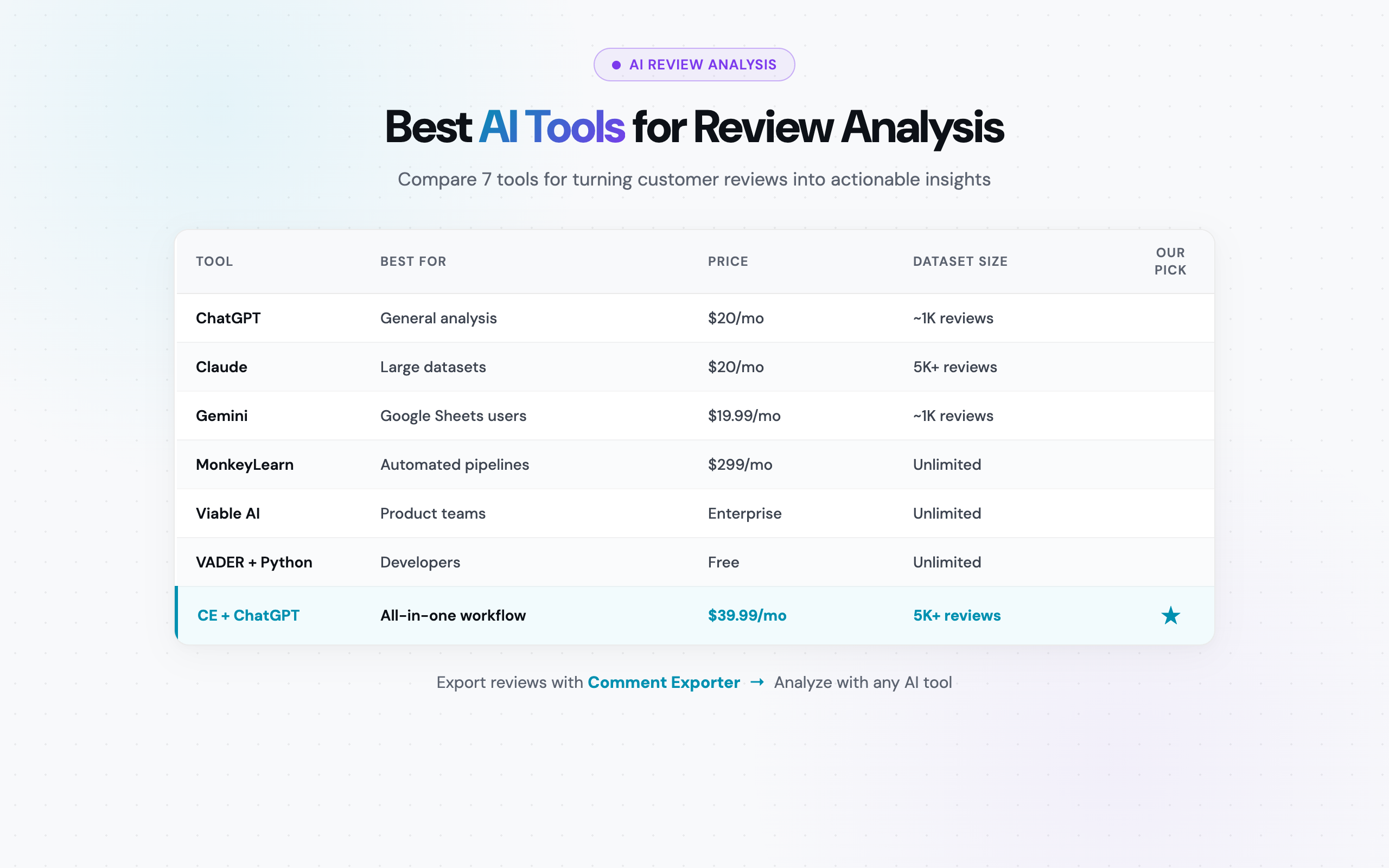
Here is every tool at a glance -- best use case, pricing, dataset capacity, and learning curve:
| Tool | Best For | Pricing | Dataset Size | Learning Curve | Export Compatibility |
|---|---|---|---|---|---|
| ChatGPT (OpenAI) | General review analysis | Free / $20/mo (Plus) | ~50-100 pages of text | Low | CSV, JSON, TXT upload |
| Claude (Anthropic) | Large dataset analysis | Free / $20/mo (Pro) | ~200K tokens (~500 pages) | Low | CSV, JSON, TXT upload |
| Google Gemini | Google Sheets users | Free / $19.99/mo | ~100K tokens | Low | CSV, Sheets, Docs |
| MonkeyLearn | Automated pipelines | ~$299/mo | Unlimited (API-based) | Medium | CSV, API |
| Viable AI | Product teams | Enterprise pricing | Unlimited (platform) | Low-Medium | CSV, integrations |
| VADER + Python | Developers | Free (open-source) | Millions of reviews | High | Any format (code) |
| Comment Exporter + ChatGPT | Best all-in-one workflow | $39.99/mo combined | Thousands of reviews | Low | Native CSV workflow |
Tool Reviews
Below, we break down each tool in detail -- what it does well, where it falls short, exact pricing, and who should use it.
1. ChatGPT (OpenAI) -- The Most Popular Option
What it is: ChatGPT is OpenAI's conversational AI model and the most widely used LLM in the world. For review analysis, it acts as a flexible, prompt-driven analyst: you upload a CSV file of reviews, describe what you want to know, and ChatGPT processes the data and returns structured insights.
The key advantage is flexibility. Unlike purpose-built tools with fixed analysis pipelines, ChatGPT lets you ask any question about your review data. You can start with sentiment analysis, pivot to feature extraction, then ask for a competitive comparison -- all in the same conversation.
On the free tier, you get access to GPT-4o-mini with limited file uploads. ChatGPT Plus ($20/month) unlocks GPT-4o, larger file uploads, and Advanced Data Analysis (formerly Code Interpreter), which can run Python code on your data directly in the chat. This is where ChatGPT becomes genuinely powerful for review analysis -- it can generate charts, calculate statistics, and process structured data with code rather than relying solely on language processing.
For a step-by-step walkthrough, see our detailed ChatGPT review analysis guide.
Example Prompts for Review Analysis:
Upload your CSV file to ChatGPT and try these prompts:
I've uploaded a CSV of 1,500 Amazon product reviews. Please analyze them and provide:
1. Overall sentiment breakdown (positive/negative/neutral with percentages)
2. Top 10 most frequently mentioned product features
3. The top 5 complaints, ranked by frequency
4. Any notable sentiment shifts by date (are recent reviews more negative?)
Format the results as a structured report with bullet points.
Using the review data I uploaded, perform a feature-level sentiment analysis.
For each product feature mentioned (battery, screen, camera, price, build quality, etc.):
- Count how many reviews mention it
- Calculate the average sentiment (positive/negative/mixed)
- Pull 2-3 representative quotes
Output as a markdown table.Strengths:
- Versatility: Ask any question about your data -- sentiment, themes, trends, comparisons, summaries. No fixed analysis templates.
- Advanced Data Analysis: The Plus tier can run Python code on your CSV, generating charts, pivot tables, and statistical breakdowns.
- Custom GPTs: Build a reusable "Review Analyzer" GPT with pre-loaded instructions so you do not have to re-type your prompt every time.
- Multilingual: Handles reviews in English, Spanish, German, Japanese, French, and dozens of other languages without extra setup.
- Summarization quality: Particularly strong at generating executive summaries from large review datasets.
- Ecosystem: Hundreds of third-party plugins, Custom GPTs in the GPT Store, and community-shared prompts for review analysis.
Limitations:
- Token limits: Even on Plus, ChatGPT can struggle with very large CSV files (5,000+ reviews). You may need to split your dataset into batches.
- No persistent memory: Each conversation starts fresh. If you analyze reviews weekly, you will re-upload and re-explain every time (unless using a Custom GPT).
- Hallucination risk: ChatGPT can fabricate statistics or miscount data. Always verify quantitative claims against your raw data.
- No direct database connection: You need to upload files manually -- there is no live connection to your review data source.
Pricing:
- Free: GPT-4o-mini, limited file uploads, limited message volume
- Plus: $20/month -- GPT-4o, larger uploads, Advanced Data Analysis, Custom GPTs
- Team: $25/user/month -- higher limits, workspace features
Best For:
Most users. ChatGPT is the best general-purpose option for review analysis because of its flexibility, large user community, and the Advanced Data Analysis feature on Plus. If you are analyzing fewer than 2,000 reviews at a time and want maximum prompt flexibility, ChatGPT is the place to start.
2. Claude (Anthropic) -- Best for Large Datasets
What it is: Claude is Anthropic's AI assistant, and its standout feature for review analysis is its massive context window. Claude can process approximately 200,000 tokens in a single conversation -- roughly 500 pages of text or a CSV file containing 5,000-8,000 reviews with full text. That is 3-5x more than what ChatGPT can handle in a single upload.
This context window advantage makes Claude the best choice when you need to analyze a complete dataset in one pass, without splitting it into batches. Upload your entire CSV, ask your question, and Claude processes every row. No pagination, no "analyze the first 500 reviews" workarounds.
Claude is also notably strong at structured data analysis. When you upload a CSV, Claude correctly identifies columns, handles edge cases (commas in review text, special characters, Unicode), and produces well-organized output. Its responses tend to be thorough and systematic rather than creative -- which is exactly what you want for analytical work.
Example Prompt for Large Dataset Analysis:
I've uploaded a CSV containing 4,200 Amazon reviews for [Company Name].
Please provide a comprehensive analysis:

1. SENTIMENT OVERVIEW: Break down reviews by sentiment (positive/negative/neutral)
   with exact counts and percentages.
2. THEME ANALYSIS: Identify the top 15 recurring themes across all reviews.
   For each theme, provide the count, average associated star rating, and
   a representative quote.
3. CRITICAL ISSUES: What are the top 5 problems customers mention most?
   Rank by frequency and severity.
4. STRENGTHS: What do satisfied customers praise most? Top 5 strengths.
5. TREND ANALYSIS: Is sentiment improving or declining over time?
   Break down by quarter if dates are available.
6. COMPETITIVE MENTIONS: Do any reviews mention competitor products by name?
   List them with context.

Format as a structured report suitable for a product team meeting.
Strengths:
- Largest context window: Process 5,000-8,000 full reviews in a single conversation. No batching required for most datasets.
- Structured analysis: Excellent at parsing CSV data correctly, handling edge cases, and producing organized output.
- Lower hallucination rate: Claude tends to be more conservative with statistics and is more likely to say "I cannot determine this from the data" rather than fabricating numbers.
- Nuanced understanding: Strong at detecting mixed sentiment, sarcasm, and subtle complaints that other tools might classify as neutral.
- Projects feature: Claude Pro includes Projects where you can save context and instructions, creating a persistent review analysis workspace.
Limitations:
- Slower responses: Processing a large CSV through Claude takes longer than ChatGPT -- expect 30-90 seconds for a comprehensive analysis of thousands of reviews.
- Smaller ecosystem: Fewer plugins, integrations, and community resources compared to ChatGPT.
- No built-in code execution: Unlike ChatGPT's Advanced Data Analysis, Claude cannot run Python code on your data. Analysis is purely language-based.
- Free tier limits: The free tier has usage caps that can restrict heavy analysis workflows.
Pricing:
- Free: Access to Claude with usage limits
- Pro: $20/month -- higher limits, priority access, Projects feature
- Team: $25/user/month -- collaboration features
Best For:
Users working with large datasets (2,000+ reviews) who need to analyze everything in a single pass. If you export a full set of Amazon reviews and want comprehensive analysis without splitting files, Claude is the superior choice. Also excellent for users who prioritize accuracy over speed.
3. Google Gemini -- Best for Google Sheets Integration
What it is: Google Gemini is Google's AI model, available as a standalone chatbot and integrated into Google Workspace products. For review analysis, Gemini's killer feature is its native integration with Google Sheets -- you can analyze review data directly in your spreadsheet without downloading, uploading, or switching between tools.
If your workflow already involves importing review CSVs into Google Sheets (which is a natural step for many teams), Gemini lets you run AI analysis in-place. Select a range of cells, ask Gemini to analyze sentiment, and the results appear right next to your data. No copy-pasting, no file uploads, no context-switching.
Gemini Advanced ($19.99/month as part of Google One AI Premium) unlocks the full model with larger context windows and priority access. It also includes Gemini integration in Gmail, Docs, and Slides -- meaning you can generate a review analysis report in Sheets and then have Gemini draft a presentation from it in Slides.
The multimodal capability is a bonus for review analysis workflows that include images. If your reviews contain product photos (common on Amazon), Gemini can analyze both the text and associated images in a single prompt.
Strengths:
- Google Sheets integration: Analyze review data directly in your spreadsheet. Add sentiment labels, extract themes, and generate summaries without leaving Sheets.
- Workspace ecosystem: Seamlessly moves from Sheets (analysis) to Docs (reports) to Slides (presentations). End-to-end workflow in one ecosystem.
- Multimodal analysis: Can process both review text and review images -- useful for platforms that include photo reviews.
- Free tier: Functional free access for light analysis workloads.
- Google Drive integration: Upload your CSV to Drive and reference it directly in Gemini conversations.
Limitations:
- Less precise structured analysis: For pure CSV-based analytical tasks, Claude and ChatGPT tend to produce more accurate and detailed outputs.
- Rate limits on free tier: Heavy analysis workflows will hit rate limits quickly on the free plan.
- Sheets integration still maturing: The in-Sheets AI features are powerful but can be inconsistent with complex queries on large datasets.
- Smaller context window than Claude: Cannot handle the same volume of review data in a single pass.
Pricing:
- Free: Basic Gemini access with usage limits
- Gemini Advanced: $19.99/month (part of Google One AI Premium) -- full model, Workspace integration, larger context
Best For:
Teams already working in Google Workspace who want to keep their review analysis workflow inside Sheets. If you import your CSV into Google Sheets and collaborate with team members there, Gemini adds AI analysis without introducing another tool. Also a strong choice for users who need to analyze review images alongside text.
4. MonkeyLearn -- Best for Automated Sentiment Pipelines
What it is: MonkeyLearn is a dedicated text analysis platform built specifically for extracting insights from text data -- including customer reviews, support tickets, survey responses, and social media mentions. Unlike general-purpose LLMs, MonkeyLearn provides pre-built machine learning models for sentiment analysis, topic classification, keyword extraction, and entity recognition.
The platform takes an API-first approach. You set up analysis models (or use pre-built ones), connect your data source, and MonkeyLearn processes your text data through the pipeline automatically. This makes it ideal for teams that need ongoing, automated analysis rather than one-off explorations.
MonkeyLearn also includes a no-code model builder. If the pre-built sentiment model does not match your industry's language patterns, you can train a custom model by labeling examples. This is particularly useful for niche product categories where general sentiment models struggle with domain-specific terminology.
Strengths:
- Purpose-built for text analysis: Every feature is designed for extracting insights from text data. No need to craft elaborate prompts -- the models are pre-configured for sentiment, topics, and keywords.
- No-code model training: Build custom classification models by labeling examples in a visual interface. No machine learning expertise required.
- API integration: Connect to your data pipeline via REST API. Automate the flow: export reviews with Comment Exporter, push to MonkeyLearn via API, get tagged results back.
- Batch processing: Upload large CSV files for batch analysis. Every review gets sentiment-tagged, topic-classified, and keyword-extracted in one pass.
- Visualizations: Built-in dashboards for sentiment distribution, topic trends, and keyword frequency -- no need for a separate BI tool.
Limitations:
- Expensive: Starting at approximately $299/month, MonkeyLearn is priced for teams and businesses, not individual researchers.
- Requires pipeline setup: Unlike ChatGPT where you upload a file and ask a question, MonkeyLearn requires configuring models, workflows, and data connections.
- Less flexible than LLMs: You cannot ask arbitrary questions about your data. Analysis is limited to the models you have configured.
- Learning curve for custom models: While the no-code builder is accessible, training a good custom model still requires understanding of classification principles.
Pricing:
- Free trial: Limited queries for testing
- Team: Starting at ~$299/month for 10,000 queries/month
- Business/Enterprise: Custom pricing for higher volumes
Best For:
Teams that need automated, ongoing review analysis -- not one-off explorations. If you process thousands of reviews per week and need consistent, reproducible sentiment tagging and topic classification that feeds into dashboards or reports, MonkeyLearn's pipeline approach is more reliable than manually prompting an LLM each time. The cost is justified when review analysis is a core business function, not an occasional task.
5. Viable AI -- Best for Product Teams
What it is: Viable AI is an AI-powered customer feedback analysis platform designed specifically for product teams. It ingests customer reviews, support tickets, survey responses, and NPS feedback, then automatically categorizes everything by theme, sentiment, and urgency. The output is a structured report that product managers can act on directly.
Where Viable differentiates itself is in automation and team collaboration. Instead of one person uploading a CSV and prompting an LLM, Viable creates a shared analysis workspace where product managers, designers, and executives can all access the same insights. The platform continuously processes new feedback as it comes in, maintaining a running analysis that updates in real time.
Viable uses AI to automatically detect themes in your feedback data -- you do not need to define categories in advance. It identifies patterns like "shipping delays," "confusing UI," "great customer service," and "battery drain" from the raw text, then tracks each theme's frequency and sentiment over time.
Strengths:
- Automated theme detection: No manual tagging or category setup. Viable identifies themes from your data automatically and groups related feedback together.
- Team collaboration: Shared dashboards, saved analyses, and team-level access. Product managers, designers, and executives see the same insights.
- Continuous analysis: Set up data connections and Viable processes new feedback automatically as it arrives. No repeated manual uploads.
- Urgency scoring: Identifies not just what customers are saying but which issues are most urgent based on frequency, severity, and recency.
- Integrations: Connects with Zendesk, Intercom, Slack, and other tools in the product team stack.
Limitations:
- Enterprise pricing: Viable does not publicly list per-seat pricing. Expect enterprise-level costs that are justified for larger teams but impractical for solo researchers or small businesses.
- Less flexible than general LLMs: You cannot ask arbitrary questions the way you can with ChatGPT or Claude. Analysis is structured around Viable's framework.
- Overkill for small datasets: If you are analyzing a few hundred reviews once a quarter, Viable's platform is more infrastructure than you need.
- Setup time: Getting integrations connected and the platform configured takes days, not minutes.
Pricing:
- Enterprise: Contact sales for pricing. Typically structured as annual contracts based on feedback volume and seats.
Best For:
Product teams at mid-to-large companies that process customer feedback continuously across multiple channels. If your team receives thousands of reviews and support tickets per month and needs a shared, always-on analysis platform, Viable replaces the manual process of exporting, uploading, and prompting. For teams analyzing reviews from ecommerce platforms alongside support data, Viable unifies everything in one dashboard.
6. VADER + Python -- Best for Developers
What it is: VADER (Valence Aware Dictionary and sEntiment Reasoner) is a free, open-source sentiment analysis library for Python. Combined with pandas for data manipulation, it provides a completely free, infinitely scalable approach to review sentiment analysis.
VADER is a rule-based model specifically tuned for social media and short-text sentiment. It uses a dictionary of words with pre-assigned sentiment scores, modified by grammatical rules (negation, intensifiers, punctuation, capitalization). It is not an AI in the LLM sense -- it does not "understand" text -- but it processes millions of reviews in minutes on a standard laptop.
For developers and data scientists who want reproducible, version-controlled analysis pipelines, VADER combined with pandas and a CSV export from Comment Exporter creates a robust workflow. You can run the same analysis script on new review exports every week, compare results over time, and integrate the output into databases, dashboards, or reports programmatically.
One of our users described this exact workflow: "I exported 2,000 Reddit comments and loaded them straight into my research pipeline." -- Pendo Kessam. VADER and pandas are the tools that make that research pipeline work.
Example Python Script:
import pandas as pd
from vaderSentiment.vaderSentiment import SentimentIntensityAnalyzer

# Load your exported review CSV
df = pd.read_csv('amazon_reviews_export.csv')

# Initialize VADER
analyzer = SentimentIntensityAnalyzer()

# Score each review
df['sentiment_scores'] = df['review_text'].apply(
    lambda x: analyzer.polarity_scores(str(x))
)
df['compound_score'] = df['sentiment_scores'].apply(lambda x: x['compound'])
df['sentiment_label'] = df['compound_score'].apply(
    lambda x: 'Positive' if x >= 0.05 else ('Negative' if x <= -0.05 else 'Neutral')
)

# Summary statistics
print(df['sentiment_label'].value_counts(normalize=True))
print(f"Average compound score: {df['compound_score'].mean():.3f}")
Strengths:
- Completely free: No subscription, no API costs, no usage limits. Process a million reviews at zero cost.
- Scalability: Processes thousands of reviews per second on a standard laptop. No API rate limits or token restrictions.
- Reproducibility: Script-based analysis produces identical results every time. Version-control your analysis with Git.
- Customizable: Add domain-specific words to the sentiment dictionary. Combine with other Python libraries (spaCy, NLTK, scikit-learn) for topic modeling and keyword extraction.
- Integration: Output directly to databases, visualization tools (matplotlib, plotly), or business intelligence platforms.
Limitations:
- No nuanced understanding: VADER counts words and applies rules. It does not understand context, sarcasm, or implied meaning the way LLMs do.
- Struggles with complex text: Long reviews with mixed sentiment (positive and negative in the same paragraph) confuse rule-based scoring.
- Requires coding: You need Python proficiency to set up and use VADER. There is no visual interface.
- No theme extraction: VADER only provides sentiment scores. You need additional libraries (like Latent Dirichlet Allocation or BERTopic) for theme and topic analysis.
- English-centric: VADER's dictionary is English-only. Multilingual analysis requires separate tools.
Pricing:
- Free: Completely open-source (MIT license)
Best For:
Developers and data scientists building reproducible analysis pipelines. If you need to process reviews at massive scale (10,000+), want version-controlled analysis, or are integrating sentiment scores into a larger data system, VADER + Python is the most flexible and cost-effective approach. Pair it with review exports from Comment Exporter for a zero-to-insights workflow that costs nothing beyond the export tool. For context on how sentiment analysis applies to Reddit data specifically, see our guide on Reddit sentiment analysis.
7. Comment Exporter + ChatGPT Workflow -- Best All-in-One Approach
What it is: This is not a single tool but a combined workflow that pairs Comment Exporter (for review extraction) with ChatGPT or Claude (for AI analysis). It is the approach we recommend for most users because it covers both halves of the problem: getting the data out and making sense of it.
The workflow is straightforward:
- Export: Use Comment Exporter to pull reviews from any of 11 supported platforms -- Amazon (20+ domains), YouTube, Reddit, Steam, Hacker News, Product Hunt, Etsy, Quora, Facebook, Google Maps, or Shopify. One click downloads a clean CSV file.
- Upload: Open ChatGPT (or Claude) and upload the CSV file directly into the conversation.
- Analyze: Prompt the AI with your specific analysis questions -- sentiment breakdown, theme extraction, competitive mentions, feature-level sentiment, trend analysis.
- Iterate: Ask follow-up questions, drill into specific themes, request different output formats (tables, bullet points, reports).
As one of our users noted: "Compared to other tools, the price is incredibly low for the quality it delivers. I can now export reviews from Amazon in seconds." -- Mitran Marian. That quick export is the first step in a workflow that turns raw platform data into actionable product intelligence.
Step-by-Step Example:
STEP 1: Install Comment Exporter from the Chrome Web Store
STEP 2: Navigate to an Amazon product page with reviews
STEP 3: Click the Comment Exporter icon → "Export Reviews" → CSV downloads
STEP 4: Open ChatGPT (Plus) → Upload the CSV file
STEP 5: Use this prompt:

"I've uploaded a CSV of Amazon product reviews. Please analyze them and tell me:
- What percentage of reviews are positive vs negative?
- What are the top 5 things customers love about this product?
- What are the top 5 complaints?
- Are there any features customers are requesting?
- How does sentiment compare between verified and unverified purchases?
Format as a report I can share with my product team."
Why This Combo Works:
- Coverage: Comment Exporter supports 12 platforms -- so you can analyze reviews from Amazon, then cross-reference with Reddit discussions. No other single tool provides this breadth of data extraction.
- Clean data: Comment Exporter outputs well-structured CSV files with consistent column headers. This means ChatGPT and Claude can parse the data immediately without data cleaning steps.
- Flexibility: Once your data is in ChatGPT or Claude, you can ask literally any question. No predefined analysis templates, no fixed dashboards -- pure conversational analysis.
- Affordable: Comment Exporter ($49/month) + ChatGPT Plus ($20/month) = $69/month total. Or use the free tiers of both for lighter workloads.
- No technical skills required: The entire workflow is point-and-click plus natural language prompts. No code, no API keys, no configuration.
Limitations:
- Manual process: Each analysis requires exporting, uploading, and prompting. Not automated like MonkeyLearn or Viable.
- LLM limits still apply: ChatGPT's token limits and potential for hallucination apply to this workflow too.
- Two subscriptions: If you need both the export tool and AI analysis, you are paying for two services.
Pricing:
- Comment Exporter: Free (Reddit only) or $49/month (Starter -- 12 platforms)
- ChatGPT Plus: $20/month
- Combined: $69/month for the full workflow (or free for Reddit exports + ChatGPT free tier)
Best For:
This is the recommended approach for most users -- product managers, marketers, researchers, and analysts who need to analyze reviews from multiple platforms without building complex pipelines. The combination of broad data extraction (12 platforms) and flexible AI analysis (ask any question) makes this the highest-value workflow at under $40/month. Start with the free tiers of both tools to test the workflow before committing.
Which Tool Should You Choose?
Your choice depends on four factors: your technical skill level, how many reviews you analyze, whether you need ongoing automation, and your budget. Here is a decision matrix:
| If You Are... | Use This | Why | Monthly Cost |
|---|---|---|---|
| A product manager analyzing reviews quarterly | Comment Exporter + ChatGPT | Export from multiple platforms, ask any question, get reports fast | $39.99 |
| A researcher with 5,000+ reviews to analyze | Claude Pro | Largest context window handles massive datasets in one pass | $20 |
| A Google Workspace team | Google Gemini Advanced | Analyze directly in Sheets, generate reports in Docs | $19.99 |
| A team needing automated weekly analysis | MonkeyLearn | Set-and-forget pipeline with consistent, reproducible results | ~$299 |
| A product team at a mid-large company | Viable AI | Automated theme detection, team dashboards, integrations | Enterprise |
| A developer building a data pipeline | VADER + Python | Free, scalable, reproducible, version-controlled | Free |
| New to review analysis and unsure where to start | ChatGPT (free tier) | Zero cost, easy to use, test before investing | Free |
For the majority of users -- those who need to analyze reviews from multiple platforms, want actionable insights without building pipelines, and have a moderate budget -- the Comment Exporter + ChatGPT workflow is the sweet spot. It gives you the broadest data coverage and the most flexible analysis at a fraction of the cost of dedicated platforms.
How to Get Started: Export + Analyze Workflow
Here is a step-by-step walkthrough for going from zero to AI-powered review insights in under 10 minutes. This uses Comment Exporter for extraction and ChatGPT for analysis, but you can substitute Claude or Gemini for the analysis step.
Step 1: Install Comment Exporter
Go to the Chrome Web Store and install Comment Exporter. It is free for Reddit exports; the Starter plan ($49/month) unlocks Amazon, YouTube, and 8 other platforms.
Step 2: Export Your Reviews
Navigate to the review page you want to analyze. This could be:
- An Amazon product review page (use our Amazon review scraper)
- A YouTube video's comment section (use our YouTube comment scraper)
- A Reddit thread or subreddit
- Any of the 11 supported platforms
Click the Comment Exporter icon in your Chrome toolbar, select your export options, and download the CSV file.
Step 3: Upload to Your AI Tool
Open ChatGPT, Claude, or Google Gemini. Upload the CSV file directly. All three accept file uploads on both free and paid tiers (with limits on the free tier).
Step 4: Prompt for Analysis
Start with a broad analysis prompt and then drill into specifics:
I've uploaded a CSV of customer reviews. Please analyze this data and provide:
1. Total review count and date range covered
2. Sentiment breakdown (positive/negative/neutral with percentages)
3. Top 10 recurring themes or topics
4. Top 5 customer complaints (ranked by frequency)
5. Top 5 things customers praise
6. Any notable patterns or anomalies in the data
Step 5: Iterate and Drill Down
Once you have the overview, ask follow-up questions:
- "Show me all reviews that mention [specific feature]. What's the sentiment?"
- "Compare 5-star reviews vs 1-star reviews. What features do happy customers mention that unhappy ones don't?"
- "Generate a one-page executive summary of these findings for my product team."
- "Create a prioritized list of product improvements based on this feedback data."
Step 6: Export Your Analysis
Copy the AI's analysis into a Google Doc, Excel spreadsheet, or presentation. If using ChatGPT's Advanced Data Analysis, you can download generated charts and tables directly.
This entire workflow takes 5-10 minutes for a dataset of 500-2,000 reviews. That is faster than reading even 50 reviews manually -- and the AI catches patterns you would miss.
Tips for Better AI Review Analysis
After analyzing thousands of reviews across multiple tools, here are the practices that consistently produce better results:
1. Always Include Metadata in Your Export
Do not strip your CSV down to just review text. Include star ratings, dates, verified purchase status, and helpful vote counts. This metadata gives the AI essential context. A review saying "it's fine" means very different things at 2 stars vs 4 stars. Comment Exporter includes all available metadata fields by default -- keep them.
2. Be Specific in Your Prompts
Vague prompts produce vague analysis. Instead of "analyze these reviews," specify exactly what you want: sentiment breakdown with percentages, top N complaints ranked by frequency, feature-level sentiment in table format, trends by date range. The more specific your prompt, the more actionable the output.
3. Verify Quantitative Claims
LLMs can miscalculate percentages or invent statistics. If ChatGPT says "73% of reviews mention battery life," spot-check that claim. Use Ctrl+F on your CSV to search for "battery" and verify the count. ChatGPT's Advanced Data Analysis (which runs actual Python code) is more reliable for statistics than pure language-based responses.
4. Analyze Competitors Side by Side
The real power of AI review analysis emerges when you compare. Export reviews for your product AND your top 2-3 competitors, then upload all files to the same ChatGPT conversation. Ask: "Compare sentiment and top complaints across these three products." This feeds directly into competitor analysis using reviews and gives you a strategic edge.
5. Use Multiple AI Tools for Important Analyses
For high-stakes analyses (informing a product launch, guiding a major redesign), run the same dataset through both ChatGPT and Claude. Compare their findings. Where they agree, you can be confident. Where they disagree, investigate further. This cross-validation catches hallucinations and biases in either model.
6. Segment Before Analyzing
Do not just analyze all reviews as one blob. Segment by star rating (what do 1-star reviewers say vs 5-star reviewers?), by date (has sentiment shifted recently?), by platform (do Amazon reviewers complain about different things than Google reviewers?), or by verified purchase status. Segmented analysis reveals insights that aggregate analysis hides.
7. Build a Prompt Library
Save your best-performing prompts. When you find a prompt that produces excellent results for sentiment analysis, feature extraction, or competitive comparison, save it in a document. Over time, you build a toolkit of proven prompts that make every future analysis faster and more consistent. If using ChatGPT, create a Custom GPT with your prompts baked in.
Frequently Asked Questions
Can AI tools accurately analyze customer reviews?
Yes. Modern large language models like ChatGPT, Claude, and Gemini can accurately identify sentiment, extract key themes, and summarize patterns across hundreds or thousands of reviews. They outperform traditional keyword-based tools at understanding context, sarcasm, and nuance. For best results, provide structured CSV data (with star ratings, review text, and dates) and use specific prompts that tell the AI exactly what to analyze. Always verify quantitative claims against your raw data, as LLMs can occasionally miscalculate statistics.
What is the best free AI tool for review analysis?
ChatGPT's free tier (GPT-4o-mini) is the best free starting point for review analysis. It can handle file uploads and basic sentiment analysis for small datasets. Claude's free tier also works well, especially for larger CSV files. For developers, VADER is a completely free open-source Python library for sentiment scoring. Each free option has limitations -- ChatGPT and Claude restrict usage volume, while VADER only provides basic sentiment scores without deeper thematic analysis.
How do I prepare review data for AI analysis?
Export your reviews to CSV format using a tool like Comment Exporter, which supports Amazon, YouTube, Reddit, and 5 other platforms. Ensure your CSV includes key columns: review text, star rating, date, and any metadata like verified purchase status. Clean the data by removing duplicates and empty rows. Then upload the CSV directly to ChatGPT, Claude, or Google Gemini and use a specific prompt describing what insights you want -- such as top complaints, feature requests, or sentiment trends over time. For a detailed walkthrough, see our guide on how to analyze Amazon reviews with AI.
See also on Adlicio: Adlicio's free review analyzer.