Browse AI Alternative: Purpose-Built Review Scraping Without Robots
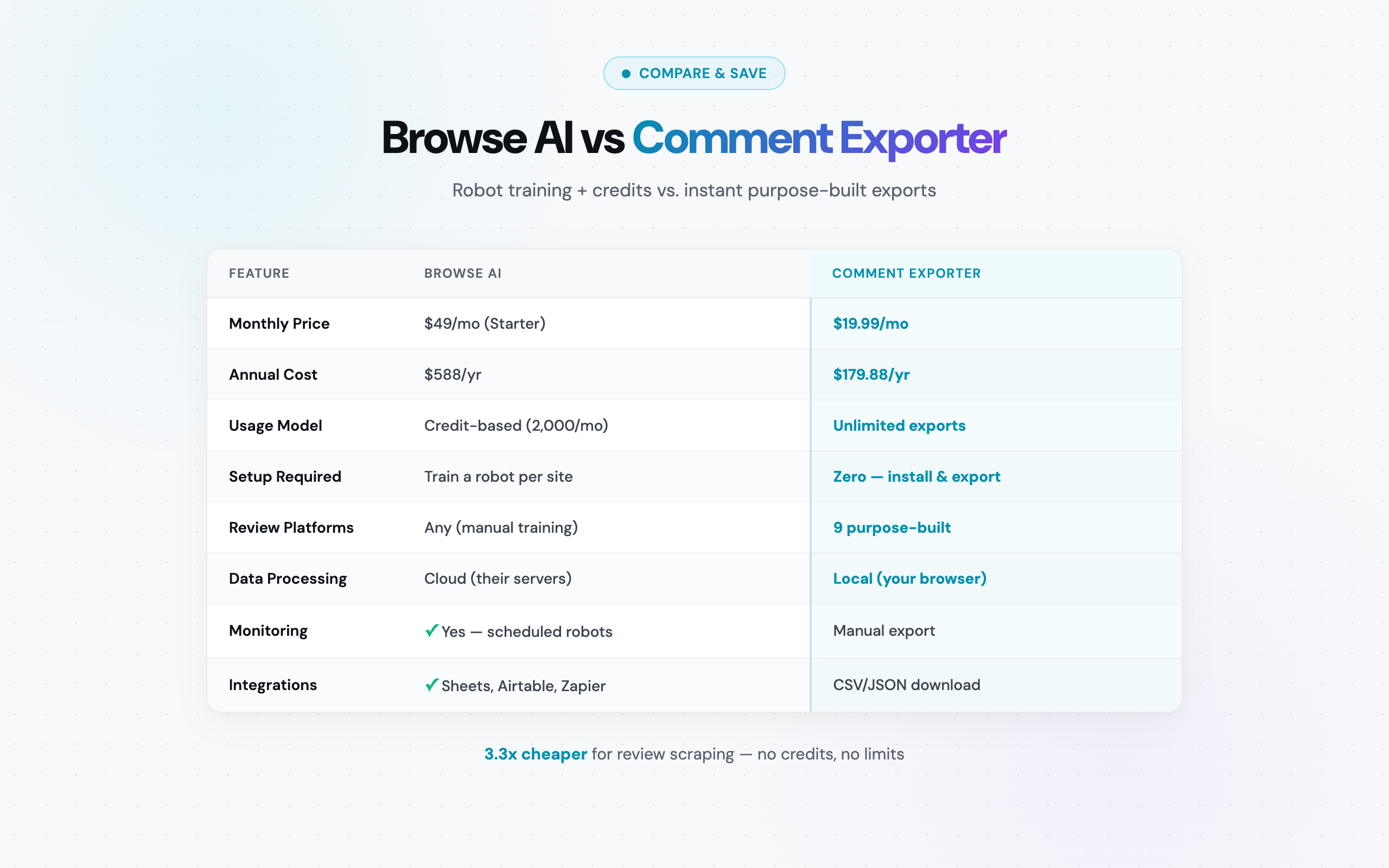
Browse AI vs Comment Exporter at a Glance
Before diving into the details, here is a high-level comparison of the two tools. Browse AI is a general-purpose web scraping platform; Comment Exporter is a specialist tool for review and comment extraction. These are fundamentally different product categories, and the right choice depends entirely on what you need to scrape.
| Feature | Comment Exporter | Browse AI |
|---|---|---|
| Product type | Chrome extension | Cloud-based web scraping platform |
| Focus | Reviews and comments (specialist) | Any website (generalist) |
| Setup required | Zero -- install and click | Train a robot per website |
| Pricing model | Credits (250/mo at $49) | Credit-based ($49-$249+/mo) |
| Free tier | Reddit (free to start, no card) | 5 robots, 50 credits/month |
| Supported platforms | 30 customer sources | Any website (via trained robots) |
| Export formats | CSV, JSON | CSV, Google Sheets, Airtable, Zapier |
| Data processing | Local (in-browser, private) | Cloud-based (Browse AI servers) |
| Monitoring / scheduling | No | Yes (automated robot runs) |
| Chrome Web Store rating | 4.6/5 | N/A (web platform) |
The table tells the fundamental story: Browse AI is built to scrape anything with trained robots; Comment Exporter is built to scrape reviews and comments from specific platforms with zero configuration. The rest of this article unpacks when each approach makes more sense.
What Browse AI Does Well
Browse AI has earned its reputation as one of the most accessible no-code scraping platforms available. It deserves credit for several genuine strengths that make it a solid choice for certain use cases.
General-purpose scraping with trainable robots
Browse AI's core concept is straightforward: you visit a webpage, click on the data you want, and Browse AI creates a "robot" that can extract that data repeatedly. This point-and-click robot builder means you do not need to write code, understand CSS selectors, or learn XPath. For someone who needs to pull product listings from a niche e-commerce site, extract job postings from a company careers page, or gather real estate data from a property portal, this flexibility is genuinely valuable.
The robot approach means Browse AI can theoretically scrape any website. There is no predefined list of supported platforms -- if a website displays data in a structured way, you can train a robot to extract it. That kind of universality is something a specialist tool like Comment Exporter deliberately does not offer.
Monitoring and change detection
One of Browse AI's standout features is its monitoring capability. Once you have trained a robot, you can schedule it to run automatically -- daily, weekly, or at custom intervals. The platform then alerts you when data changes. This is excellent for tracking competitor pricing, monitoring stock availability, watching for new job postings, or detecting content changes on specific pages.
For businesses that need ongoing surveillance of web data rather than one-time extraction, this automated monitoring is a legitimate differentiator. Comment Exporter requires manual triggering for each export, making it unsuitable for hands-off monitoring workflows.
Integrations with business tools
Browse AI connects directly with Google Sheets, Airtable, and Zapier. These integrations mean extracted data can flow automatically into spreadsheets, databases, or multi-step automation workflows. For teams that have built their data pipelines around these tools, Browse AI slots in with minimal friction. API access on paid plans adds another layer of programmability for developers.
Cloud-based execution
Robots run on Browse AI's servers, not in your browser. This means scraping continues even when your computer is off, and you do not need to keep a browser tab open during extraction. For large-scale or scheduled scraping jobs, cloud execution is a practical advantage.
Where Browse AI Falls Short for Review Scraping
Browse AI's generalist design becomes a liability when you need to do one specific thing well: extract reviews and comments from established platforms. Here is where the friction appears.
Robot training for every platform
Want to scrape Amazon reviews? Train a robot. YouTube comments? Train another robot. Each platform requires its own trained robot, and each robot needs to be configured correctly to capture the right data fields. You need to click on the review text, the star rating, the reviewer name, the date -- each field individually.
This training process is not difficult, but it is unnecessary if you are working with well-known review platforms. Comment Exporter has pre-built parsers for each of its 11 supported platforms. Navigate to an Amazon product page, click the extension, and every relevant field -- star rating, review title, body text, date, verified purchase status, helpful vote count -- is captured automatically. No training, no configuration, no field selection.
The difference compounds when you work across multiple platforms. A researcher who needs data from Reddit, Amazon, and YouTube would need to train and maintain three separate robots on Browse AI. With Comment Exporter, it is the same one-click workflow on every platform.
Credit costs add up fast for review data
Browse AI's credit system is the most significant pain point for review scraping. Each page scraped by a robot costs credits. Review pages on platforms like Amazon often contain 10-20 reviews per page, and a product with 500 reviews means paginating through 25-50 pages. Each of those pages costs credits.
On the Starter plan ($49/month), you get 2,000 credits. That sounds like a lot until you start scraping review-heavy pages regularly. A single product with 500 reviews across 50 pagination pages could consume a meaningful portion of your monthly allotment, depending on how Browse AI counts the pages. And unlike Comment Exporter, where you pay the same price whether you export 50 reviews or 5,000, Browse AI's costs scale linearly with your data volume.
No specialized review parsers
Browse AI does not have purpose-built parsers for review platforms. Its robots extract data based on the visual structure of a page, which means they can miss platform-specific metadata that a specialist tool captures automatically. Consider what a purpose-built Amazon review parser extracts versus what a general robot might capture:
- Star rating -- embedded in Amazon's HTML in a non-obvious way; general scrapers sometimes miss it or capture it as text like "5.0 out of 5 stars" instead of a clean numeric value
- Verified purchase badge -- a small label that a trained robot might not be configured to detect
- Helpful vote count -- dynamic content that requires specific parsing
- Review date normalization -- Amazon displays dates differently by region; a purpose-built parser handles all 20+ country domains
Similarly, on Reddit, Browse AI's robots have no concept of comment nesting, flair tags, or vote score structure. On Steam, they will not automatically capture playtime hours or recommendation status. These are not edge cases -- they are the core metadata that makes review and comment data useful for analysis.
Dynamic content challenges
Review platforms like Amazon and YouTube load comments dynamically through JavaScript. While Browse AI handles many JavaScript-rendered pages, it can struggle with infinite scroll patterns, lazy-loaded content, and dynamically injected review sections. Comment Exporter, running directly in your browser, interacts with these platforms exactly as a user would -- scrolling, loading, and capturing content as the page renders it in real time.
How Comment Exporter Simplifies Review Extraction
Comment Exporter takes a fundamentally different approach to the same problem. Instead of building a universal scraping platform that can attempt any website, it focuses exclusively on doing one category of scraping exceptionally well: extracting reviews and comments from platforms where people share opinions.
Step 1: Install the Chrome extension
Visit the Chrome Web Store, install Comment Exporter, and you are ready to go. No account creation required for Reddit scraping. The entire setup takes under 30 seconds.
Step 2: Navigate to any supported page
Go to a Reddit thread, a YouTube video, an Amazon product page, a Steam game page, an Etsy listing, a Quora question, a Hacker News discussion, a Product Hunt launch, a Facebook post, a Google Maps listing, or a Shopify page. Comment Exporter automatically detects the platform and activates the correct parser.
Step 3: Preview, filter, and export
Click the extension icon. Comment Exporter shows you a preview of the data it will extract, letting you verify the content before committing to an export. Apply filters if needed, then export to CSV or JSON with a single click. The data is processed entirely within your browser -- nothing leaves your machine.
That is the entire workflow. No robot training, no field configuration, no credit calculations. The simplicity is the point.
As one user put it: "Compared to other tools, the price is incredibly low for the quality it delivers. I can now export reviews from Amazon in seconds." -- Mitran Marian
The output quality matters just as much as the workflow. Another user noted: "The files it spits out are perfectly formatted, no messy cleanup needed." -- Alfon Labadan. When you are feeding review data into analysis pipelines or research databases, clean output eliminates an entire step from your workflow.
Feature-by-Feature Comparison
The overview table at the top of this article covers the basics. This detailed comparison digs into the specific capabilities that matter for review and comment scraping workflows.
| Capability | Comment Exporter | Browse AI |
|---|---|---|
| Reddit comments | Full thread with nesting, flair, votes (FREE) | Requires trained robot; no nesting support |
| YouTube comments | Comments, likes, replies, channel names | Requires trained robot; dynamic loading issues |
| Amazon reviews | Star rating, title, body, date, verified badge, 20+ domains | Requires trained robot; per-page credit cost |
| Steam reviews | Review text, playtime, recommendation, helpful votes | Requires trained robot; may miss game-specific metadata |
| Etsy reviews | Star rating, buyer details, purchase item | Requires trained robot |
| Hacker News | Comments, points, reply depth, timestamps | Requires trained robot |
| Product Hunt | Comments, upvotes, maker responses | Requires trained robot |
| Quora | Answers, upvotes, author credentials | Requires trained robot; heavy JavaScript |
| Non-standard websites | Not supported (supported sources only) | Yes -- train a robot for any site |
| Pagination handling | Automatic (built into each parser) | Configurable per robot (additional credits per page) |
| Comment nesting / threads | Preserved with depth indicators | Flat extraction (no thread structure) |
| Preview before export | Yes | Yes (after robot runs) |
| Filtering | Yes (pre-export filtering) | Post-extraction filtering |
| Data privacy | Local processing (browser only) | Cloud processing (Browse AI servers) |
| API access | No | Yes (paid plans) |
| Scheduling / automation | No | Yes (schedule robots to run automatically) |
| Change detection | No | Yes (alerts when data changes) |
| Users | 16,000+ | Not publicly disclosed |
The pattern is clear: Browse AI requires training and credits for every platform, while Comment Exporter provides instant, pre-configured extraction. Browse AI wins on automation, monitoring, and universal website coverage. Comment Exporter wins on simplicity, cost, and extraction accuracy for review-specific data.
For more comparisons across the scraping tool landscape, see our best comment exporters roundup, our ParseHub alternative comparison, and our Outscraper alternative guide.
Pricing Breakdown
Pricing is where the general-purpose vs. specialist distinction has the most tangible impact. Browse AI's credit system is designed for broad web scraping where usage varies widely. Comment Exporter's flat rate is designed for the predictable, high-volume nature of review and comment extraction.
Browse AI pricing (as of March 2026):
- Free: 5 robots, 50 credits/month
- Starter ($49/mo): 25 robots, 2,000 credits/month
- Professional ($99/mo): 100 robots, 5,000 credits/month
- Team ($249/mo): Unlimited robots, 15,000 credits/month
Comment Exporter pricing:
- Free: Reddit comment export to start -- no card required
- Pro ($9.99/mo): No cap on Reddit scrapes in the Chrome extension
- Starter ($49/mo): 250 credits a month across 30 sources, CSV and JSON
- Yearly ($33.25/mo, billed annually at $399/year): Same features, 32% savings
Annual cost comparison:
- Browse AI Starter: $49/mo x 12 = $588/year
- Comment Exporter yearly: $33.25/mo x 12 = $399/year
- Difference: Browse AI costs more than Comment Exporter annually
That $588/year comes with a 2,000 credit monthly cap. Comment Exporter's $399/year Starter plan includes 250 credits a month. If you exceed Browse AI's Starter credits, you need the Professional plan at $99/month ($1,188/year), which costs more for review scraping.
Even Browse AI's free plan (50 credits/month) is severely limited for review scraping. Fifty credits might cover reviews from a single product page. Comment Exporter's free plan lets you start exporting Reddit comments with no card, and Pro ($9.99/mo) has no cap on Reddit scrapes in the Chrome extension.
The Credit Problem: Why Per-Page Pricing Hurts Review Scrapers
Credit-based pricing makes sense for general-purpose scraping where usage is sporadic and varied. You scrape a few pages here, a few pages there, and credits provide flexible, usage-proportional billing. But review and comment scraping has a specific characteristic that makes credit pricing punitive: high row counts per session.
Reviews and comments are inherently voluminous. A single Amazon product can have thousands of reviews spread across hundreds of pages. A popular Reddit thread can contain 2,000+ comments. When each page costs credits, these routine extractions become expensive fast.
Scenario: Scraping 500 Amazon reviews for competitive analysis
You are an e-commerce manager analyzing competitor products on Amazon. You want reviews from 5 competing products, averaging 100 reviews each (500 reviews total). Amazon displays roughly 10 reviews per page, so that is approximately 50 pages to scrape.
- Browse AI Starter ($49/mo, 2,000 credits): Those 50 pages consume credits. Depending on how Browse AI counts pagination, you have used a quarter of your monthly credits on a single analysis. You still need credits for next week's analysis, and the week after that
- Browse AI Free (50 credits/mo): You run out of credits within the first product. The free tier is essentially non-functional for review scraping at any meaningful scale
- Comment Exporter ($49/mo): All 500 reviews exported with no impact on your remaining capacity. Tomorrow you can export 500 more, or 5,000 more. The cost does not change
Scenario: Academic research across multiple platforms
A researcher studying consumer sentiment needs data from Reddit (free on Comment Exporter), Amazon product reviews, and YouTube video comments. Monthly volume: approximately 3,000 comments and reviews across all platforms.
- Browse AI Professional ($99/mo): 5,000 credits should cover 3,000 rows with room to spare, but at $99/month. If the research project runs for 6 months, that is $594
- Comment Exporter yearly ($33.25/mo): $399 billed for the entire year. It costs less than six months of Browse AI Professional at $594
One researcher shared their experience: "I exported 2,000 Reddit comments and loaded them straight into my research pipeline." -- Pendo Kessam. On Comment Exporter, that export was free (Reddit tier). On Browse AI, 2,000 rows would consume a significant portion of any paid plan's monthly credits.
The math consistently favors flat-rate pricing for review scraping. Credits work well when you scrape 5-10 pages per month from varied sources. They work poorly when you regularly export hundreds or thousands of rows from review-dense platforms.
When Browse AI Is the Better Choice
Browse AI is a capable platform, and there are legitimate scenarios where it is the better tool -- even for users who also need review scraping. This section is not about fairness for its own sake; it is about helping you choose the right tool and avoid the frustration of using the wrong one.
- Monitoring competitor pages for changes: If you need to track when a competitor updates their pricing page, adds a new product, or changes their feature list, Browse AI's scheduled robots with change detection are built for exactly this. Comment Exporter has no monitoring capability -- it is a manual-trigger tool
- Price tracking across e-commerce sites: Monitoring product prices across multiple retailers is a classic Browse AI use case. Train a robot per retailer, schedule daily runs, and get alerts when prices change. This is outside Comment Exporter's scope entirely
- General data extraction from non-standard sites: Need to scrape a local government database, a university course catalog, a niche industry directory, or any website that is not one of Comment Exporter's 12 platforms? Browse AI's trainable robots are your best no-code option
- Automated, hands-off scraping: If your workflow requires data extraction to happen on a schedule without anyone clicking a button, Browse AI delivers. Robots can run hourly, daily, or weekly on Browse AI's servers. Comment Exporter requires a human to open a browser, navigate to a page, and click the extension
- Multi-tool automation via Zapier: If your data pipeline connects scraping to CRM updates, email alerts, Slack notifications, or other automated workflows, Browse AI's Zapier integration and API make it a component in a larger automation stack
- Enterprise-scale scraping needs: The Team plan with unlimited robots and 15,000 credits per month is designed for organizations with broad, diverse scraping needs across many websites. If review scraping is just one small part of your data extraction work, Browse AI's all-in-one approach may justify its higher cost
The bottom line: if you need a Swiss Army knife for web data, Browse AI is a strong contender. If you need a scalpel for reviews and comments, it is overkill.
When Comment Exporter Is the Better Choice
Comment Exporter is the right tool when your work revolves around what people say in reviews, comments, and discussions. Here are the specific use cases where it outperforms Browse AI.
- Review extraction for product research: E-commerce managers, product managers, and DTC brands analyzing competitor reviews on Amazon or Etsy. One-click extraction, pre-configured fields, no credit anxiety. See our guide on ecommerce review analysis for workflows
- Comment export for content research: YouTube comment scraping for video creators analyzing audience feedback, or Reddit thread exports for social listening. Comment Exporter captures the full thread structure including reply nesting and vote counts
- Academic and market research: Researchers who need large volumes of review data for sentiment analysis, NLP training, or consumer behavior studies. Local processing means no data privacy concerns -- relevant for IRB-compliant research. Flat-rate pricing keeps project budgets predictable
- Competitive intelligence: Analyzing what customers say about competitors across multiple review platforms. A single $49/month subscription covers Amazon, Steam, and more -- no per-platform robot training required. Learn more in our guide on competitor analysis using reviews
- Freelancers and small teams on budgets: When you need professional-quality review data but cannot justify $49-$99/month for a general scraping platform. Comment Exporter's yearly plan at $33.25/month delivers review exports at a fraction of Browse AI's cost
- Reddit-specific workflows: Community managers, social media analysts, and researchers tracking Reddit discussions. Comment Exporter's Reddit tier is completely free -- $0 vs. Browse AI's minimum $49/month for any meaningful scraping volume
- Privacy-sensitive work: All Comment Exporter processing happens locally in your browser. No data is sent to external servers. For organizations with strict data handling policies, this eliminates the compliance questions that come with cloud-based extraction
- People who want to scrape reviews without learning a new platform: Browse AI requires understanding robots, training workflows, credit management, and scheduling. Comment Exporter requires understanding one action: click the extension on a supported page. If you want to scrape reviews without coding or configuration, the difference in learning curve is significant
Frequently Asked Questions
Can Browse AI scrape Amazon reviews?
Yes, Browse AI can scrape Amazon reviews, but you need to train a robot first by clicking on the data fields you want to extract. Each page scraped costs credits, and you need to configure the robot to handle pagination across multiple review pages. Comment Exporter's Amazon review scraper extracts reviews with one click -- pre-configured fields including star rating, review title, body, date, and verified purchase status -- with no credit limits and support for 20+ Amazon country domains.
How much does Browse AI cost compared to Comment Exporter?
Browse AI uses credit-based pricing: the Free plan offers 50 credits/month, the Starter plan costs $49/month for 2,000 credits, the Professional plan is $99/month for 5,000 credits, and the Team plan is $249/month for 15,000 credits. Comment Exporter charges a flat $49/month, or $33.25/month on the yearly plan, for exports across 12 platforms. Reddit scraping is free. Browse AI Starter costs $588 a year compared with Comment Exporter's $399 annual plan.
Does Comment Exporter require robot training like Browse AI?
No. Comment Exporter uses purpose-built parsers for each of its 11 supported platforms (Reddit, YouTube, Amazon, Steam, Etsy, Quora, Hacker News, Product Hunt, Facebook, Google Maps, and Shopify). There is no robot to train, no fields to configure, and no point-and-click setup. You navigate to a supported page, click the extension, preview the data, and export. Browse AI requires you to train a separate robot for each website by clicking on the data elements you want to extract.
Bottom Line
Browse AI and Comment Exporter solve related but different problems. Browse AI is a general-purpose web scraping platform with genuine strengths in monitoring, automation, and universal website coverage. It is the right tool when you need trained robots that can extract data from any website on a schedule.
For the specific, high-volume task of extracting reviews and comments from established platforms such as Amazon, YouTube, Reddit, Steam, Etsy, Quora, Hacker News, Product Hunt, Facebook, Google Maps, and Shopify, Browse AI's robot-training approach and credit-based pricing create unnecessary friction and cost. You are training robots to do what a purpose-built parser already knows how to do, while paying more annually.
Comment Exporter does one category of scraping and does it without compromise: zero training, instant extraction, flat-rate pricing, local processing, and pre-configured metadata fields for every supported platform. For anyone whose work depends on review data and comment analysis, the specialist tool saves time, money, and frustration compared to bending a general-purpose platform to the task.
Install Comment Exporter from the Chrome Web Store -- Reddit is free, no account required. For more tool comparisons, read our ExportComments alternative and Thunderbit alternative guides, or browse all our guides and tutorials.
See also on Adlicio: how Adlicio compares with other scrapers.