Data Miner Alternative: Purpose-Built Review Exports vs General Scraping
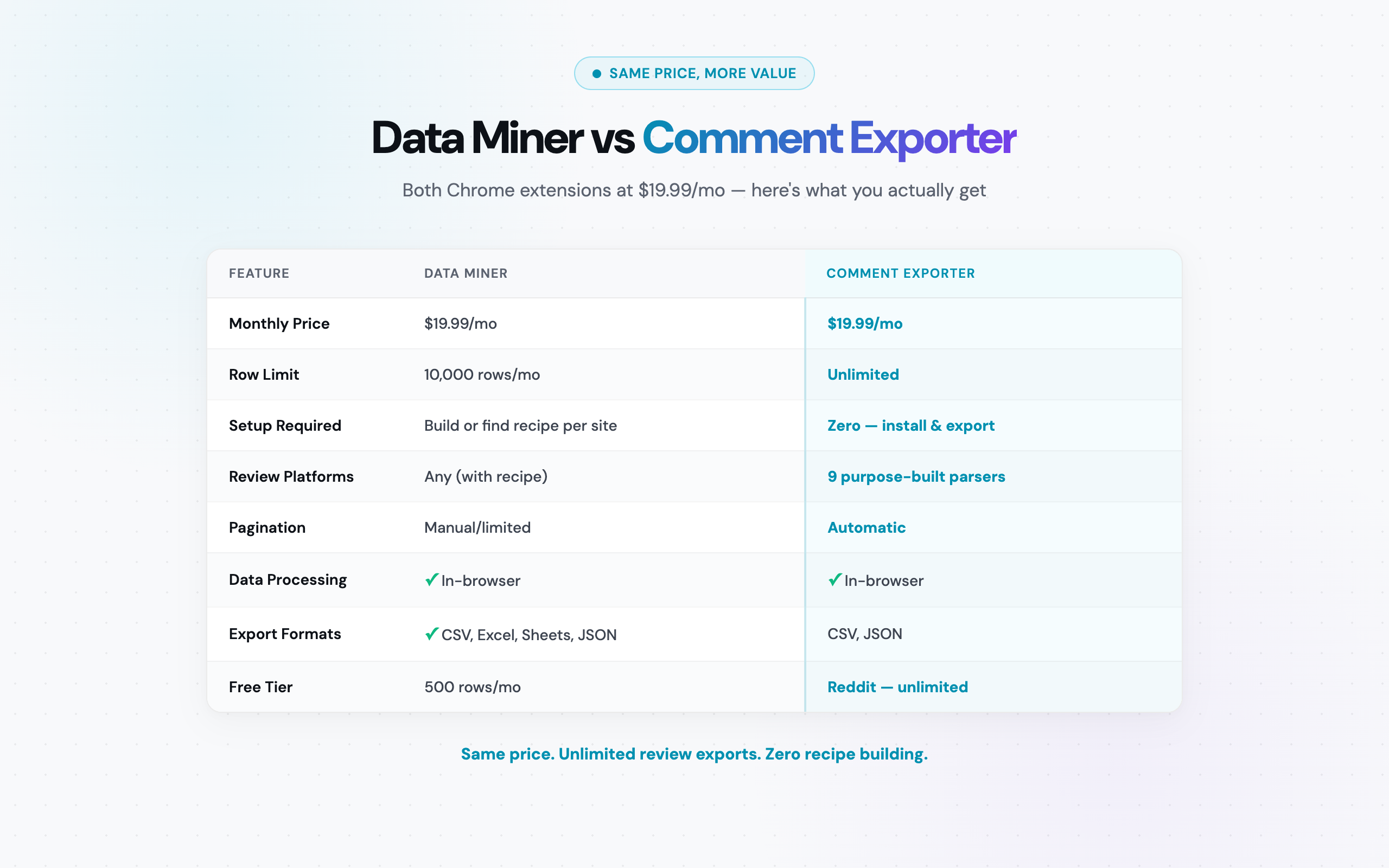
Data Miner vs Comment Exporter at a Glance
Before diving into the details, here is a side-by-side overview of how these two Chrome extensions compare for review and comment scraping workflows.
| Feature | Comment Exporter | Data Miner |
|---|---|---|
| Tool type | Purpose-built review/comment exporter | General-purpose web scraper |
| Platform | Chrome extension | Chrome extension |
| Scraping approach | Pre-built parsers per source | Recipes (templates) -- build or download |
| Supported platforms | 30 customer sources | Any website (with correct recipe) |
| Setup per export | One click | Find/build recipe, configure fields |
| Base paid plan | $49/mo (250 credits/month) | $19.99/mo (10,000 rows/month) |
| Row/export limits | 250 credits/month | Yes (all plans except Enterprise) |
| Free tier | Reddit (free to start, no card) | 500 rows/month |
| Export formats | CSV, JSON | CSV, Excel, Google Sheets, JSON |
| Data processing | Local (in-browser) | Local (in-browser) |
| Chrome Web Store rating | 4.6/5 (16,000+ users) | 4.4/5 |
The table tells the core story: different prices, same platform (Chrome), and fundamentally different approaches. One requires recipe building and enforces row limits. The other provides instant, one-click extraction from a focused set of platforms. The rest of this article unpacks when each approach makes sense.
What Data Miner Does Well
Data Miner has earned its reputation as one of the most popular Chrome extensions for web scraping. It has been around for years, has a large user base, and solves a genuinely hard problem: extracting structured data from unstructured web pages. Credit where it is due -- here is what Data Miner does well.
General-purpose scraping flexibility
Data Miner works on any website. Product catalogs, business directories, job boards, real estate listings, government databases, sports statistics pages -- if the data is visible on a web page, Data Miner can likely extract it. This universality is its greatest strength. You are not locked into a fixed set of supported sites.
The recipe ecosystem
Data Miner's recipe system is essentially a library of scraping templates. The community has built and shared thousands of recipes for popular websites, which means someone may have already created a recipe for the exact page type you need to scrape. When a recipe exists and works, the experience is smooth: apply the recipe, run the extraction, get your data.
The recipe builder itself uses a point-and-click interface for defining what to scrape. You click on a data element on the page, Data Miner identifies the CSS selector, and you build up your extraction template field by field. For people comfortable with web concepts, it is more accessible than writing code.
Chrome extension UX
Like Comment Exporter, Data Miner runs as a Chrome extension. This is a genuine advantage over server-side scraping tools: no proxy management, no IP rotation concerns, no authentication headaches. You are browsing the site normally through Google Chrome, and the extension extracts data from the pages you visit. Both tools share this architectural advantage.
Table and list extraction
Where Data Miner particularly shines is extracting data from HTML tables and structured lists. If a page displays data in a table format -- pricing comparisons, product specifications, directory listings -- Data Miner can often detect and extract that data with minimal configuration. This is a use case where general-purpose scraping genuinely outperforms specialized tools.
Multiple export destinations
Data Miner exports to CSV, Excel, Google Sheets, and JSON. The Google Sheets integration is particularly convenient for teams that want scraped data to land directly in a shared spreadsheet without a manual import step.
Where Data Miner Falls Short for Review Scraping
Data Miner's generalist approach creates specific friction points when the task is extracting reviews and comments. These are not design flaws -- they are natural consequences of building a tool that tries to work everywhere rather than working perfectly on specific platforms.
The recipe building problem
Every website you want to scrape with Data Miner requires a recipe. For common sites, you might find a community recipe that works. But review pages are notoriously inconsistent in their HTML structure. Amazon changes its review page layout frequently. YouTube loads comments asynchronously after the initial page load.
The result: community recipes for review pages break regularly. When they break, you either wait for someone to update the recipe, or you build your own from scratch. Building a recipe from scratch for a complex review page can take 30-60 minutes -- and it may break again the next time the site updates its layout.
Compare this to a purpose-built tool like Comment Exporter, where the developers maintain dedicated parsers for each supported platform. When Amazon changes its review page structure, the Comment Exporter team updates the parser. You never see the breakage because the fix ships before most users notice the problem.
Row limits constrain review volume
Data Miner enforces row limits on every plan except Enterprise:
- Free: 500 rows/month
- Starter ($19.99/mo): 10,000 rows/month
- Professional ($39.99/mo): 50,000 rows/month
- Enterprise ($99.99/mo): Unlimited rows
For casual scraping of tables and directories, 10,000 rows per month is generous. For review scraping, it can disappear fast. A single Amazon product with 2,000 reviews consumes 20% of your monthly Starter allotment. A researcher scraping reviews across 10 competing products in a category could burn through 10,000 rows in a single research session.
Comment Exporter's paid plans run on monthly credits instead: Starter is $49/mo for 250 credits a month.
Pagination and dynamic content issues
Review pages are almost universally paginated or dynamically loaded. Amazon shows 10 reviews per page. YouTube loads comments in batches as you scroll. Data Miner can handle pagination with recipe configuration, but it adds complexity and each page of reviews still counts against your row limit.
More critically, JavaScript-heavy pages often defeat recipe-based extraction entirely. If reviews load via AJAX calls after the initial page render, a recipe targeting the initial HTML structure will return empty results. This is a common frustration for Data Miner users attempting to scrape modern review platforms.
No review-specific parsing
Data Miner extracts raw data based on CSS selectors. It has no concept of what a "star rating" is, what "verified purchase" means, or how to interpret a nested comment thread. Every field must be explicitly defined in the recipe.
This means you miss metadata that a review-specific tool captures automatically. Amazon's verified purchase badges, Steam's playtime hours, Reddit's flair tags and vote counts -- these are all platform-specific data points that require custom recipe configuration for each site. A tool built specifically for review extraction captures these fields by default because it knows what they are and where to find them.
How Comment Exporter Handles Review Extraction
Comment Exporter takes the opposite approach to Data Miner. Instead of trying to scrape any website with configurable templates, it focuses exclusively on reviews and comments from 12 platforms and builds a dedicated parser for each one.
The 11 supported platforms:
- Reddit -- comments, replies, vote counts, flair, timestamps (free tier)
- YouTube -- comments, likes, reply threads, channel names
- Amazon -- reviews, star ratings, review titles, verified purchase status, helpful votes (20+ Amazon domains)
- Steam -- reviews, playtime, recommendation status, helpful votes
- Hacker News -- comments, points, reply depth, timestamps
- Product Hunt -- comments, upvotes, maker responses
- Etsy -- reviews, star ratings, buyer details, purchased items
- Quora -- answers, upvotes, author credentials
- Facebook -- post comments and replies
- Google Maps -- business reviews and ratings
- Shopify -- product reviews and customer feedback
How the workflow actually works
Step one: install the extension from the Chrome Web Store. No account creation required for Reddit scraping. Setup takes under 30 seconds.
Step two: navigate to any supported page. Go to a Reddit thread, a YouTube video, an Amazon product page, or any other supported platform. Comment Exporter automatically detects the platform and activates the correct parser.
Step three: click the extension icon, preview the data, and export to CSV or JSON. That is the entire workflow. No recipe selection, no field configuration, no CSS selectors, no row limit calculations.
As one user put it: "Compared to other tools, the price is incredibly low for the quality it delivers. I can now export reviews from Amazon in seconds." -- Mitran Marian
The output quality is equally important. Another user noted: "The files it spits out are perfectly formatted, no messy cleanup needed." -- Alfon Labadan. When you are feeding review data into analysis pipelines, sentiment analysis tools, or research databases, clean output eliminates an entire data-wrangling step from your workflow.
Key technical advantages
- In-browser processing: All data extraction happens locally in your browser. Nothing is sent to external servers. This matters for researchers working under IRB protocols, competitive intelligence teams handling proprietary research, and anyone who values data privacy
- Platform-specific metadata: Each parser captures fields unique to its platform. Reddit flair tags, Steam playtime hours, Amazon verified purchase badges -- these are captured automatically because the parser knows what they are
- Handles dynamic content: Comment Exporter's parsers are built to handle each platform's specific rendering method, including AJAX-loaded comments, infinite scroll, and paginated reviews
- 20+ Amazon domains: Not just amazon.com -- the Amazon parser works across more than 20 international Amazon domains
For a deeper look at scraping reviews without technical setup, see our guide on how to scrape reviews without coding.
Feature-by-Feature Comparison
The overview table at the top covers the basics. This detailed comparison digs into specific capabilities that matter when choosing between these two tools for review and comment work.
| Capability | Comment Exporter | Data Miner |
|---|---|---|
| Amazon review extraction | One click, all fields pre-configured | Requires recipe, pagination manual |
| YouTube comment extraction | One click, handles async loading | Difficult (JS-heavy, dynamic loading) |
| Reddit comment threads | Free, full tree with metadata | Requires recipe, nesting often lost |
| Star rating extraction | Automatic (platform-aware) | Must map CSS selector per site |
| Verified purchase badges | Captured automatically | Must configure in recipe |
| Comment nesting/threads | Preserved with depth indicators | Flat extraction (nesting lost) |
| Pagination handling | Automatic per platform | Manual recipe configuration |
| Recipe/template required | No | Yes (build or download) |
| Row limits | None | 500 - 50,000/mo (plan-dependent) |
| General web scraping | No (supported sources only) | Yes (any website) |
| Table extraction | No | Yes (strong) |
| Directory scraping | No | Yes |
| Community templates | N/A (pre-built parsers) | Yes (recipe library) |
| Data privacy | Local processing only | Local processing |
| Google Sheets export | No (CSV/JSON) | Yes (direct integration) |
The pattern is clear: Data Miner wins on breadth (any website, tables, directories, multiple export destinations). Comment Exporter wins on depth for review scraping (pre-built parsers, no configuration, platform-specific metadata). For a broader comparison across all tools in this space, see our best comment exporters roundup.
Pricing Comparison
This is where the Data Miner vs Comment Exporter comparison gets particularly interesting: Data Miner starts at $19.99/month, while Comment Exporter Starter costs $49/month. Different prices, different value propositions.
Data Miner pricing (as of March 2026):
- Free: 500 rows/month
- Starter ($19.99/mo): 10,000 rows/month
- Professional ($39.99/mo): 50,000 rows/month
- Enterprise ($99.99/mo): Unlimited rows
Comment Exporter pricing:
- Free: Reddit comment export to start -- no card required
- Pro ($9.99/mo or $79.99/yr): No cap on Reddit scrapes in the Chrome extension
- Starter ($49/mo or $399/yr): 250 credits a month across 30 sources, CSV and JSON
The row limit math for review scraping
Let us run the numbers on Data Miner's Starter plan (10,000 rows/month at $19.99/mo) versus Comment Exporter ($49/mo, 250 credits a month).
A typical Amazon product in a competitive category has 500-2,000 reviews. A popular Reddit thread often contains 500-1,000+ comments. A YouTube video with decent engagement can generate 1,000-5,000 comments.
Scenario 1: Product researcher scraping Amazon reviews
You are analyzing 5 competing products in a category, each with an average of 1,500 reviews. Total: 7,500 rows.
- Comment Exporter: $49/mo. All 7,500 reviews exported across 5 products, drawing on the plan's 250 monthly credits
- Data Miner Starter ($19.99/mo): 7,500 of 10,000 rows consumed. Only 2,500 rows left for the entire month. Add a sixth product and you might hit the cap
Scenario 2: Multi-platform competitive intelligence
You are tracking a competitor across Amazon reviews (2,000), YouTube comments (1,000), and Reddit discussions (2,000). Total: 5,000 rows per month.
- Comment Exporter: $49/mo. All platforms covered under one plan with 250 credits a month
- Data Miner Starter ($19.99/mo): 5,000 of 10,000 rows. Workable this month, but if volume increases you will need the Professional plan at $39.99/mo
Scenario 3: High-volume research project
An academic researcher needs to scrape 15,000 reviews across multiple products and platforms for a sentiment analysis study.
- Comment Exporter: $49/mo, or $399 for the year, for 250 credits a month. Growth ($99/mo, 600 credits a month) covers bigger projects
- Data Miner Starter ($19.99/mo): 10,000 row cap exceeded. Must upgrade to Professional ($39.99/mo), which raises the monthly cost but still enforces a row cap
Annual cost comparison for moderate-to-heavy review scraping (8,000-15,000 rows/mo):
- Comment Exporter yearly: $399/year
- Data Miner Professional yearly: $479.88/year ($39.99/mo x 12)
- Data Miner Enterprise yearly: $1,199.88/year ($99.99/mo x 12)
Comment Exporter at $399/year costs less than Data Miner Professional at $479.88/year for review scraping work. One researcher summed up the value: "I exported 2,000 Reddit comments and loaded them straight into my research pipeline." -- Pendo Kessam. On Comment Exporter, that Reddit export was free.
The Recipe Problem: Building vs Purpose-Built
This is the fundamental architectural difference between Data Miner and Comment Exporter, and it has practical consequences that go beyond the initial setup time.
The time cost of recipe building
Building a Data Miner recipe from scratch for a review page involves several steps: identifying the container element for each review, mapping individual fields (reviewer name, date, rating, body text, helpful votes) to CSS selectors, configuring pagination rules, and testing the recipe across multiple pages to ensure consistency.
For a simple HTML table, this takes 5-10 minutes. For a complex review page with dynamic loading, nested elements, and conditional fields (like Amazon's verified purchase badge that only appears on some reviews), recipe building can take 30-60 minutes. And you need a separate recipe for each website.
If you scrape reviews from 4 platforms -- Amazon, YouTube, Reddit, and Steam -- that is potentially 4 recipes to build and maintain. Each time a platform updates its page structure, the recipe breaks and needs updating.
The maintenance burden
Recipe maintenance is the hidden cost of general-purpose scraping. Websites change their HTML structure regularly -- sometimes dramatically during redesigns, sometimes subtly when a single class name changes. Each change can break a recipe.
With Data Miner's community recipe library, you are dependent on other users noticing the breakage and publishing an updated recipe. With custom recipes you built yourself, the maintenance falls on you. Either way, you spend time debugging extraction failures instead of analyzing data.
Comment Exporter sidesteps this entirely. The development team maintains 30+ source-specific parsers. When Amazon updates its review page layout, the parser is updated and pushed to users through the Chrome extension update mechanism. Users do not see breakage because the fix is deployed before most people encounter the problem.
Accuracy differences
A recipe that targets CSS selectors will extract whatever text those selectors point to. It has no understanding of what the data means. If Amazon wraps a star rating in a new HTML element, the recipe returns empty or incorrect data. If Reddit changes how it nests comment replies, the recipe extracts a flat list instead of a threaded conversation.
A purpose-built parser understands the data semantics. It knows that a star rating is a number between 1 and 5, that a verified purchase badge is a boolean indicator, that comment replies have a parent-child relationship. This semantic understanding produces cleaner, more reliable output -- especially for downstream analysis where data quality directly affects results.
For more context on how purpose-built tools compare to general scrapers, see our comparisons with ParseHub and PhantomBuster, which face similar recipe/template challenges.
When Data Miner Is the Better Choice
Data Miner is a genuinely useful tool -- just not for dedicated review scraping. Here are the scenarios where it clearly outperforms Comment Exporter:
- Scraping HTML tables: If a page displays data in a table format -- product comparison charts, pricing tables, specification lists, sports statistics -- Data Miner excels. Its table detection is fast and accurate. Comment Exporter does not handle tables
- Directory and listing extraction: Business directories, job boards, real estate listings, event calendars. Any structured listing on the web is within Data Miner's reach. These are entirely outside Comment Exporter's scope
- Product catalog scraping: E-commerce sites with product names, prices, SKUs, and specifications in list format. Data Miner handles these efficiently with recipes
- Non-standard websites: Government portals, academic databases, internal tools, niche industry sites -- if the data is on a website that Comment Exporter does not support, Data Miner is your option. Comment Exporter only works on its 11 specific platforms
- Google Sheets integration: If your workflow requires scraped data to land directly in a Google Sheet without any intermediate export step, Data Miner's native integration saves time. Comment Exporter exports to CSV and JSON, which can be imported into Google Sheets but requires a manual step
- Low-volume, varied scraping: If you scrape small amounts of data from many different websites each month -- 50 rows here, 100 rows there -- Data Miner's 500-row free tier or 10,000-row Starter plan gives you flexibility across unlimited sites
The core principle: Data Miner is built for breadth. If your scraping needs span many different types of websites and page structures, its general-purpose approach and recipe ecosystem deliver genuine value.
When Comment Exporter Is the Better Choice
If your work matches any of these patterns, Comment Exporter will save you time, money, or both:
- Regular review and comment exports: Any recurring need -- weekly Amazon review monitoring, ongoing Reddit thread tracking -- where a fixed monthly price eliminates the "am I over my row limit?" question
- Multi-platform review research: Projects spanning Reddit + Amazon + YouTube + Steam. One tool, one subscription, no recipe building for each platform
- Sentiment analysis and NLP projects: If you are feeding review data into analysis tools, the clean structured output from purpose-built parsers saves significant data cleaning time. Every field is correctly typed and consistently formatted
- Competitive intelligence on products: Monitoring what customers say about your product and competitors' products across review platforms. Starter's 250 monthly credits cover 30 sources, and Growth ($99/mo, 600 credits) is there when coverage grows
- Predictable budgets: Teams and freelancers who need to know exact costs upfront. $49/mo or $399/yr for 250 credits a month -- no variable row-based charges
- Privacy-sensitive research: Academic researchers under IRB review, competitive intelligence analysts handling proprietary research. Comment Exporter processes everything locally in your browser -- no data touches external servers
- High-volume review exports: If you routinely pull 1,000+ reviews per session, Data Miner's row limits become a constraint. Comment Exporter's paid plans use monthly credits (250 on Starter, 600 on Growth)
- Reddit-specific workflows: Comment Exporter's free plan gets you started, and Pro has no cap on Reddit scrapes in the Chrome extension. For Reddit-only use cases, the cost comparison is $9.99/mo vs $19.99/mo (Data Miner Starter) for equivalent functionality
You can also read how Comment Exporter compares to other alternatives: ExportComments, Thunderbit, Browse AI, and Instant Data Scraper.
Frequently Asked Questions
Can Data Miner scrape Amazon reviews effectively?
Data Miner can scrape Amazon reviews if you find or build the right recipe, but it struggles with paginated reviews, dynamic content loading, and JavaScript-heavy pages. You also face row limits on all plans except Enterprise ($99.99/month). Comment Exporter's Amazon parser extracts star ratings, review titles, body text, dates, verified purchase status, and helpful votes with one click -- no recipe building -- and works across 20+ Amazon domains.
How does Data Miner pricing compare to Comment Exporter?
Data Miner's Starter plan costs $19.99/month and gives you 10,000 rows/month with general-purpose scraping that requires recipe building for each site. Comment Exporter's $49/month Starter plan gives you 250 credits a month across 30 customer sources with pre-built parsers. Reddit scraping is free to start on Comment Exporter, no card required. For heavy review scraping (15,000+ rows/mo), Data Miner requires upgrading to Professional ($39.99/mo) or Enterprise ($99.99/mo), while Comment Exporter Starter gives 250 credits a month at $49/mo.
Is Comment Exporter better than Data Miner for review scraping?
For the specific task of scraping reviews and comments, yes. Comment Exporter has dedicated parsers for 12 platforms (including Reddit, YouTube, Amazon, Steam, Hacker News, Product Hunt, Etsy, Quora, Facebook, Google Maps, and Shopify) that capture platform-specific metadata automatically. Data Miner requires finding or building a recipe for each site, struggles with pagination on review pages, and enforces row limits. However, Data Miner is the better choice if you need to scrape general web data like tables, directories, or product catalogs from arbitrary websites that Comment Exporter does not support.
Bottom Line
Data Miner and Comment Exporter are both solid Chrome extensions with different pricing and limits. The question is not which tool is "better" in the abstract -- it is which tool is better for your specific workflow.
If you scrape data from a wide variety of websites -- tables, directories, catalogs, listings -- Data Miner's recipe-based approach and broad compatibility make it worth the price. The community recipe library means someone has probably already solved your specific scraping problem, and the point-and-click recipe builder handles the rest.
If your work centers on reviews and comments -- what customers say about products on Amazon, what users discuss on Reddit, what viewers comment on YouTube -- Data Miner is the wrong category of tool. Comment Exporter provides pre-configured, one-click extraction across 30 customer sources without recipe overhead.
Different prices. Different tools. Different value. Choose the one that matches your actual work.
Install Comment Exporter from the Chrome Web Store -- Reddit is free, no account required.
See also on Adlicio: how Adlicio compares with other scrapers.