Web Scraper Alternative: Instant Review Exports Without Sitemap Building
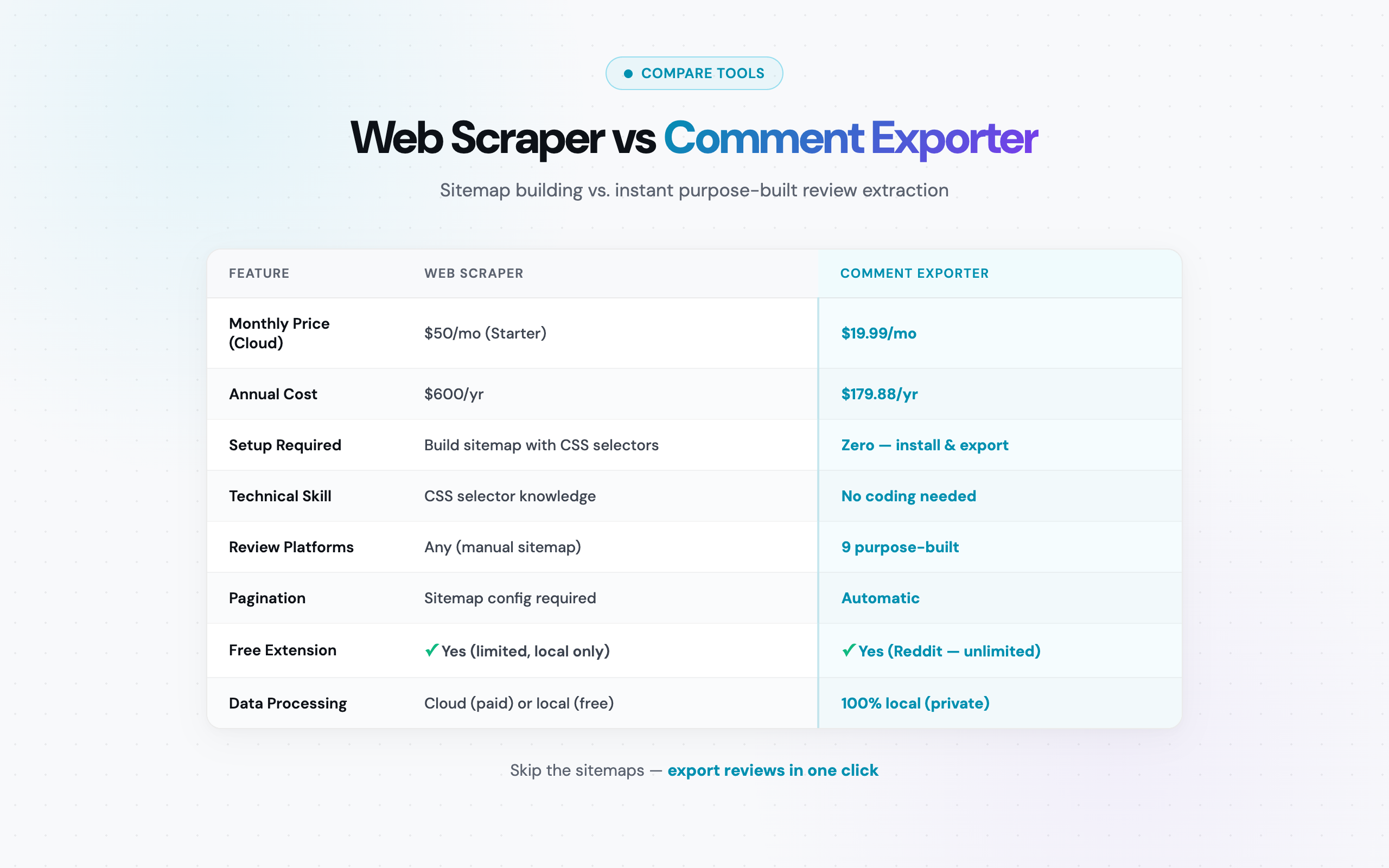
Web Scraper vs Comment Exporter at a Glance
Before diving into details, here is the high-level comparison. These two tools solve fundamentally different problems, even though they both live in the "data extraction" space.
| Criteria | Web Scraper (webscraper.io) | Comment Exporter |
|---|---|---|
| Tool type | General-purpose sitemap-based scraper | Purpose-built review/comment exporter |
| Technical knowledge | CSS selectors, sitemap building | None required |
| Free tier | Chrome extension (local, sitemap required) | Reddit exports (instant, no card) |
| Paid pricing | Cloud: $50-$200+/month | $49/month or $399/year |
| Pricing model | Page-based limits | Monthly credits (250 on Starter) |
| Setup time per site | 15-60 minutes (sitemap building) | 0 minutes (one click) |
| Best for | Custom data from any website | Reviews and comments from 12 platforms |
The distinction is clear: Web Scraper is a Swiss army knife that works on any website but requires assembly. Comment Exporter is a precision tool for one specific job -- extracting reviews and comments -- and it works instantly out of the box.
What Web Scraper Does Well
Web Scraper has earned its popularity for good reasons. It is one of the most established scraping tools in the Chrome extension ecosystem, and its approach -- while technical -- offers genuine flexibility that general users appreciate once they learn the system.
Visual sitemap builder
Web Scraper's core innovation is the sitemap concept. Instead of writing code, you build a visual tree structure that tells the scraper how to navigate and extract data from a website. Each node in the tree represents a selector -- a CSS rule that identifies specific elements on the page. You click on elements in the browser, and Web Scraper generates the selector for you. This is more accessible than writing raw code, though it still requires understanding of how web pages are structured.
Free Chrome extension
The Chrome Web Store version of Web Scraper is genuinely free. You can build sitemaps and run scrapes locally in your browser without paying anything. For users who have the technical skills and do not need cloud-scale scraping, this is a legitimate zero-cost option. The extension integrates directly into Chrome DevTools, which makes it feel native to web developers who already live in the browser inspector.
Flexible data extraction
Because Web Scraper uses CSS selectors, it can theoretically extract any visible element from any website. Product catalogs, job listings, directory pages, e-commerce data, real estate listings -- if the data is in the HTML, Web Scraper can grab it. This breadth is its primary advantage over specialized tools. Community-shared sitemaps also help new users get started on popular sites without building selectors from scratch.
Cloud scraping service
For users who need to scrape at scale, Web Scraper offers a cloud service that runs your sitemaps on their servers. This means you do not need to keep your browser open during long scrapes. The cloud version also handles IP rotation and can scrape more pages than is practical in a local browser session. Export options include CSV and XLSX files, which open directly in Microsoft Excel.
Pagination handling
With proper sitemap configuration, Web Scraper can follow pagination links across multi-page results. You define a "Link" selector for the "next page" button, and the scraper follows it automatically. This is essential for sites that split content across dozens or hundreds of pages -- product listings on e-commerce sites, for example.
Where Web Scraper Struggles with Review Extraction
Web Scraper's flexibility is also its weakness when applied to the specific task of extracting reviews and comments. The tool's generalist architecture creates friction at every step of the review export workflow.
Sitemap building complexity
Every new website requires a new sitemap. If you want to scrape Amazon reviews, you build a sitemap for Amazon's review page structure. YouTube comments? Another sitemap. Each one takes 15 to 60 minutes to build correctly, depending on the complexity of the page and your familiarity with CSS selectors.
For someone who just needs to export 200 Amazon reviews to analyze competitor sentiment, spending 30 minutes building a sitemap -- and then debugging it when it misses fields -- is a significant friction cost. As one Comment Exporter user described the difference: "Compared to other tools, the price is incredibly low for the quality it delivers. I can now export reviews from Amazon in seconds." -- Mitran Marian
CSS selector knowledge requirement
Web Scraper's point-and-click selector picker works for simple page structures. But review pages on major platforms are not simple. Amazon's review section uses dynamically generated class names. YouTube loads comments via JavaScript injection. In these cases, the point-and-click approach often selects the wrong elements, and users need to manually edit CSS selectors -- a skill that requires understanding of HTML document structure.
This is not a criticism of Web Scraper's design; it is an inherent limitation of the general-purpose approach. A tool that can scrape any website cannot also be a tool that requires zero knowledge of how websites work.
Dynamic content issues
Modern review platforms load content dynamically. Amazon reviews appear via AJAX calls. YouTube comments load on scroll. Reddit uses infinite scrolling with lazy-loaded comment trees. Web Scraper can handle some dynamic content, but configuring it correctly -- setting wait times, scroll actions, and AJAX load triggers in your sitemap -- adds another layer of complexity. Get it wrong, and you export an incomplete dataset without realizing it.
Page-based pricing on cloud plans
Web Scraper's cloud service charges by the page. The Starter plan gives you 5,000 pages per month for $50. But a single Amazon product with 500 reviews might span 50 pages of reviews (10 per page). If you are researching 20 products, that is 1,000 pages consumed -- 20% of your monthly allotment on a single research project. The page-based model works well for scraping product catalogs (one page per product) but poorly for review extraction (many pages per product).
How Comment Exporter Simplifies the Process
Comment Exporter -- originally called Reddit Comment Scraper -- was built from the ground up for one purpose: exporting comments and reviews from specific platforms. Instead of offering a general-purpose scraping framework, it ships with dedicated parsers for each supported platform. Each parser knows exactly which elements to extract and how the platform structures its data.
The 11 supported platforms:
- Reddit -- comments, replies, vote counts, flair, timestamps (free tier)
- YouTube -- comments, likes, reply threads, channel names
- Amazon -- reviews, star ratings, review titles, verified purchase status, helpful votes
- Steam -- reviews, playtime, recommendation status, helpful votes
- Hacker News -- comments, points, reply depth, timestamps
- Product Hunt -- comments, upvotes, maker responses
- Etsy -- reviews, star ratings, buyer details, purchase items
- Quora -- answers, upvotes, author credentials
- Facebook -- post comments and replies
- Google Maps -- business reviews and ratings
- Shopify -- product reviews and customer feedback
How it works:
Navigate to a supported page. Click the Comment Exporter extension icon. The extension detects which platform you are on, activates the correct parser, extracts all comments or reviews with full metadata, and presents you with a CSV or JSON download. No sitemaps. No CSS selectors. No configuration dialogs. The entire process takes under 10 seconds for most pages.
For a deeper look at how Comment Exporter handles specific platforms, see the dedicated guides for Amazon review scraping and YouTube comment scraping.
Key advantages for review extraction:
- One-click operation: No setup, no configuration, no learning curve. Navigate to the page, click, export
- Platform-specific metadata: Each parser captures fields that a generic scraper would miss -- Reddit flair tags, Steam playtime hours, Amazon verified purchase badges
- Local processing: All data extraction happens in your browser. Nothing is sent to external servers -- relevant for researchers working with sensitive data or under IRB protocols
- Predictable costs: Flat monthly or yearly rate. No page limits, no credit system, no surprises
The files it produces are clean and analysis-ready. "The files it spits out are perfectly formatted, no messy cleanup needed." -- Alfon Labadan
Feature-by-Feature Comparison
Here is the detailed breakdown across every dimension that matters for comment and review extraction.
| Feature | Comment Exporter | Web Scraper (webscraper.io) |
|---|---|---|
| Focus area | Comments and reviews (specialist) | Any website (generalist) |
| Chrome extension | Yes | Yes |
| Cloud scraping | No (local only) | Yes (paid plans) |
| Technical setup | None -- one click | Sitemap building with CSS selectors |
| Learning curve | None | Moderate to steep |
| Supported platforms | 30 customer sources | Any website (with configuration) |
| Free tier | Reddit (instant, no card) | Chrome extension (local, sitemap required) |
| Paid pricing | $49/mo or $399/yr | Cloud: $50-$200+/mo |
| Pricing model | Monthly credits | Page-based limits |
| Export formats | CSV, JSON | CSV, XLSX |
| Comment nesting/threads | Yes (preserves reply structure) | Must be configured in sitemap |
| Platform-specific metadata | Yes (vote counts, flair, playtime, etc.) | Only if correctly selected in sitemap |
| Dynamic content handling | Built-in per platform | Requires sitemap configuration |
| Pagination | Handled automatically | Requires sitemap Link selectors |
| Data accuracy | High (purpose-built parsers) | Variable (depends on sitemap quality) |
| Data processing | Local (in-browser) | Local (extension) or cloud (paid) |
| Scheduled scraping | No | Yes (cloud plans) |
| Non-standard websites | No (supported sources only) | Yes (any website) |
| Chrome Web Store rating | 4.6/5 | 4.3/5 |
For additional comparisons with other tools in this space, see the full comment exporter comparison, our ParseHub alternative analysis, or the Instant Data Scraper alternative breakdown.
Pricing Breakdown
Pricing is where the difference between a general-purpose scraper and a specialist tool becomes most tangible. Both tools have free tiers, but the paid experience diverges sharply.
Web Scraper pricing (as of March 2026):
- Free Chrome Extension: Full sitemap builder, local scraping only. No page limits, but you must keep your browser open and build all sitemaps yourself. No cloud execution, no scheduling
- Cloud Starter ($50/month): 5,000 pages per month, cloud execution, data export
- Cloud Professional ($100/month): 20,000 pages per month, priority processing
- Cloud Enterprise (from $200/month): Custom page volumes, dedicated support, API access
Comment Exporter pricing:
- Free: Reddit comment export to start -- no card required, instant
- Pro ($9.99/month or $79.99/year): No cap on Reddit scrapes in the Chrome extension
- Starter ($49/month or $399/year): 250 credits a month across 30 sources, CSV and JSON output
The free tier comparison
Both tools have free Chrome extensions, but the user experience is entirely different. Web Scraper's free extension gives you a powerful but complex scraping framework -- you can scrape any website, but you must build a sitemap first. For a first-time user trying to export Amazon reviews, that means 20-40 minutes of learning the sitemap builder, understanding CSS selectors, and debugging your first extraction before you get any data at all.
Comment Exporter's free tier gives you instant Reddit exports. Install the extension, navigate to a Reddit thread, click the icon, get your CSV. The entire process takes under 30 seconds, including installation. No account, no configuration, no learning curve. For the 10 other platforms, you need the paid plan -- but even then, the one-click experience is the same.
The paid tier comparison
For users who need cloud or paid features, the gap widens further.
Scenario: Monthly review research across 2 platforms
You are a product manager who exports Amazon reviews (20 products, roughly 100 reviews each) and YouTube comments (15 videos, roughly 200 comments each). That is roughly 5,000 reviews/comments per month.
- Comment Exporter: $49/month for 250 credits a month. No page counting. Annual option: $399/year (works out to about $33.25/month)
- Web Scraper Cloud Starter ($50/month): You would need to calculate page consumption carefully. If Amazon shows 10 reviews per page, 2,000 reviews equals 200 pages. YouTube adds more. You might stay within 5,000 pages -- but you also spent hours building and maintaining 2 separate sitemaps for roughly the same monthly price
- Web Scraper Cloud Professional ($100/month): Comfortable page headroom, but at about twice the monthly cost of Comment Exporter for the same review data
Annual cost comparison:
- Comment Exporter yearly: $399/year
- Web Scraper Cloud Starter yearly: $600/year ($50/month x 12)
- Web Scraper Cloud Professional yearly: $1,200/year ($100/month x 12)
Web Scraper Cloud costs more each year for the same volume of review and comment data, and Comment Exporter requires zero sitemap maintenance.
The Sitemap Problem: Why Review Pages Break General Scrapers
This section gets to the heart of why a general-purpose scraper like Web Scraper struggles specifically with review and comment extraction, even though it excels at other types of structured data.
The fundamental issue is that review pages on major platforms are not static HTML documents. They are dynamic, JavaScript-heavy applications that load content progressively, change DOM structures frequently, and use techniques specifically designed to prevent automated extraction.
Dynamic loading on Amazon
Amazon product review pages load reviews via AJAX requests. The initial HTML contains a limited number of reviews, and additional reviews load as the user scrolls or clicks pagination. Amazon also uses dynamically generated CSS class names that change periodically -- a class like .a-section.review might work today and break next month when Amazon updates their frontend framework. A Web Scraper sitemap built for Amazon's current structure will eventually stop working, requiring manual updates to the CSS selectors.
Comment Exporter's Amazon parser does not rely on CSS selectors. It uses a purpose-built extraction method that adapts to Amazon's structure programmatically. When Amazon changes their frontend, the parser is updated once in the extension, and every user gets the fix automatically.
Lazy-loaded comments on YouTube
YouTube does not include comments in the initial page HTML at all. Comments load only after the user scrolls down past the video description. They appear in batches of 20, triggered by scroll events. Capturing all comments requires simulating scroll behavior, waiting for AJAX responses, and handling the "Show more replies" expansion for nested threads.
In Web Scraper, you would need to configure scroll actions in your sitemap, set appropriate wait times between scrolls, and build selectors that account for YouTube's component-based rendering. Getting this right is possible but non-trivial, and the result is fragile -- any change to YouTube's comment loading behavior can break the sitemap.
Comment Exporter's YouTube parser handles all of this natively. It triggers comment loading, waits for responses, expands reply threads, and captures the full comment tree with likes, timestamps, and channel names. One click.
The maintenance burden
This is the hidden cost of general-purpose scraping tools for review extraction. Even if you successfully build sitemaps for Amazon, YouTube, and other platforms, those sitemaps require ongoing maintenance. Platform frontends change. CSS classes get renamed. DOM structures get reorganized. Every change risks breaking your extraction pipeline, and you will not know it is broken until you notice missing or malformed data in your exports.
With a specialist tool like Comment Exporter, that maintenance burden shifts from you to the tool developer. When Amazon changes their review page structure, the Comment Exporter team updates the parser and pushes an extension update. You keep clicking the same button and getting the same clean exports.
When Web Scraper Is the Better Choice
Web Scraper is not the right tool for dedicated review extraction, but it genuinely excels in scenarios where Comment Exporter cannot help. Here is when Web Scraper earns its place in your toolkit.
- Custom data from any website: If you need to scrape product catalogs, job listings, real estate data, directory pages, or any other structured data from websites that Comment Exporter does not support, Web Scraper's flexibility is invaluable. Its sitemap approach can adapt to virtually any page structure
- E-commerce catalog scraping: Pulling product names, prices, descriptions, images, and specifications from online stores is one of Web Scraper's strongest use cases. The page-per-product model aligns well with its pricing structure, and sitemaps for product pages are generally simpler to build than sitemaps for review pages
- Large-scale structured datasets: Research projects that require scraping thousands of pages from a single site -- directory listings, government databases, academic paper metadata -- benefit from Web Scraper's cloud execution and scheduling features
- Recurring automated scrapes: If you need data pulled on a daily or weekly schedule without manual intervention, Web Scraper's cloud plans support scheduling. Comment Exporter requires manual triggering each time
- Team workflows with shared sitemaps: Web Scraper allows you to export and share sitemaps with team members. If your organization has invested in building sitemaps for specific sites, that knowledge base has compounding value
The pattern is clear: Web Scraper wins when the task is broad, the target is a non-standard website, or the workflow requires cloud execution and automation. For an even broader comparison of general-purpose scrapers, see our Data Miner alternative comparison.
When Comment Exporter Is the Better Choice
If your workflow matches any of these patterns, Comment Exporter will save you significant time, money, or both.
- Regular review and comment exports: Any recurring need -- weekly Amazon review pulls, ongoing YouTube comment analysis -- where a fixed monthly price and zero setup time eliminate friction
- Multi-platform research: Projects spanning Reddit + Amazon + YouTube + Steam + other supported platforms. One tool, one subscription, one-click exports across all platforms without building separate sitemaps for each
- Non-technical users: Marketing teams, product managers, UX researchers, and academic researchers who need comment data but do not have (and should not need) CSS selector knowledge. The entire concept of sitemaps, selectors, and DOM trees is irrelevant with Comment Exporter
- Predictable budgets: Teams and freelancers who need to know exact costs upfront. $49/month or $399/year -- no page-based overages to track, no variable costs to explain in budget meetings
- Privacy-sensitive research: Academic researchers under IRB review, competitive intelligence analysts handling proprietary research -- Comment Exporter processes everything locally in your browser. No data touches external servers. Web Scraper's cloud service, by contrast, routes your scraped data through their infrastructure
- High-volume comment exports: If you routinely pull 1,000+ comments per session, page-based pricing becomes expensive and unpredictable. Comment Exporter Pro ($9.99/mo) has no cap on Reddit scrapes in the Chrome extension
- Reddit-specific workflows: Comment Exporter's free plan gets you started, and Pro ($9.99/mo) has no cap on Reddit scrapes in the Chrome extension. For Reddit-only use cases, the cost comparison is $9.99/mo versus the time investment of building and maintaining Web Scraper sitemaps for Reddit's complex nested comment structure
As one researcher described: "I exported 2,000 Reddit comments and loaded them straight into my research pipeline." -- Pendo Kessam
For more context on how Comment Exporter compares to other tools in this category, read the complete guide to scraping reviews without coding or our ExportComments alternative breakdown.
Frequently Asked Questions
Can Web Scraper (webscraper.io) extract Amazon reviews without CSS selectors?
No. Web Scraper requires you to build a sitemap with CSS selectors to extract Amazon reviews. You need to identify the correct HTML elements for review text, star ratings, dates, and other fields. The point-and-click selector picker helps, but Amazon's dynamically generated class names often require manual selector editing. Comment Exporter extracts Amazon reviews with one click -- all fields including star rating, review title, body, date, and verified purchase status are pre-configured. No CSS selectors or sitemap building required. See the full Amazon review scraping guide for details.
How does Web Scraper pricing compare to Comment Exporter?
Web Scraper's Chrome extension is free for local scraping but requires building sitemaps manually. Their cloud service starts at $50/month for 5,000 pages (Starter), $100/month for 20,000 pages (Professional), and from $200/month for Enterprise. Comment Exporter costs $49/month or $399/year for exports across 12 platforms with no page limits. Reddit scraping is completely free on Comment Exporter. For moderate review scraping (2,000-5,000 reviews/month), Comment Exporter's annual plan ($399/year) costs a fraction of Web Scraper's cloud service ($600+/year).
Is Comment Exporter easier to use than Web Scraper?
Significantly. Web Scraper requires you to learn sitemap building, understand CSS selectors, and configure pagination handling for each site you scrape. The learning curve is moderate for web developers and steep for non-technical users. Comment Exporter requires zero technical knowledge -- navigate to a supported page, click the extension, and export. Each of the 11 supported platforms has a dedicated parser that knows exactly which fields to extract. There is nothing to configure, no selectors to write, and no sitemaps to maintain. The tradeoff is that Comment Exporter only works on its 11 supported platforms, while Web Scraper can attempt any website.
See also on Adlicio: how Adlicio compares with other scrapers.